17EN
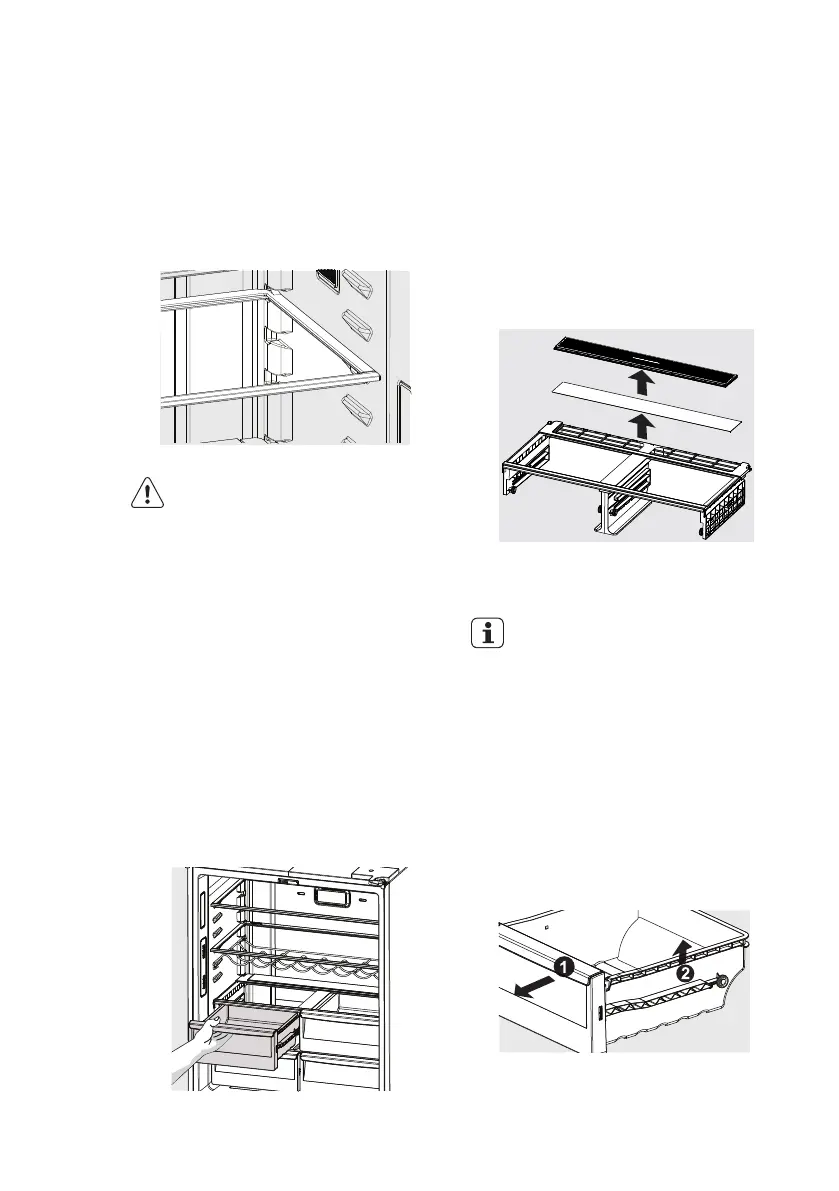
Glass shelves
To remove the shelves, gently pull them forward
until the shelf comes clear of the shelf guides.
To return the shelf, make sure there is nothing
behind that may obstruct movement. Gently
push the shelf, into the cabinet and back into
position.
CAUTION
To avoid personal injury or property
damage, handle tempered glass
shelves carefully. Shelves may break
suddenly if nicked, scratched, or
exposed to sudden temperature
change. Allow the glass shelves to
stabilize to room temperature before
cleaning. Do not wash in dishwasher.
Drawer
Your refrigerator includes a variety of storage
drawers.
Crisper (with automatic humidity control)
Crisper drawers are designed for storing
fruits, vegetables, and other fresh produce.
Crispers have an auto humidity control (with
replaceable membrane) on the back of each
crisper under the humidity control cover.
5. STORAGE FEATURES
To remove the auto humidity control
membrane:
1. Reach to back of humidity control cover.
2. Pull up on cover.
3. Pull cover towards back of cabinet and
remove.
4. Replace humidity membrane.
5. Replace cover by reversing the steps above.
Repeat for both crispers.
IMPORTANT
It’s not required to replace the Auto
humidity membrane unless it becomes
damaged or ruined. If the membrane
becames soiled or dirty, it can be
washed with soap and water. Ensure
membrane is dry before putting back
in crisper drawer. Please contact our
service provider when need to replace
your AHC membrane.
To remove the crisper for cleaning:
1. Pull the drawer out until it stops.
2. Lift the front slightly and remove the drawer.
Opening the Crisper Drawer
Removing Crisper
Remove the auto humidity control membrane




 To Next Page