5
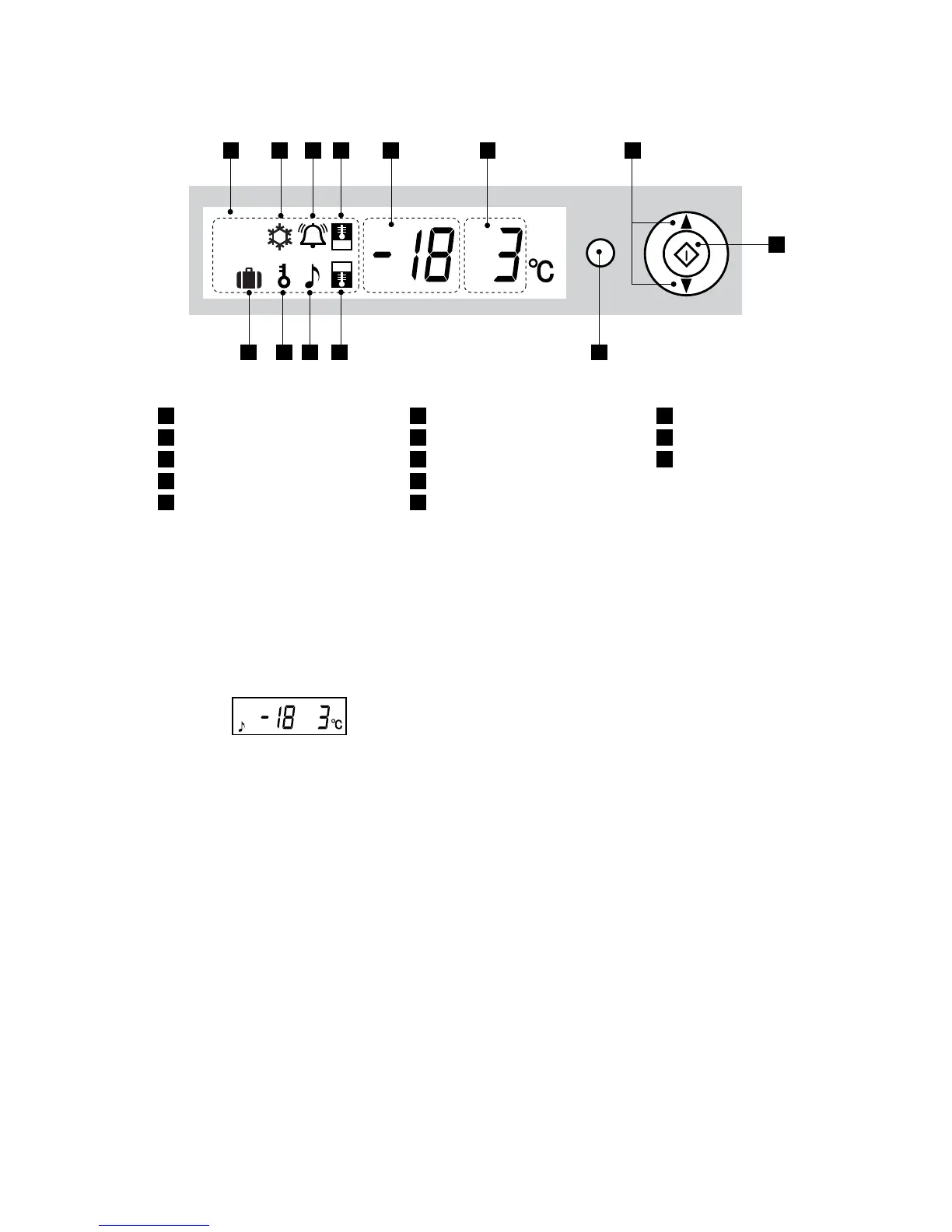
When power is turned on the display defaults to:
In the event of a power failure, the Timer feature is
cancelled and will need to be re-entered if required.
NOTE: When no operation is made for 30 seconds, the
display will automatically return to the initial content. The
backlight will become dark if there is no operation for 3
minutes. The backlight will turn off if there is no operation
for 6 minutes.
• Thedefrostingsystemisfullyautomaticand
energy efficient.
• Thedefrostwatercollectsintheevaporatingpan,
where it is evaporated by the heat of the compressor.
• Theevaporatingpandoesnotrequirecleaningor
maintenance.
1
LCD display
2
Freezer temperature setting
3
Refrigerator temperature setting
4
Function select button
5
Setting selector
6
Confirmation button
7
Express freezing
8
Timer
9
Refrigerator temperature control
10
Freezer temperature control
11
Door alarm
12
Child lock
13
Holiday mode
Function
Select
1 7 8 9 2 3 5
6
410111213




 To Next Page