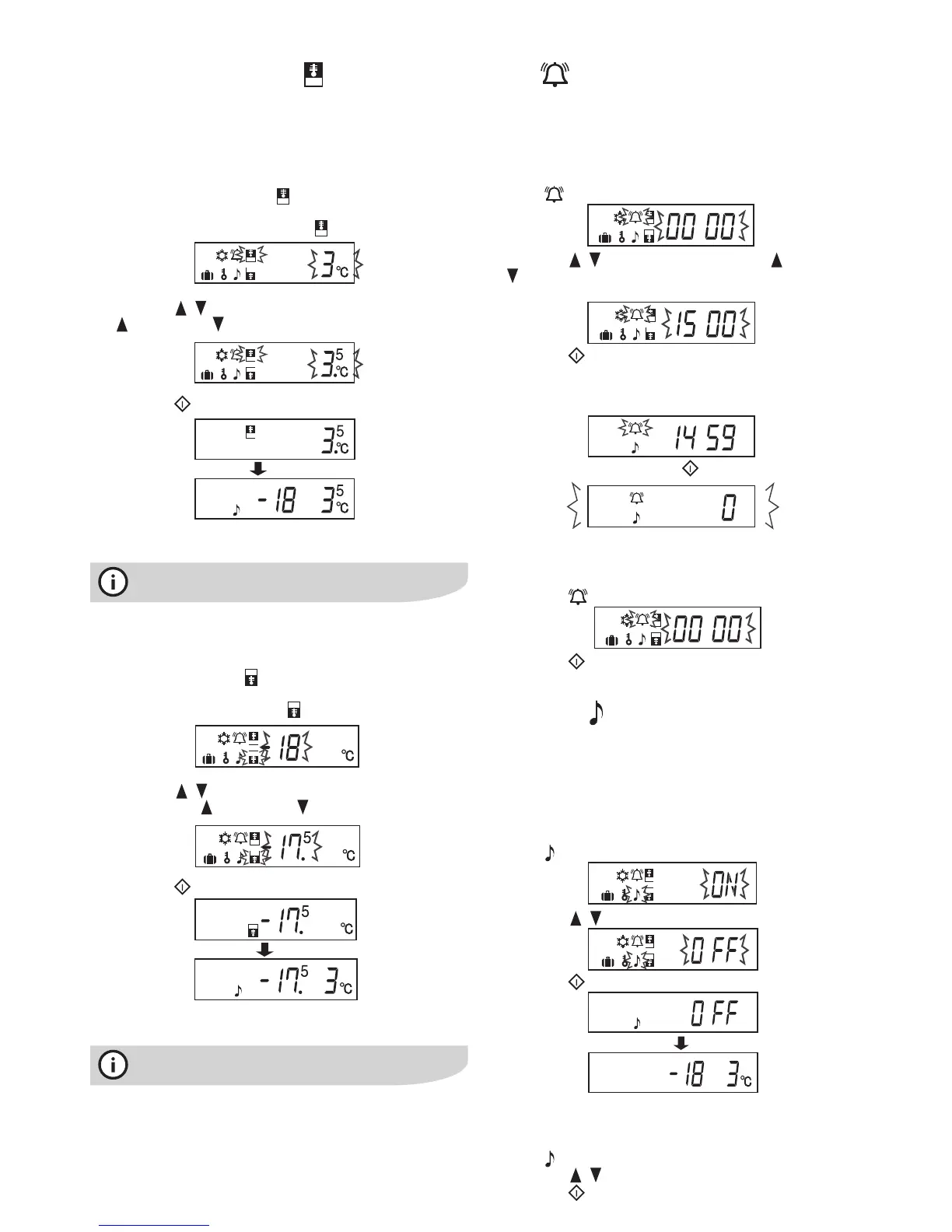
The refrigerator controls its temperature automatically.
However, if needed, adjust the temperature as follows.
Refrigerator compartment
1 Press the “Function select” button and select the
Refrigerator temperature setting icon.
2 Press the / button to select the desired temperature.
( to increase, to decrease)
3 Press the button to confirm.
Adjustable between 0° and 6°C in steps of 0.5°
For normal operation, the fridge temperature should be
set to 3°C. Adjust higher or lower to suit your needs.
Freezercompartment
1 Press the “Function select” button and select the
Freezer temperature setting icon.
2 Press the / button to select the desired
temperature. ( to increase, to decrease)
3 Press the button to confirm.
Adjustable between -13° and -21°C in steps of 0.5°
Fornormaloperation,thefreezertemperatureshould
be set to -18°C. Adjust higher or lower to suit your needs.
Controlling temperature
4 controlling temperature/timer electrolux four-door refrigerator
Timer
The timer can be set for up to 99 minutes and 30 seconds,
in intervals of 30 seconds.
1 Press the “Function select” button and select the
Timer icon. The previous timer entry is displayed.
2 Press the / button to select the time. ( to increase,
to decrease). Hold the button down to set the timer
more quickly.
3 Press the button to confirm.
The timer will start. The countdown will begin.
When the set time is reached, the end tone will sound
(for about 30 seconds).
To stop the end tone, press
To cancel the timer
1 Press the “Function select” button and select
the Timer icon.
2 Press the button.
Door alarm
An alarm will sound momentarily if a door is left open for
approximately 1 minute (60 seconds). If a door is left open
for 3 minutes, the alarm will sound continuously.
To cancel operation
1 Press the “Function select” button and select the Door
Alarm icon.
2 Press the / button to select “OFF”.
3 Press the button to confirm.
To start operation
1 Press the “Function select” button and select the Door
Alarm icon.
2 Press the / button to select “ON”.
3 Press the button to confirm.




 To Next Page