6 electrolux.com.au
GETTING FAMILIAR WITH YOUR MACHINE
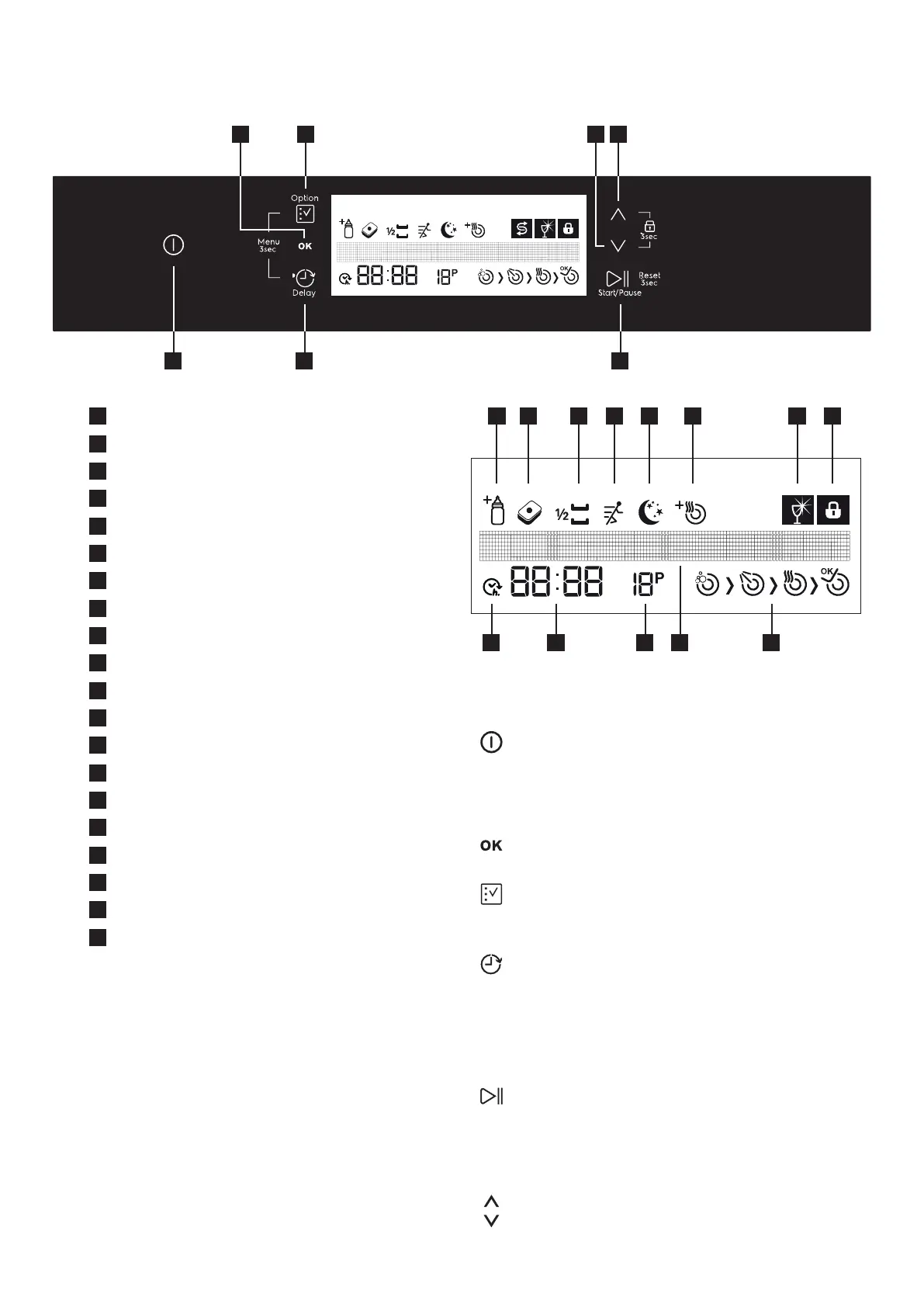
3 6
7
1
4 5
2
8
9 10 11 12 13 14 15
16
17
18
19
20
Buttons
1.PowerOn/OButton
When you press the on/o button, the machine is
energized and the display shows the last used program;
in the o position, the LEDs on the display are o.
2.ConrmationButton
Conrms (saves) your additional functions and settings.
3.OptionButton
Allows you to use the functions in the additional
function s men u. (8- 9-10-11-12-13).
4.DelayButton
Delays the starting time of the program you have
selected (1-24 hours). You may see the delay time in the
Remaining Time/Delay Time Indicator (17). When the
delay button is pressed, Delay Indicator (16) is seen on
the display.
5.Start/PauseButton
When you press the Start/Pause Button, the selected
program starts and washing symbol (a) appears on
the display. You may follow the washing phases on the
display. (2 -a-b-c-d).
6.Up/DownButtons
Allows you to browse in Program, Additional functions,
delay and settings menus.
1
On/O
2
Conrmation Button
3
Option Button
4
Delay Start Button
5
Start/Pause button
6
Up Selection Button
7
Down Selection Button
8
Extra Hygiene Indicator
9
Tablet Indicator
10
Half Load Indicator
11
Extra Fast Indicator
12
Extra Silent Indicator
13
Extra Drying Indicator
14
Rinse Aid Level Warning Indicator
15
Child Lock Indicator
16
Delay Start Indicator
17
Remaining Time/Delay Time Indicator
18
Program Number Indicator
19
Display Information Line
20
Washing cycle progress indicators
a Washing Cycle Symbol
b Rinse Cycle Symbol
c Drying Cycle Symbol
d End Cycle Symbol
0



 To Next Page