9
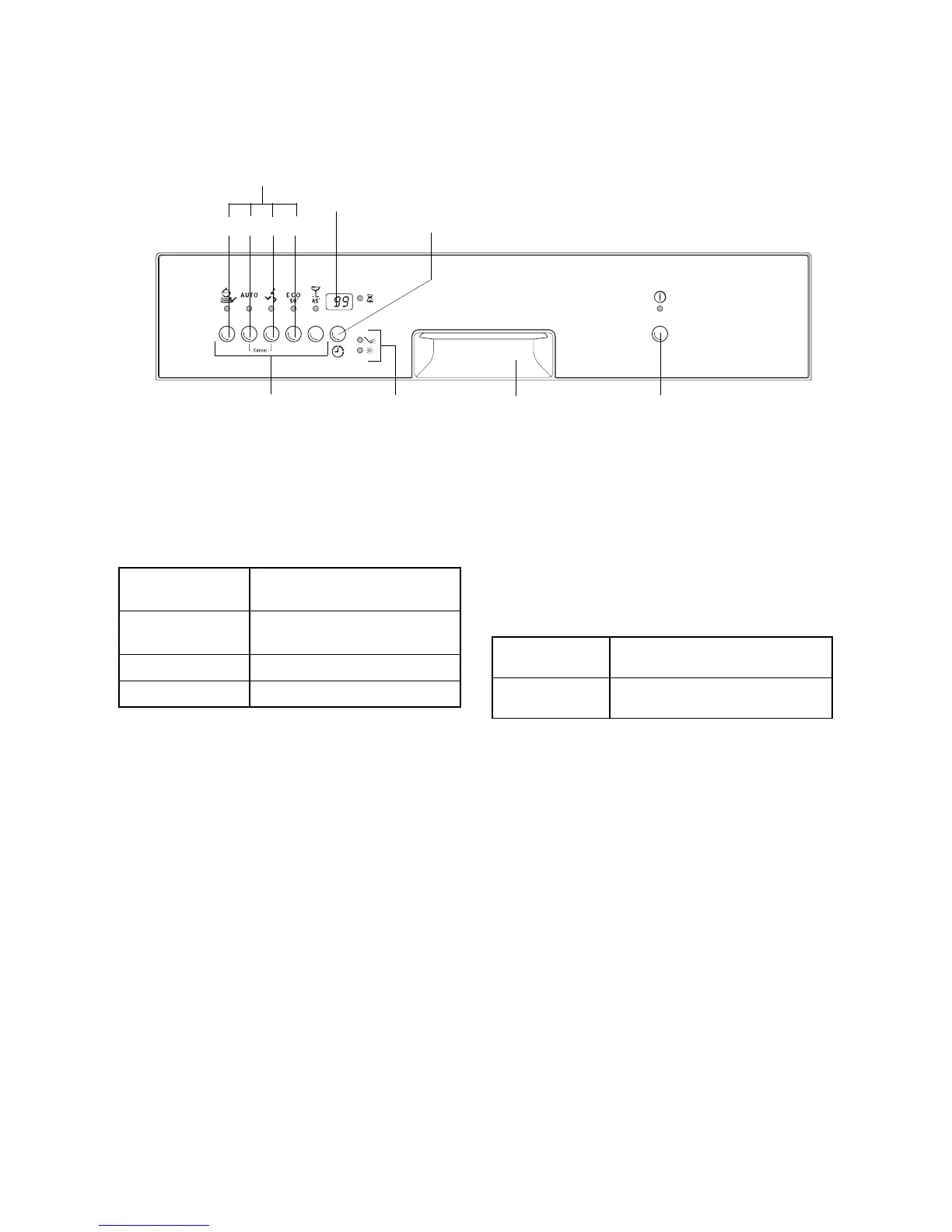
Control Panel
The control panel consists of the programme but-
tons with LED displays.
Function buttons: In addition to the stated wash
programme the following functions can also be set
using these buttons:
The multi-display can display,
– the start delay that is set.
– how long the current wash programme can be
expected to last.
– which fault has occurred on the dishwasher.
– the hardness setting to which the water sof-
tener is set.
– whether the rinse aid supply is switched on/off.
Indicators have the following significance
:
Prior to using for the first time
Prior to using for the first time, remove all the clips
with which the dish racks are secured for transport.
Then perform the following steps:
1. Adjust the water softener
2. Filling with Special Salt for the Water Softener
3. Filling with Rinse Aid
3
Special salt and rinse aid must not be added
if you use 3-in-1 detergent tablets.
Multi-display
Control panel
Indicators
ON/OFF button
Set delay
start
Door handle
Function buttons
12
34
Function button 1
Adjust the
water softener
Function button 2
Switch rinse aid supply
on and off
Function button 3 is not occupied
Function button 4 is not occupied
t
Refill with special salt
à
Refill with rinse aid



 To Next Page