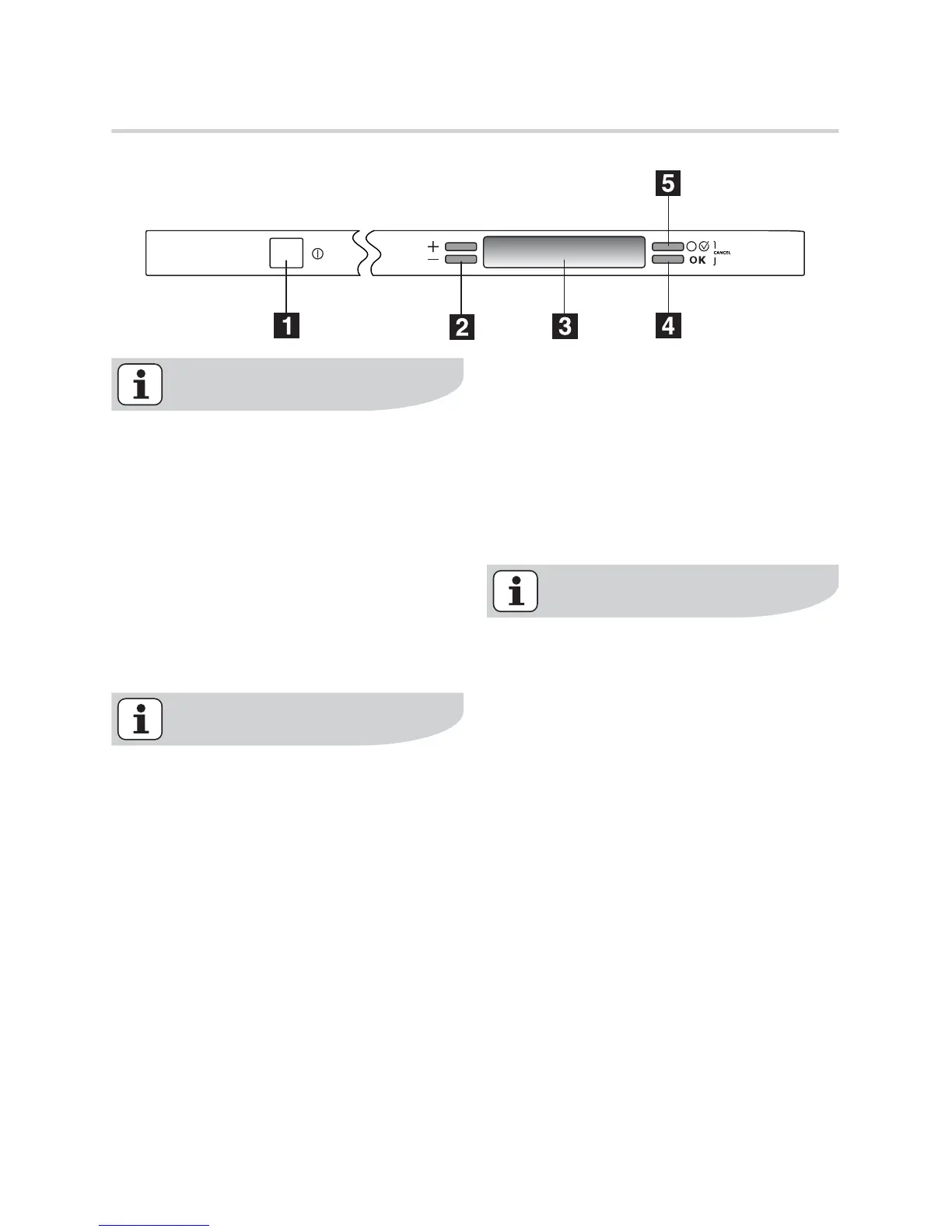
Control panel
In this fully integrated appliance the
controls are located on the top of
the door. When operating with the
controls the door needs to be open.
1. On/Off button
2. Up and down scrolling buttons (+ -)
3. Display
4. OK button
5. Option button
A sequence of displayed and audible
signals will guide you in the setting
up of the appliance and the selection
of washing programmes and op-
tions. Follow the instructions that
appear in the display.
Up and down scrolling buttons (+
-)
These two buttons have a double func-
tion:
• selecting within programme menu,
• selecting within option menu and
submenu.
OK button
Is necessary to:
• confirm / memorize any option,
• start a washing programme.
The OK and Option buttons if
pressed simultaneously can:
• cancel a washing programme in
progress,
• cancel the setting of an option.
It is also possible to return to the factory
setting for the following options:
LANGUAGE
BRIGHTNESS
In setting mode press for about 6 sec-
onds these 2 buttons simultaneously;
the default language message will ap-
pear in the display.
Option button
Press this button to enter a menu of op-
tions; press again to exit from the menu.
8 electrolux control panel



 To Next Page