34
Care and Cleaning
Replacing LED Lights
Both the freezer and fresh food compartments of your
refrigeratorincludeLEDlights.AlwaysuseElectrolux
parts for replacement.
To replace LED Lights:
1 Unplugyourrefrigerator’spowercord.
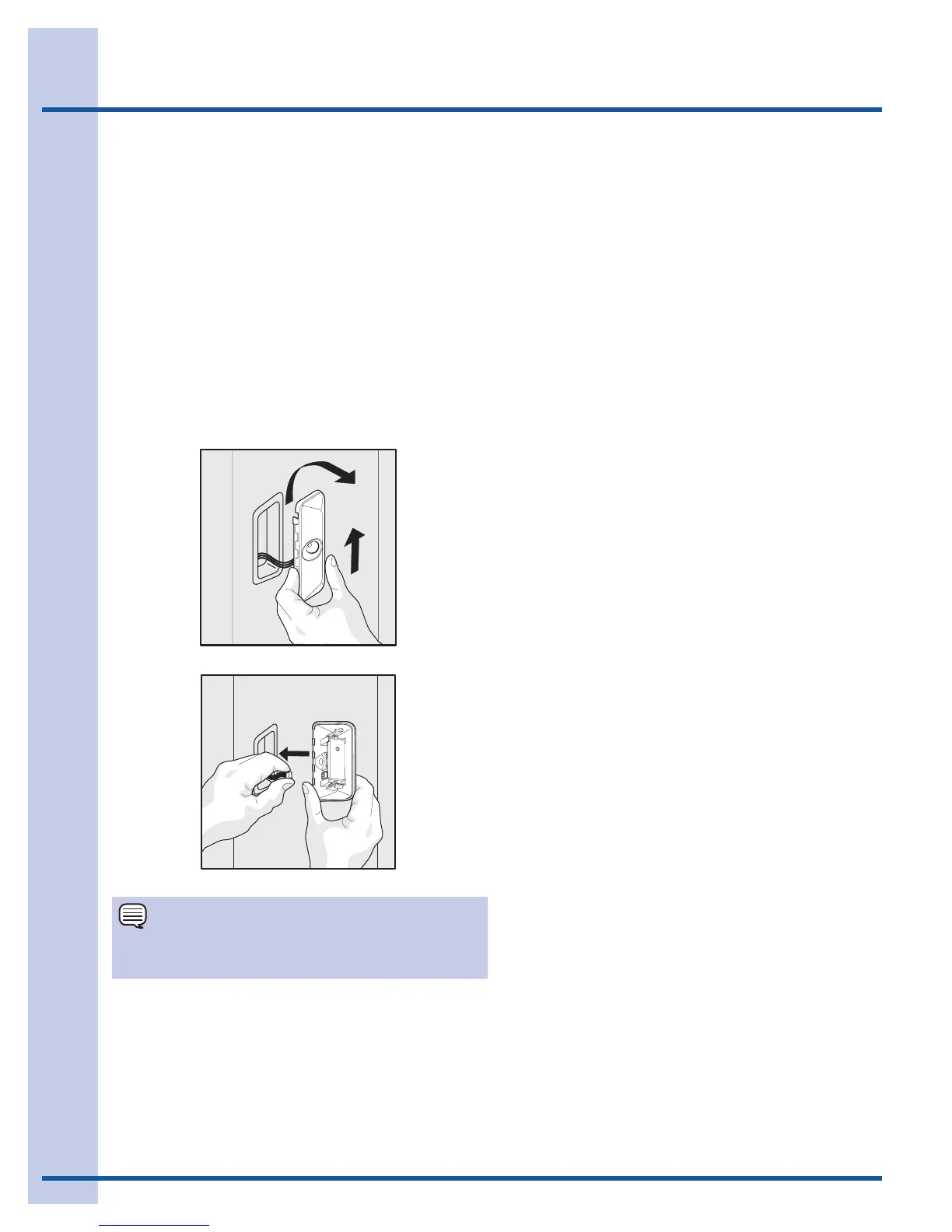
2 Remove light cover by pushing up and out.
3 Hold the LED cover with one hand and pull the
connector with the other hand while pressing the
connector latch.
4 Replace LED light and snap in place assuring the
light is facing in toward the unit (inside fresh food
and freezer).
Ordering Replacement LED Lights
Order new LEDs by calling 877-808-4195, online at
www.electroluxappliances.com, or through the dealer
where you bought the refrigerator. Here is the product
number to request when ordering:
LED Light, Part #241891102
LED Light Harness Removal
LED Light Removal
NOTE
LED lights are in series so if one is bad or unplugged,
several lights may not light up.





 To Next Page