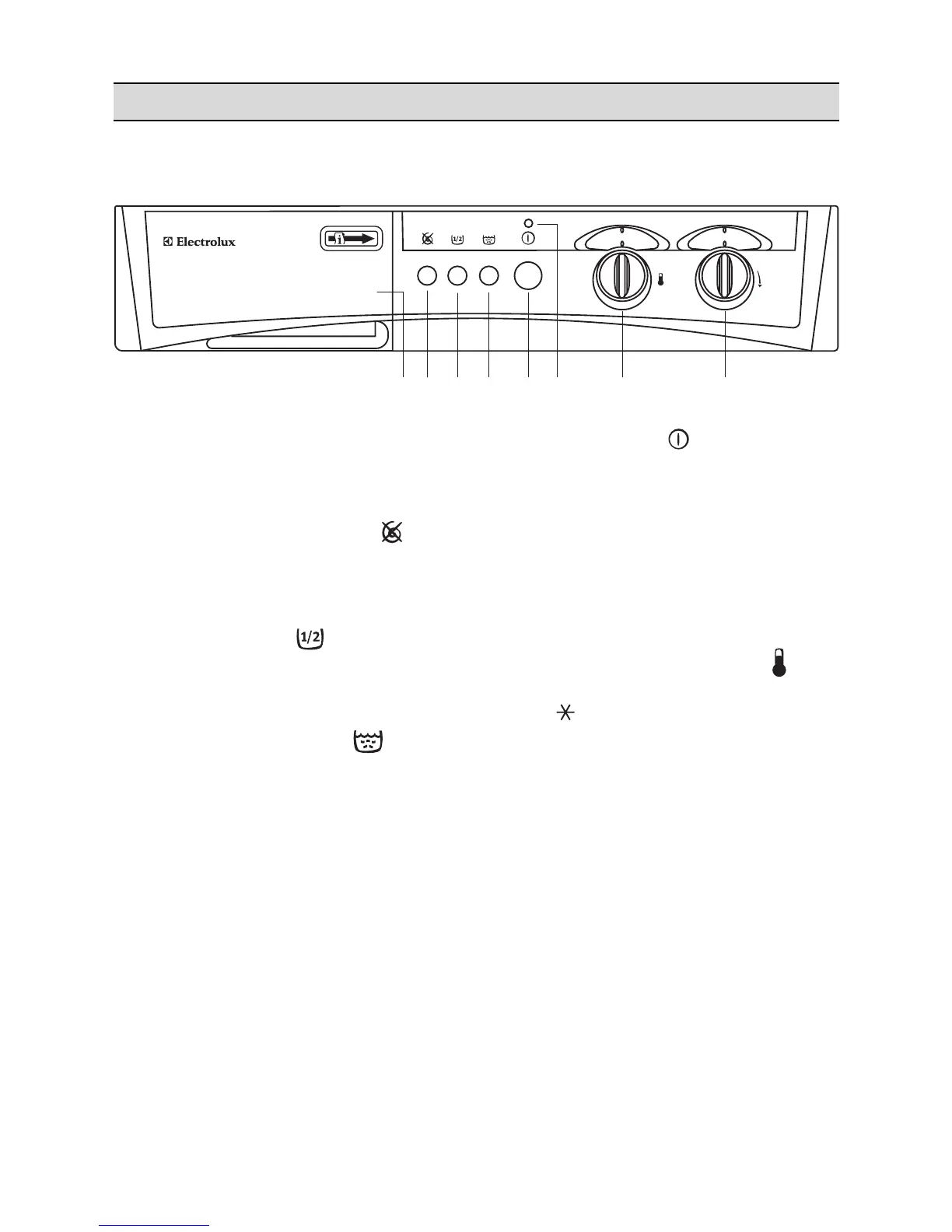
1 Programme chart
It will help you to choose the most suitable
washing programme for your laundry.
2 Spin suppression button
Depress this button when you have to wash
particularly delicate cotton or linen items in order
to exclude all the spinning phases.
3 Half load button
Select this button to reduce water consumption
on the rinse cycle when washing a half load of
cottons or linens.
4 Intensive rinse button
By depressing this button on programmes for
cotton and linen the machine will perform the
rinses with high water level.
To be used in areas where the water is very soft
or for people allergic to detergents or who have
very delicate skin.
5 ON/OFF button
Depress this button to start the programme.
Depress it again to stop the programme or to
switch the machine off.
Before selecting or changing an ongoing
programme the machine must be switched off.
6 Operating pilot light
This light is on whilst the machine is operating
and goes out at the end of the programme.
7 Temperature selector dial
Turn this dial to select the washing temperature.
Position = cold wash.
8 Programme selector dial
To select the required programme, turn this dial
clockwise until the programme letter is exactly
opposite the pointer.



 To Next Page