8
Use
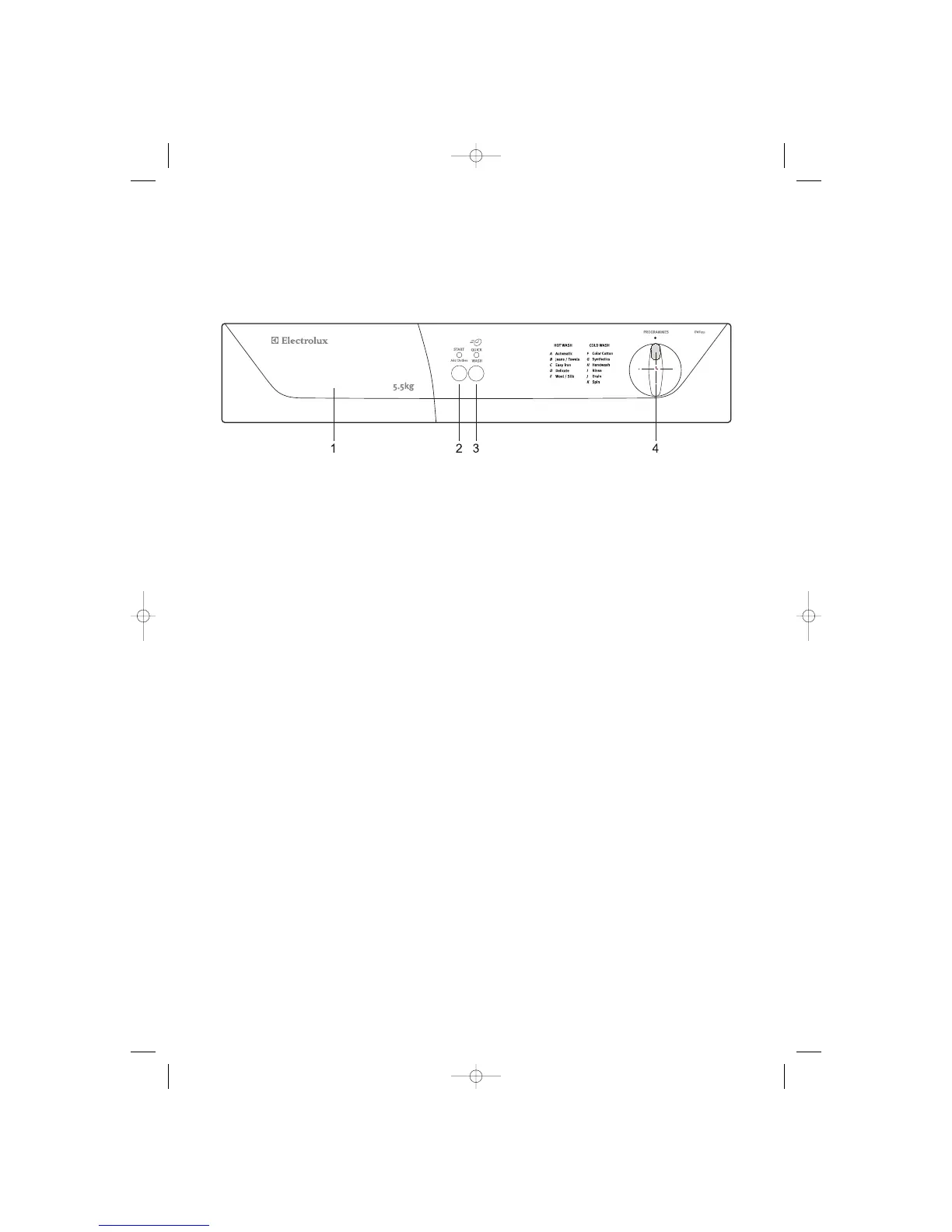
Control panel
1. Detergent Dispenser Drawer
2. ”Start /Add Clothes” Button
After having selected the programme and the required options, press this button to start the machine. The
corresponding LED stops flashing and remains lit. To interrupt a programme which is running,
depress the Start/Add Clothes button, the corresponding LED starts to flash.To restart the programme from the
point at which it was interrupted, press the Start/Add clothes button again.
3. ”Quick Wash”
Pressing this button, will shorten the selected wash program. As an example, if this button is pushed, the
LED will light up and the program ‘Automatic’ will be reduced to approx. 60 min from 110 min.
4. Programme Selector Dial
The selector is dived into three sections
OFF, COLD for EWF 549 and OFF, HOT and COLD for EWF 551 and EWF771
This can be rotated in clockwise and anti clockwise direction.
At the end of the programme the selector dialmust be turned to position “O” to switch the machine off.
Attention! If during a wash programme, the selector dial is turned to another programme, the machine will not
perform the new selected programme.
In the EWF 551 for HOT programs the temperature is preset (Refer page 14).
UserManualNukeEUFinal.OK.qxd 04/07/2005 12:53 Pagina 8



 To Next Page