9
1
2
3
4
5
7
8
6
9
10
11
12
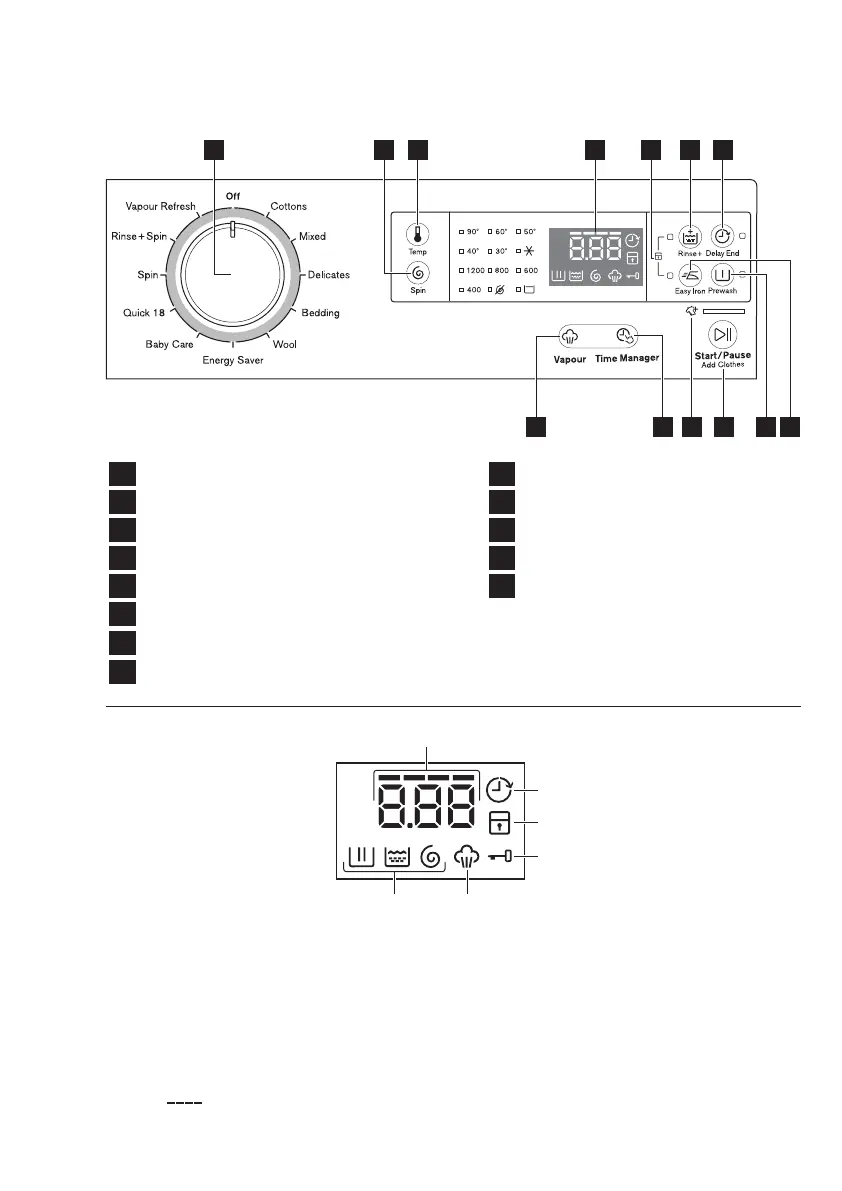
CONTROL PANEL3.
Program Knob
Temperature Touchpad
Spin Selection Touchpad
Add Clothes Function Symbol
Delay End Touchpad
Display
Rinse Plus Touchpad
Easy Iron Touchpad
Start/Pause, Add Clothes Touchpad
13
Time Manager Touchpad
Vapour Touchpad
Prewash Touchpad
Child Lock (see page 12)
A) Delay End Icon
Child Lock Icon
Door Lock Icon
Vapour Icon
Washing Phase icon
(Wash/Rinse/Spin)
B)
C)
D)
E)
F)
3.2 Display
3.1 Control Panel Description
1 2 3 4 6 7
9 81213
5
1011
Digital Number;
will tell you:
The level of the Time Manager
( ).
–
Washing cycle time.
–
–
The alarm codes. Refer to the chapter
“Troubleshooting” for their description.
–
Delay End time.
A
E
F
B
C
D
–
It is on, you cannot open the door.
–
It is off, you can open the door.



 To Next Page