ENGLISH 15
Do not use gelatinous or thick
liquid detergents.
-
Do not put more liquid than the
maximum level.
-
Do not set the DELAY START.
-
Do not set the PREWASH phase.
-
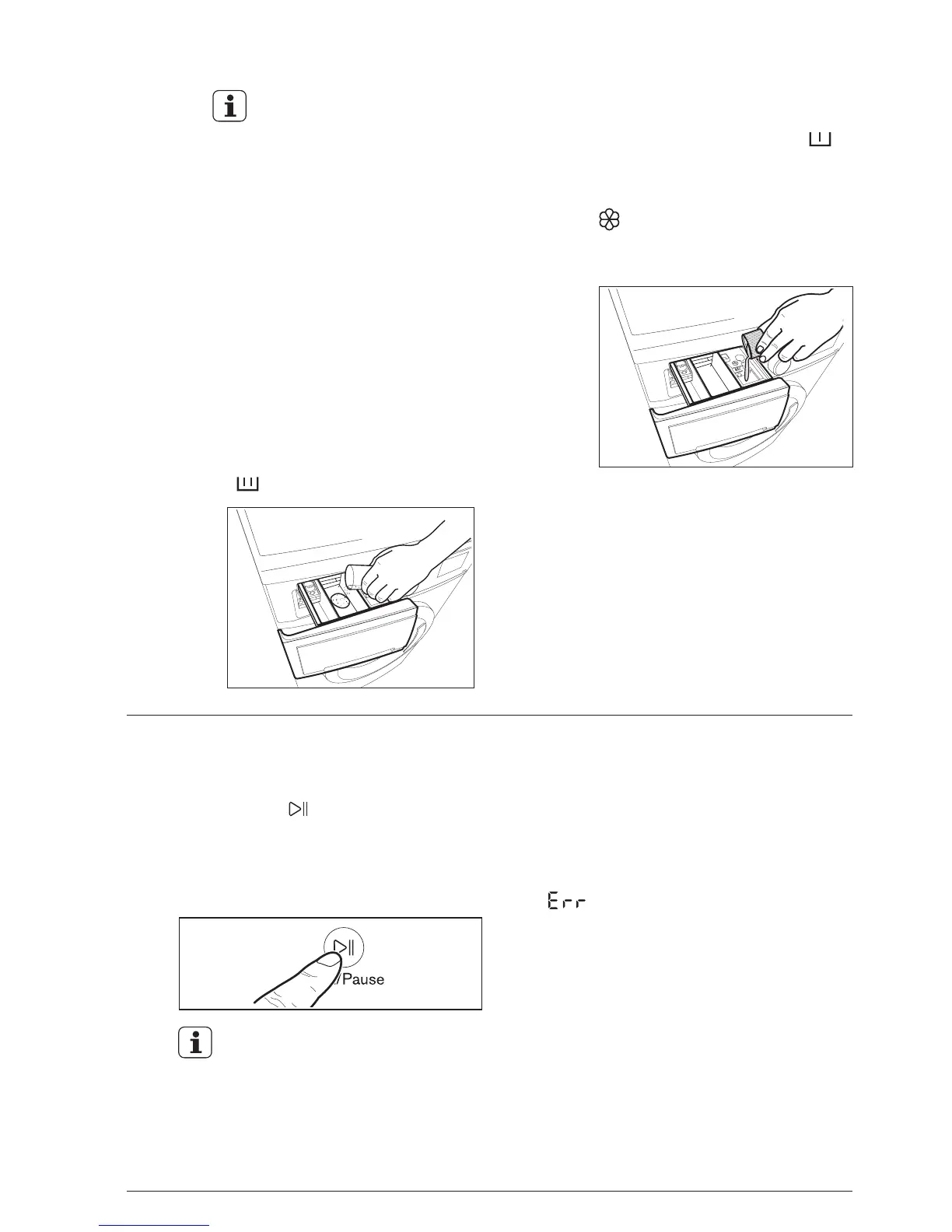
When you use the liquid
detergent:
Measure out the amount of
detergent required, pour it into
the main wash compartment
( ).
Pull out the dispenser drawer until
it stops.
-
-
Measure out the detergent and
the fabric softener;
2.
If you wish to carry out the
“Prewash” phase, pour it into
the compartment marked .
If required, pour fabric softener
into the compartment marked
(the amount used must not
exceed the “MAX” mark in the
drawer).
-
-
Close the drawer gently.
-
The appliance will automatically
adjust the selected program duration
according to the type and size of the
load.
-
Step 4 - Starting a program
To start a program, press the
Start/Pause ( ) touchpad, the
corresponding pilot light will stop
flashing and a default program duration
will be displayed on the screen (only for
display models).
After approx. 15 minutes from the
start of a program:
ATTENTION!
If you turn the program selector dial to
another program when the machine is
working, the red Start/Pause pilot light
will flash 3 times and the message
‘ ’ will appear on the display (for
display models) to indicate a wrong
selection. The machine will not
perform the new selected program.




 To Next Page