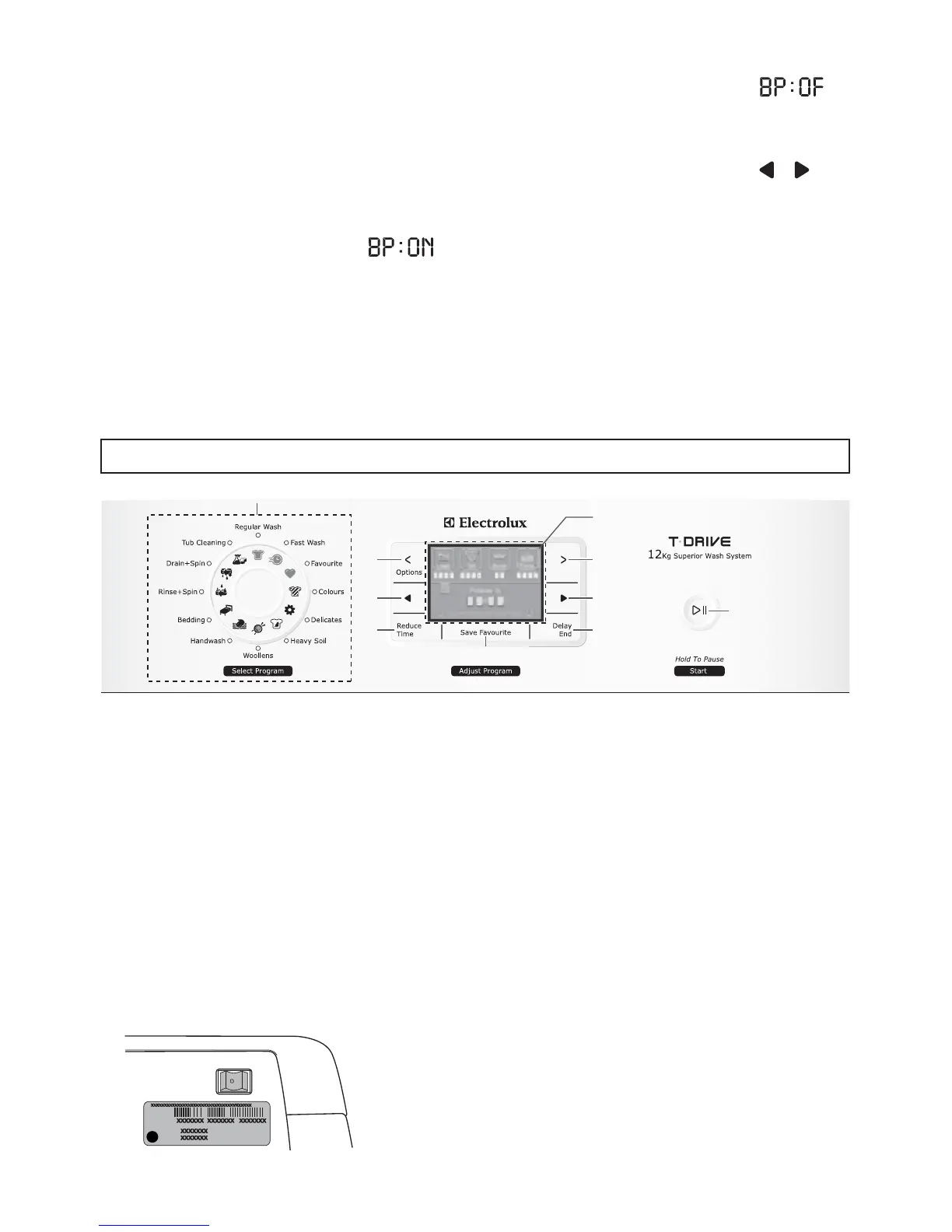
CONTROL PANEL
1. Program Selector
2. Option select buttons
3. Modify Option buttons
4. Reduce time button
8. Start/Hold To Pause
5. Save favourite button
6. Delay - End buttons
7. Display
3
5
3
1
4 6
8
2 2
7
On/Off switch is using for turn On and turn Off your
washing machine.
The On/Off switch is located at the back of the
control panel on the LH side above the rating plate.
This button is using for select an option
for your wash load.
This button is using for modify an option
that you choose.
ON - OFF Switch
NOTE: If you do not press a button
within 5 seconds the washing
machine will return to the previous
setting. To reprogram, simply repeat
the above process.
Press the “Modify Option ( , )”
button to change the selection, then
press the Start/Hold To Pause
button to store the new selection.
2.
When the washing machine in
STAND-BY-MODE or PAUSE MODE,
press and hold “Start/Hold To Pause”
buttons simultaneously for about 3
seconds to enter Enabling/Disabling
End-Of-Wash Beeping mode.
The digital display will be “ ”
when the end of wash beeping is
enabled (this is the default factory
setting).
1.
The digital display will be “ ”
when the end of wash beeping is
disabled.
9



 To Next Page