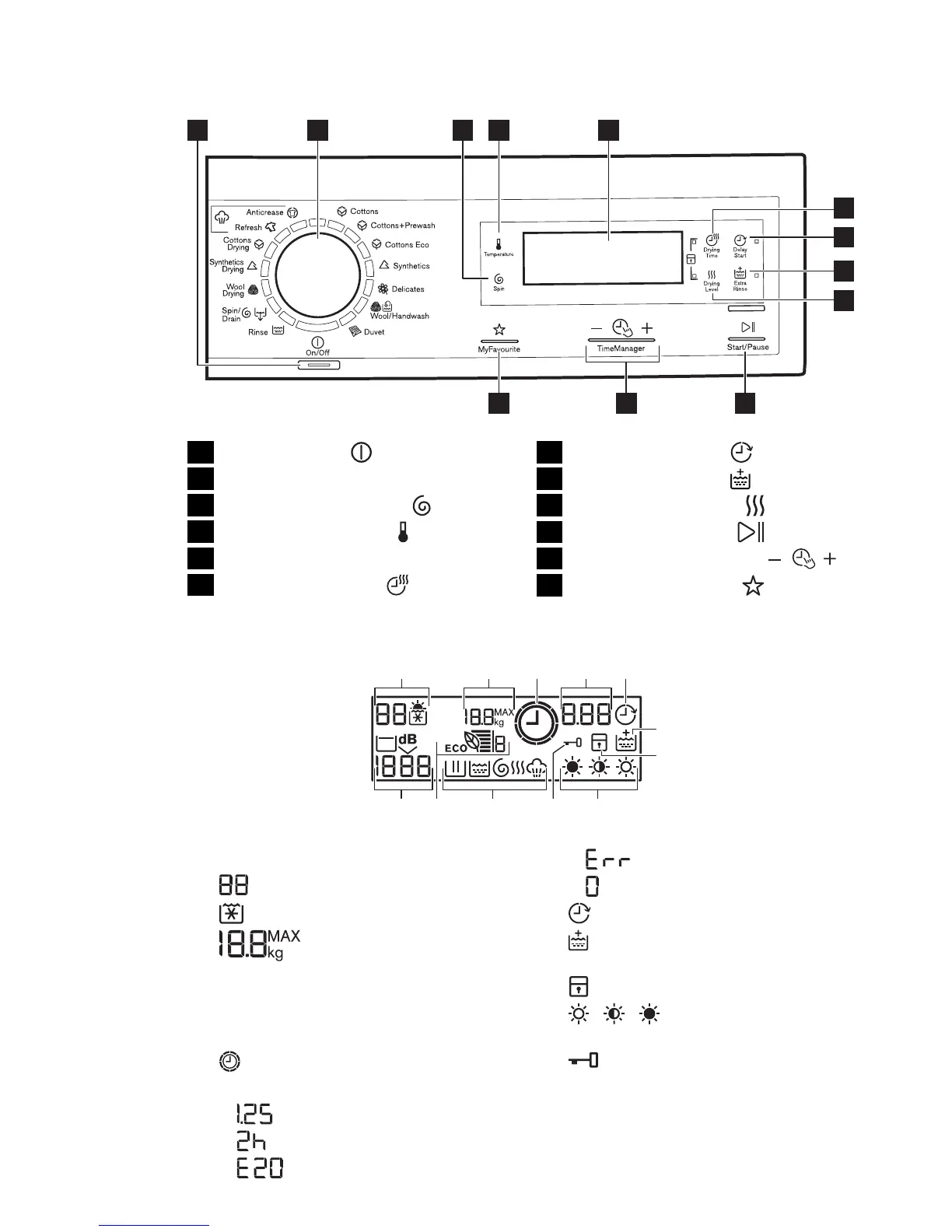
4. CONTROL PANEL
53 4
1012 11
8
7
9
6
1 2
1
On Off touchpad
2
Programme knob
3
Spin reduction touchpad
4
Temperature touchpad
5
Display
6
Drying time touchpad
7
Delay start touchpad
8
Extra rinse touchpad
9
Drying levels touchpad
10
Start pause touchpad
11
Time Manager touchpads
12
MyFavourite touchpad
4.1 Display
A B D
HL J IK
C E
F
G
A)
The Temperature area:
: Temperature indicator
: Cold water indicator
B)
: Maximum laundry load
This indicator comes on when the
programme is set and the door is
open. When you close the door, it
goes off.
C)
: Time Manager indicator
D)
The time area:
–
: The programme duration
–
: The delay start
–
: The alarm codes
–
: The message of error
–
: Programme is completed.
E)
: The delay start indicator
F)
: The permanent extra rinse indi-
cator
G)
: The indicator of the child lock
H)
, , : The indicators of dry-
ness level
I)
: The door locked indicator
– You cannot open the appliance
door when the symbol is on.
– You can open the door only when
the symbol goes off.
J)
Washing and drying indicators:
ENGLISH 7




 To Next Page