9
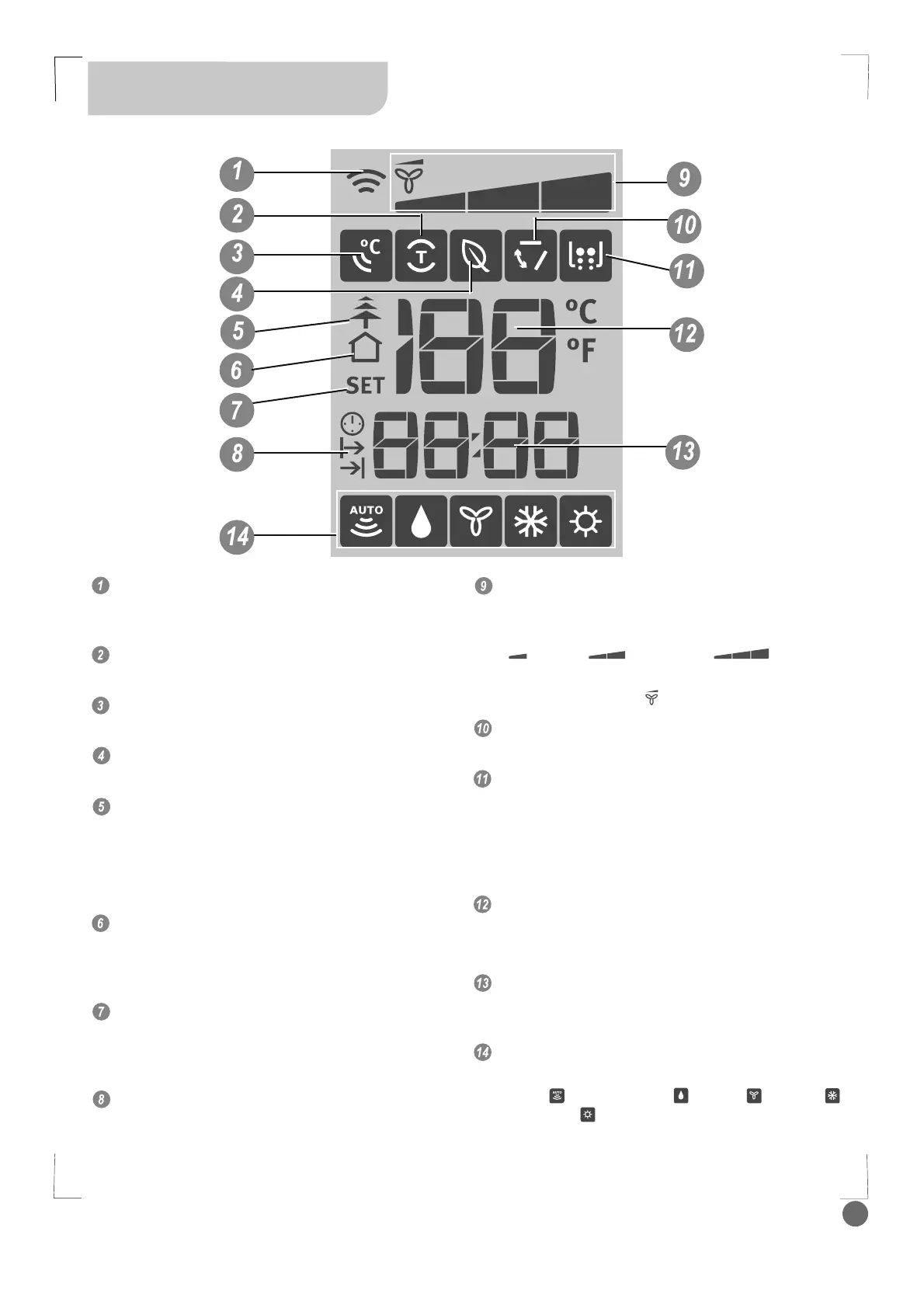
Remote Control Display
Indicator
Transmission Indicator:
Displays when the remote control transmits
signals to the indoor unit.
Turbo Display
Displays when Turbo function is selected.
I Feel Display
Displays when I Feel function is activated.
Eco Display
Displays when Eco function is selected.
Healthy Display
Displayed by pressing the Healthy button.
Press the Healthy button again to remove.
NOTE: there is no such indicator for the
models without Cold-Plasma function.
Room Temperature Display
Displays when the temperature shown on the
LCD screen is room temperature. It can be
switched on/off by pressing the Temp button.
Programmed Temperature Display
Lights when the remote control displays the
set temperature. It can be switched on/off by
pressing the Temp button.
Timer On/Off Display
Displays when the Timer On/Off function is
activated.
Fan Speed Display
Displays the selected fan speed in the following
sequence:
“
” (Low), “ ” (Medium), “ ” (High) and
Auto.
In Auto speed, only “ ” symbol displays.
Swing Display
Displays when the Swing function is selected.
X-Fan Display
Displays when the X-Fan function is activated by
pressing Turbo and Healthy buttons at the same
time (for models with Cold-plasma function) or by
pressing X-Fan button (for models without Cold-
plasma function)
Temperature Display
Displays the room or set temperature in °C or °F.
No display in Fan mode.
Time Display
Displays the Clock time (must be set) and/or the
on/off time of the timer.
Mode Display
Displays the current operation mode, including
Auto (
), Dehumidify ( ), Fan ( ), Cool ( )
and Heat (
).
NOTE: The Cool model does not offer a Heating
option.



 To Next Page