14
Getting Started
PREPARINGFOR INSTALLATION
[] [] [] [] [] [] [] !i [] [] [] [] [] [] Ii [] [] [] [] [] [] []
Before Installing Your Coffee Maker...
1. Call your local water company. Ask them for the water hardness level of the
water supplied to the building where your coffee maker will be installed.
2. If the water hardness level is above four grains per gallon (4 gpg):
<> If you are installing model E24CM76GSS (plumbed model), contact a water
treatment specialist and have a water treatment system installed to reduce
the water hardness level to 4 gpg or less.
If you are installing model E24CM75GSS (tank model), pour only filtered
water with a hardness level of 4 gpg or less into the water tank. DO NOT
use distilled water.
.
,
Have a licensed electrician install a dedicated, grounded power receptacle
near the coffee maker, if one is not available.
Have a qualified installer install the coffee maker in the desired location
according to the accompanying installation instructions.
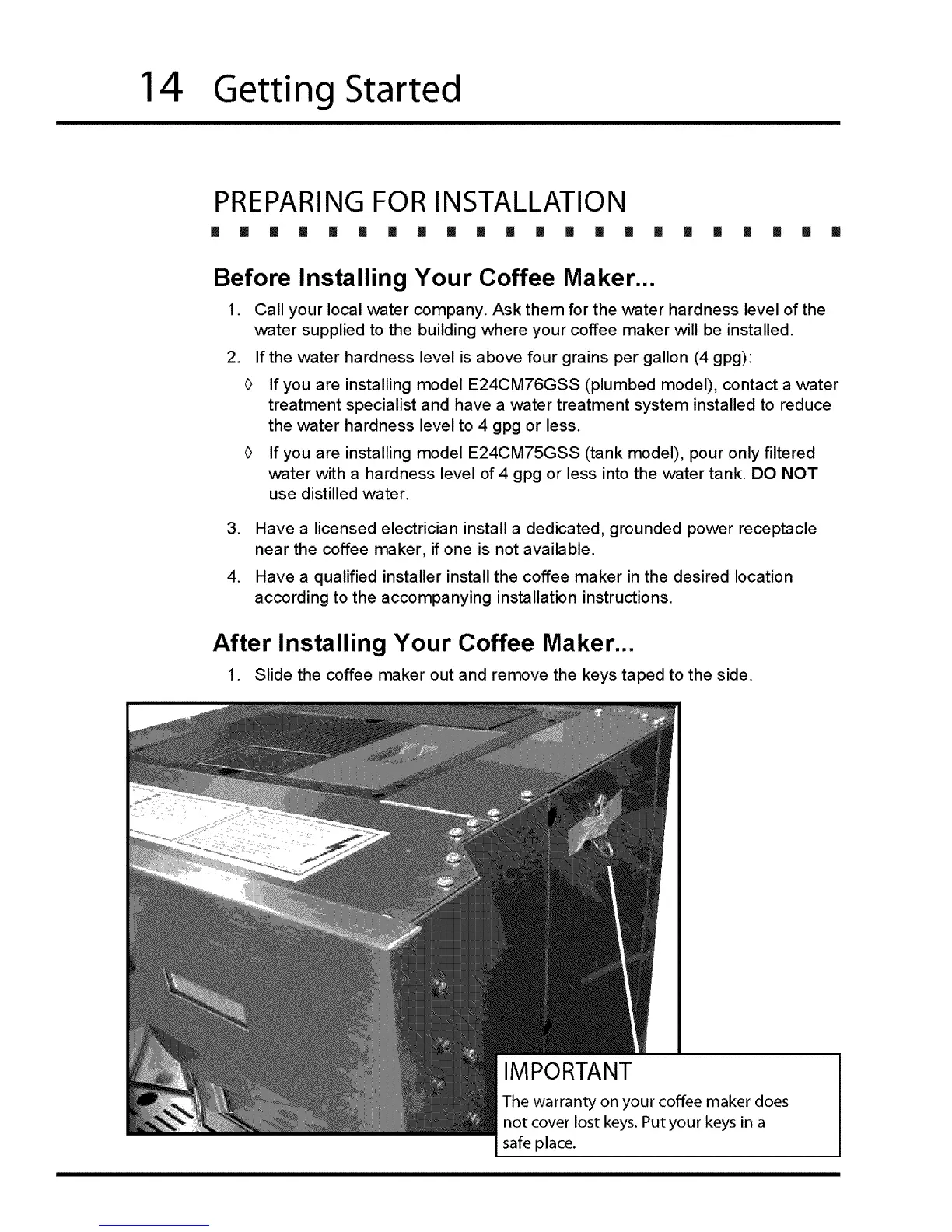
After Installing Your Coffee Maker...
1. Slide the coffee maker out and remove the keys taped to the side.
IMPORTANT
The warranty on your coffee maker does
not cover lost keys. Putyour keys in a
safe place.








 To Next Page