CCoommppoonneenntt TTeeaarrddoowwnn
4-5
LLiigghhtt SSwwiittcchh RReemmoovvaall
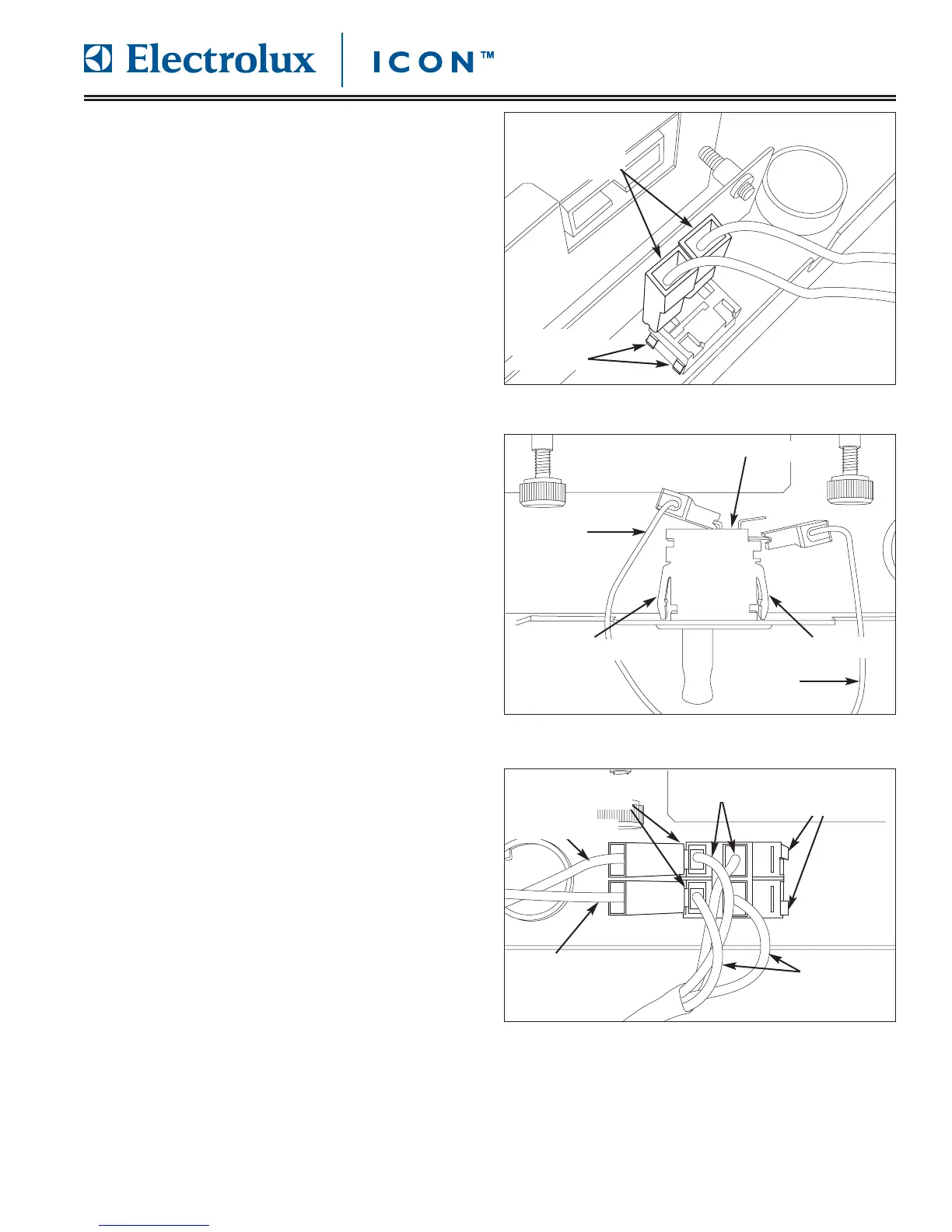
The light switch is a bipolar switch mounted to the
underside of control compartment on the left side of
door assembly.
To remove the light switch (See Figure 4-6):
1. Remove drip tray, open door and remove control
panel cover.
2. Disconnect wire leads from light switch terminals.
3. Using a flat-bladed screwdriver, press in on the
two retaining clips on one side of the light switch
while pushing the light switch through the door
frame. Repeat on opposite side of switch.
DDoooorr MMiiccrroosswwiittcchh RReemmoovvaall
The door microswitch is mounted to the inside wall of
control compartment and is secured by retaining clips
on both sides of the microswitch.
To remove the door microswitch (See Figure 4-7):
1. Remove drip tray, open door and remove control
panel cover.
2. Disconnect wire leads from door microswitch
terminals.
3. Using fingers, press in the retaining clips while
pushing the door microswitch out of door frame.
PPoowweerr SSwwiittcchh RReemmoovvaall
The power switch is mounted to the underside of
control compartment with two retaining clips on each
side of the switch.
To remove the power switch (See Figure 4-8):
1. Remove drip tray, open door and remove control
panel cover.
2. Disconnect wire leads from power switch terminals.
Label or take note of wire lead locations.
3. Using a flat-bladed screw driver, press in the
retaining clips at each corner of power switch while
pushing the power switch out of the door frame.
FFiigguurree 44--7
7.. DDoooorr MMiiccrroosswwiittcchh RReemmoovvaall
FFiigguurree 44--66.. LLiigghhtt SSwwiittcchh RReemmoovvaall
Disconnect
Wire Leads
Retaining
Clips
Red
Blue
Door Microswitch
Press Here
Press Here
FFiigguurree 44--88.. PPoowweerr SSwwiittcchh RReemmoovvaall
Retaining
Clips
Disconnect
Wire Leads
Blue
To Light
Switch
Brown
To Transformer









 To Next Page