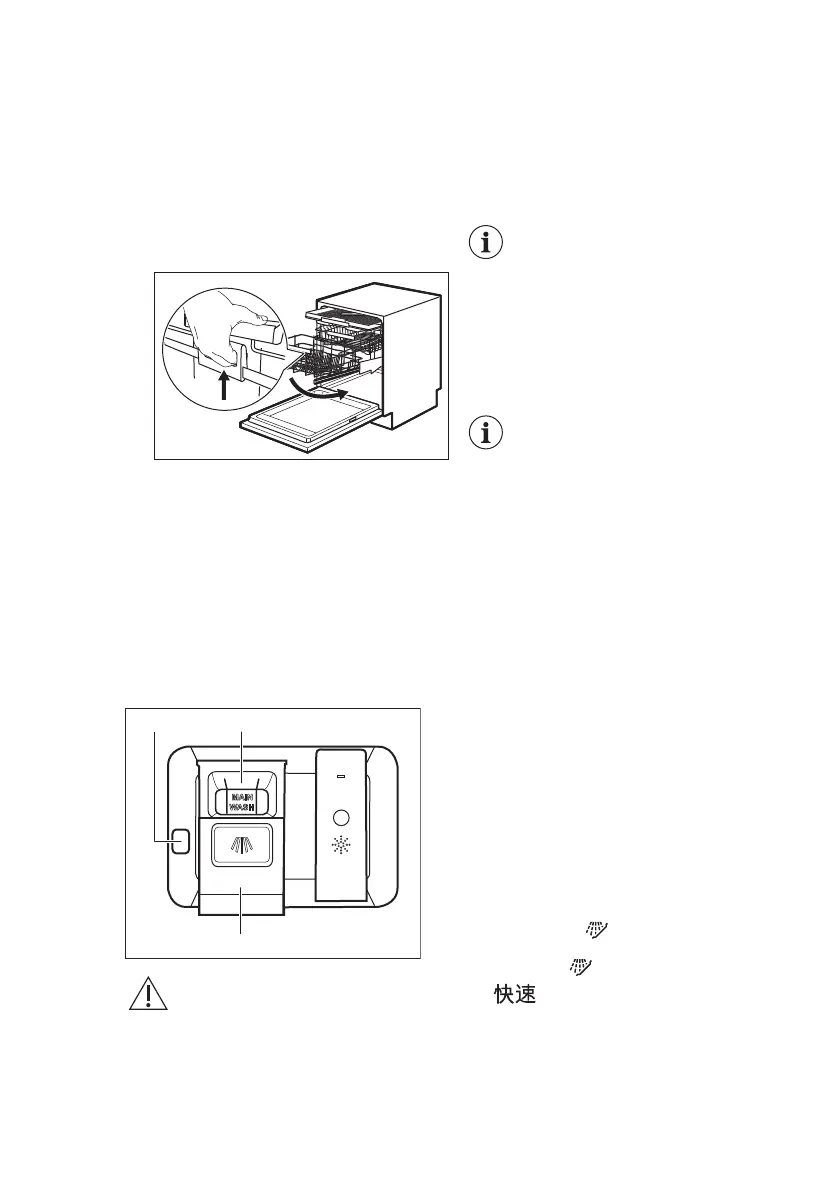
The basket is automatically locked on the
upper level.
2. Carefully place items in the basket or
remove them (refer to Basket
loading leaflet).
3. Lower the basket by connecting the
trigger handle with the basket frame
as shown below. Lift the trigger
handle completely and the basket
handle slightly until the basket is
disengaged on both sides.
Once the basket is unlocked, push
the rack down. The mechanism
returns to its default position on the
lower level.
There are two ways of lowering the
basket depending on the loading:
• If there is a full load of plates,
slightly push the basket down.
• If the basket is empty or half-
loaded, press the basket down.
8.2 Using the detergent
CAUTION!
Only use detergent
specifically designed for
dishwashers.
1. Press the release button (A) to open
the lid (C).
2. Put the detergent (gel, powder or
tablets) in the compartment (B).
3. If the programme has a prewash
phase, put a small quantity of
detergent on the inner part of the
appliance door.
4. Close the lid. Make sure that the lid
locks into position.
For information about the
detergent dosage, refer to
the manufacturer's
instructions on the
packaging of the product.
Usually, 20 - 25 ml of gel
detergent is adequate for
washing a load with normal
soil.
The upper ends of the two
vertical ribs inside the
compartment (B) indicate
the maximum level for filling
the dispenser with gel (max.
30ml).
8.3 How to select and start a
programme using 滑动时控
selection bar
1. Slide your finger across 滑动时控
selection bar to choose a suitable
programme.
• The light related to the selected
programme is on.
• The 节能程度 indicates the level
of energy and water consumption.
• The display shows the
programme duration.
2. Activate applicable 附加功能 if
desired.
3. Close the appliance door to start the
programme.
8.4 How to select and start the
programme 预冲洗
1. To select 预冲洗, press and hold
for 3 seconds.
• The light related to the button is
on.
• The 节能程度 is off.
• The display shows the
programme name and duration.
www.electrolux.com16



 To Next Page