Step 2 Fill the water drawer with fresh water.
Step 3 Select the function from the menu: Cleaning. The user interface will guide you
through the procedure.
The function duration: around 30 minutes. When this function works, the light is
off.
Step 4 Remove the baking tray, when the function ends.
11.9 How to use: Drying reminder
After steam cooking the display shows a message prompting to dry the oven.
Press YES to dry the oven.
11.10 How to use: Drying
After steam cooking or steam cleaning you can dry the cavity with this function.
Step 1 Make sure the oven is cold.
Step 2 Remove all accessories.
Step 3 Open the menu: Cleaning.
Step 4 Choose Drying.
Step 5 Follow the instructions on the screen.
11.11 How to remove and install: Door
You can remove the door and the internal glass panels to clean it. The number of glass panels
depends on specific model.
The door is heavy.
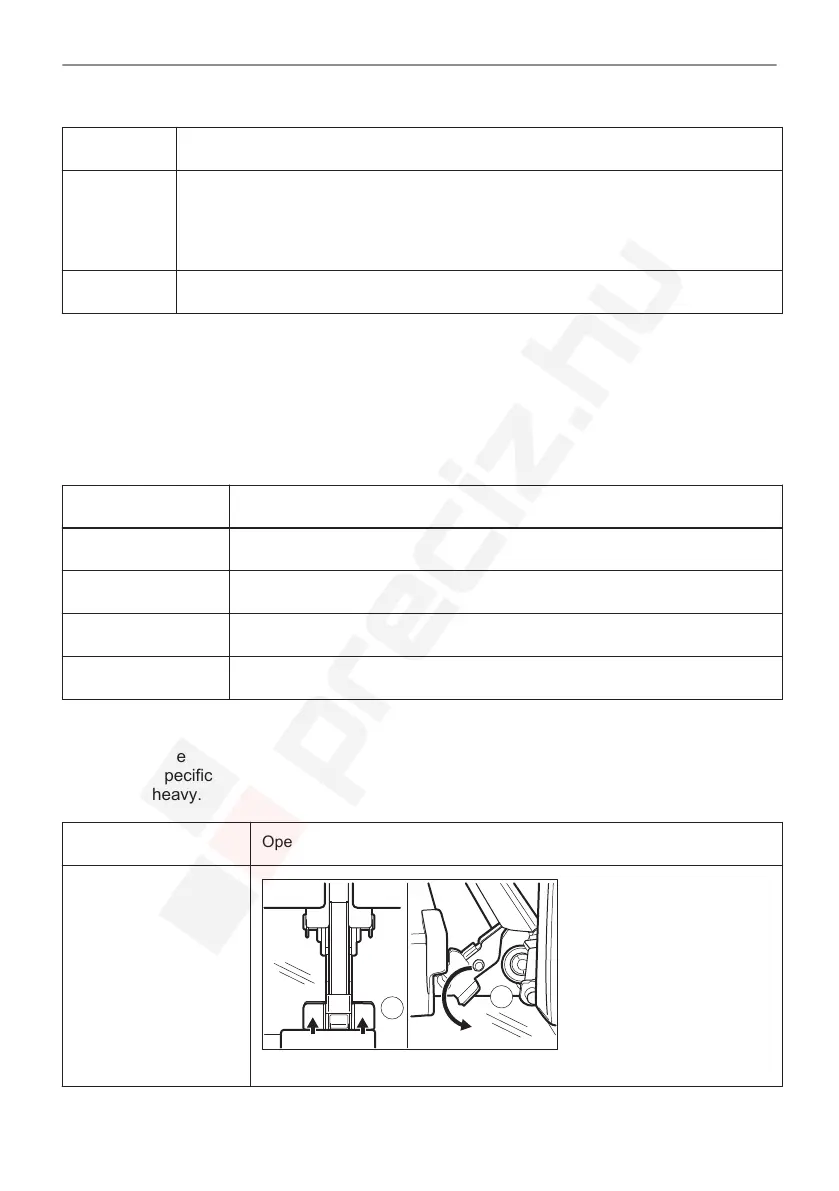
Step 1 Open the door fully.
Step 2
Fully press the clamping levers (A) on the two door hinges.
45/64
CARE AND CLEANING





 To Next Page