12
www.electrolux.com
4.1 Setting the clock
When the oven is plugged in for the first
time you can have the option of setting the
clock. The oven has a 12 and 24 hour
clock.
Example: To set the clock.
1. In standby mode, press the
Clock/Weight key once to set 12 hour
clock, if you want to set 24 hour clock,
press it again.
2. Press the Time +/- key to adjust the
hour.
3. Press the Clock/Weight key to confirm.
4. Press the Time +/- key to adjust the
minutes.
5. Press the Clock/Weight key to confirm.
During cooking, you can press the
Clock/Weight key to check the time
of day.
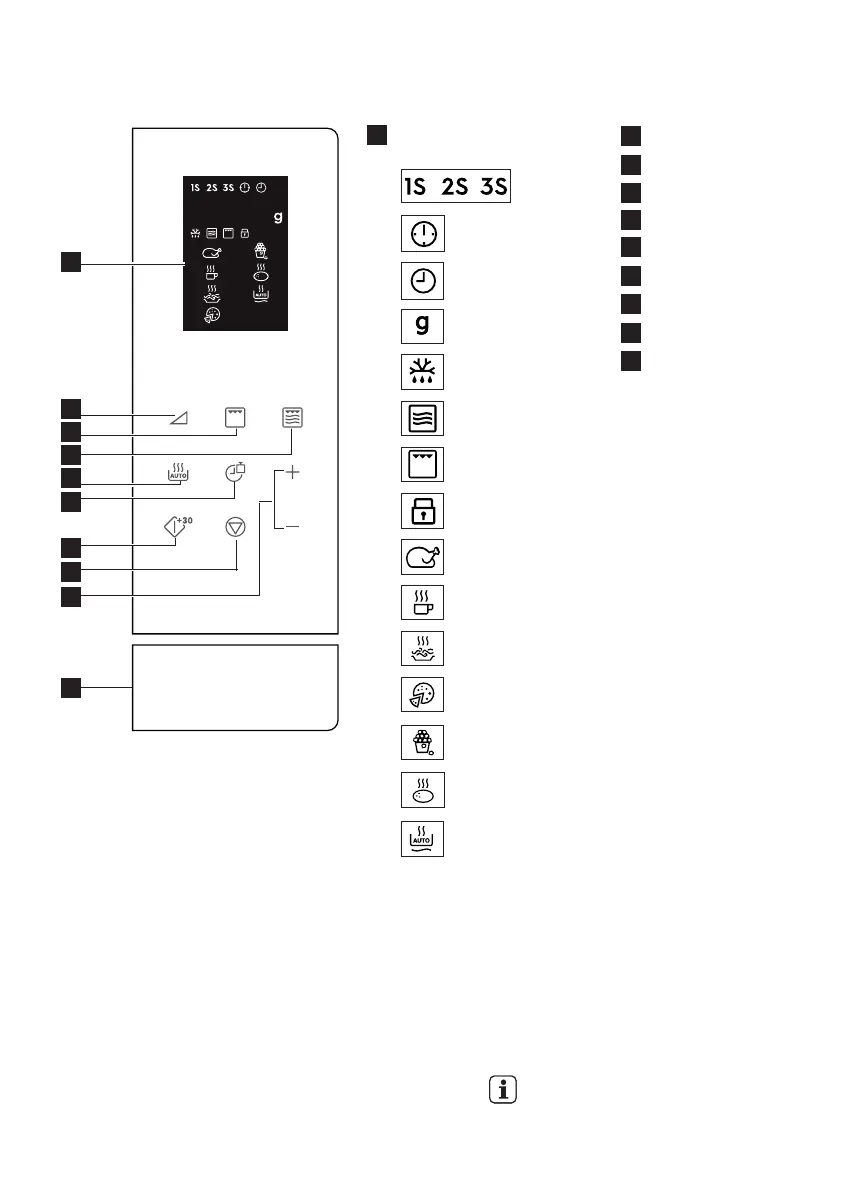
3.3 Control panel
4. OPERATION
2
3
4
7
1
5
9
6
8
10
Digital display indicators:
Multi stage
cooking
Clock set
Clock setting
Weight
Auto Defrost
Microwave
Grill
Child safety lock
Chicken
Beverages
Spaghetti
Pizza
Popcorn
Potato
Auto Reheat
1
Power level key
Grill key
Micro. + grill key
Auto cook key
Clock/weight key
Start/quick start key
Pause/cancel key
Time +/- key
Door open button
2
3
4
5
6
7
8
9
10







 To Next Page