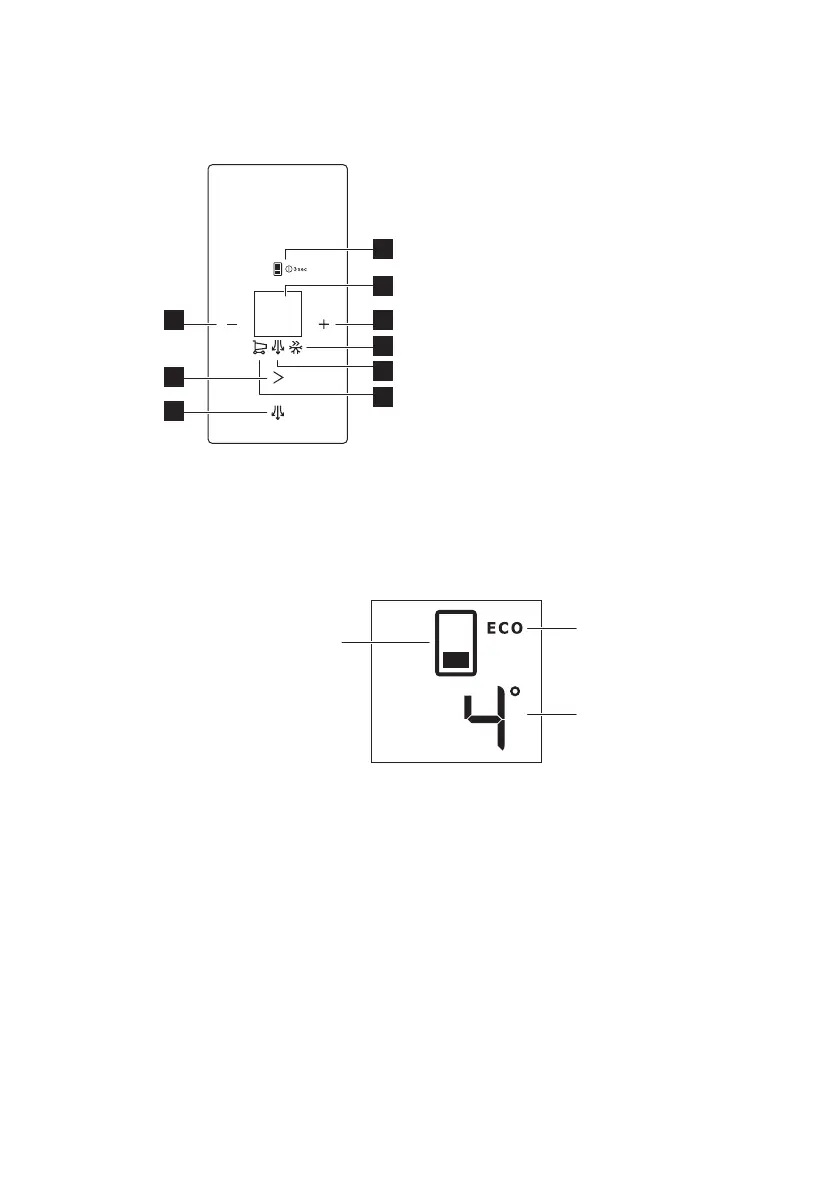
3. OPERATION
3.1 Control panel
1. Compartment select key and
ON/OFF key
2. Display
3. Temperature warmer key
4. FastFreeze indicator
5. DYNAMICAIR indicator
6. FASTCOOL indicator
7. DYNAMICAIR key
8. Mode key
9. Temperature colder key
It is possible to change predefined sound
of buttons by pressing together
temperature warmer key and
temperature colder key for 3 seconds.
Change is reversible.
Display
A. Compartment indicator
B. ECO mode
C. Temperature compartment indicator
3.2 ON/OFF
Plug the appliance into electrical mains
socket.
Appliance automatically turns ON when
plugged into an electrical mains socket.
1. Turn OFF the appliance by pressing
the ON/OFF key for 3 seconds.
2. Turn ON the appliance by pressing
the ON/OFF key.
3.3 Temperature regulation
1. Select the fridge or freezer
compartment by pressing the
compartment select key.
2. Press the temperature warmer or
colder key to set the temperature as
desire.
The default temperature settings:
• +4°C for fridge compartment;
• -18°C for freezer compartment.
The temperature indicator shows the set
temperature.
ENGLISH 51



 To Next Page