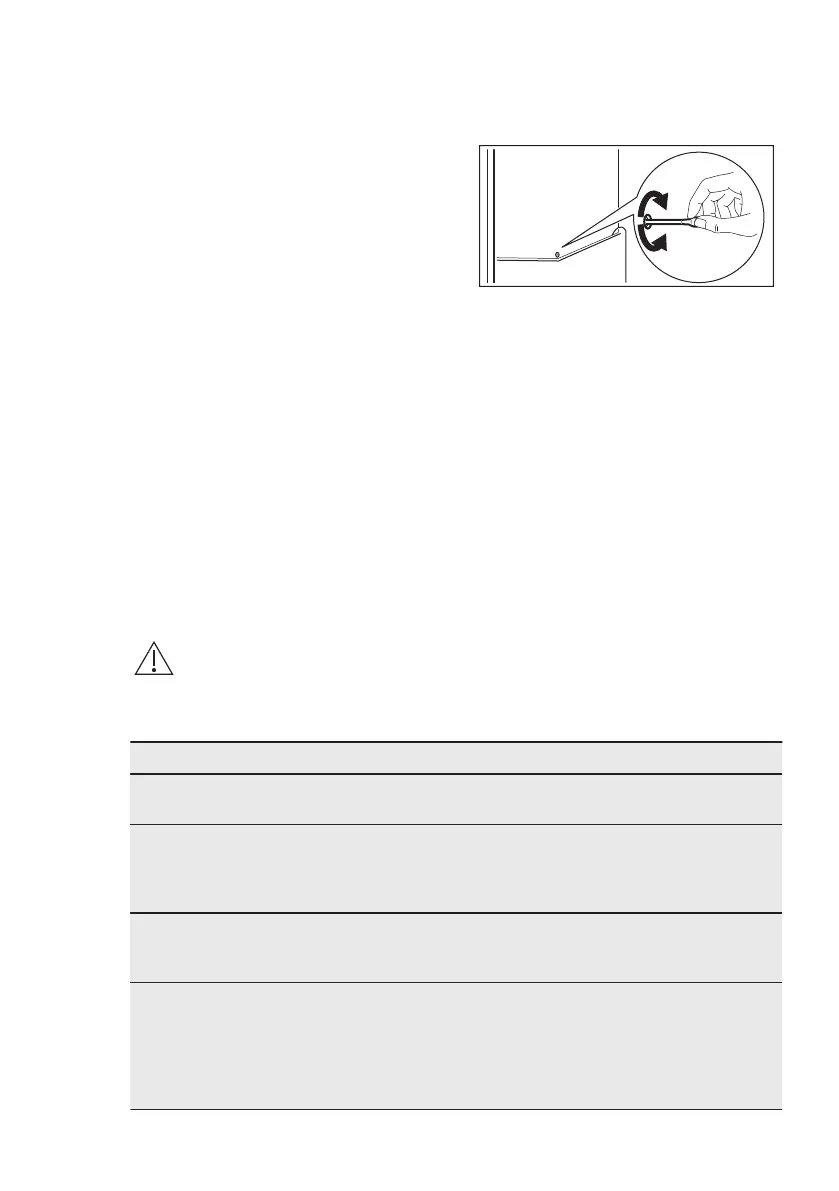
2. Regularly check the door seals and
wipe clean to ensure they are clean
and free from debris.
3. Rinse and dry thoroughly.
4. If accessible, clean the condenser
and the compressor at the back of
the appliance with a brush.
This operation will improve the
performance of the appliance and
save electricity consumption.
5.3 Defrosting
Your appliance is frost free. This means
that there is no build up of frost when it is
in operation, neither on the internal walls
nor on the foods. The absence of frost is
due to the continuous circulation of cold
air inside the compartment, driven by an
automatically controlled fan. The defrost
water drains out through a trough into a
special container at the back of the
appliance, over the motor compressor,
where it evaporates.
It is important to periodically clean the
defrost water drain hole in the middle of
the refrigerator compartment channel to
prevent the water overflowing and
dripping onto the food inside.
5.4 Periods of non-operation
When the appliance is not in use for long
periods, take the following precautions:
1. Disconnect the appliance from
electricity supply.
2. Remove all food.
3. Clean the appliance and all
accessories.
4. Leave the door/doors open to
prevent unpleasant smells.
6. TROUBLESHOOTING
WARNING!
Refer to Safety chapters.
6.1 What to do if...
Problem Possible cause Solution
The appliance is noisy. The appliance is not sup‐
ported properly.
Check if the appliance
stands stable.
Audible or visual alarm is
on.
The cabinet has been re‐
cently switched on or the
temperature is still too
high.
Refer to "Door Open
Alarm"or "High Temperature
Alarm".
The temperature in the
appliance is too high.
Refer to "Door Open
Alarm"or "High Temperature
Alarm".
A square symbol is shown
instead of numbers on the
temperature display.
Temperature sensor prob‐
lem.
Contact the nearest Author‐
ised Service Centre (the
cooling system will continue
to keep food products cold,
but temperature adjustment
will not be possible).
ENGLISH 55



 To Next Page