23
23. Programme unit
12
438 9149-81/06
04.03
Service
Manual
Service codes
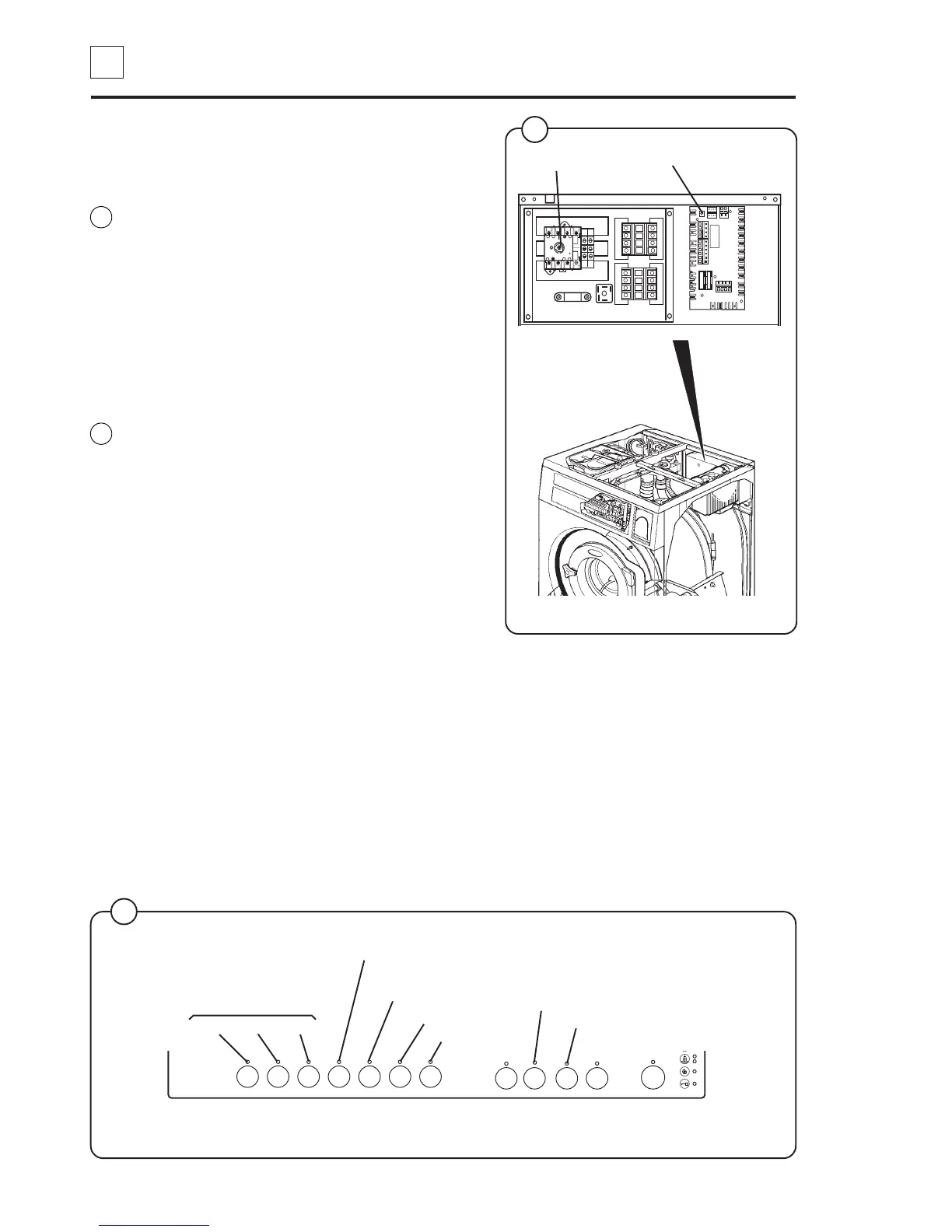
Use the service switch to enter and exit the
service mode.
Using the front panel buttons, the various
functions can be simulated by entering a service
code. The functions can then be switched on and
off using the ON/OFF button.
It is also possible to verify the input signals to the
programme unit by watching the LEDs.
Entering the service mode
• Switch off the main power switch. Unscrew
the rear electric box cover.
• Turn the main power switch again. Depress
the service switch on the communication card.
“SE” is displayed to indicate the service mode
has been engaged.
When the door is closed it automatically locks.
The door becomes unlocked when the service
mode is switched off again.
Exiting the service mode
Depress the service switch once more or switch
off the power to the machine.
To replace the cover on the rear electric box, the
main power switch must be in the 0 position.
Fig.
17
Fig.
16
T1
T2
T3
L1
N
N
L2
L3
Service switch
Main power switch
5182 5185
16
3
2
1
7
6
5
4
8
R
9
0
On/Off
Payment system
Key Coin 1 Coin 2
Price programming button
Service button (external)
Door closed
Door locked
Price reduction
Uneven load switch
5192 A
17



 To Next Page