ON OFF BUTTON
1
Press this button to activate or deactivate
the appliance. A tune sounds when the ap-
pliance is activated.
The AUTO Stand-by function automatically
deactivates the appliance to decrease the
energy consumption when:
• You do not use the appliance for 5 mi-
nutes before you press button
4
.
– All settings are cancelled.
–
Press button
1
to activate the appli-
ance again.
– Set again the washing programme and
all possible options.
• After 5 minutes from the end of the
washing programme. Refer to 'At the end
of programme'.
PROGRAMME KNOB
2
Turn this knob to set a programme. The re-
lated programme indicator comes on.
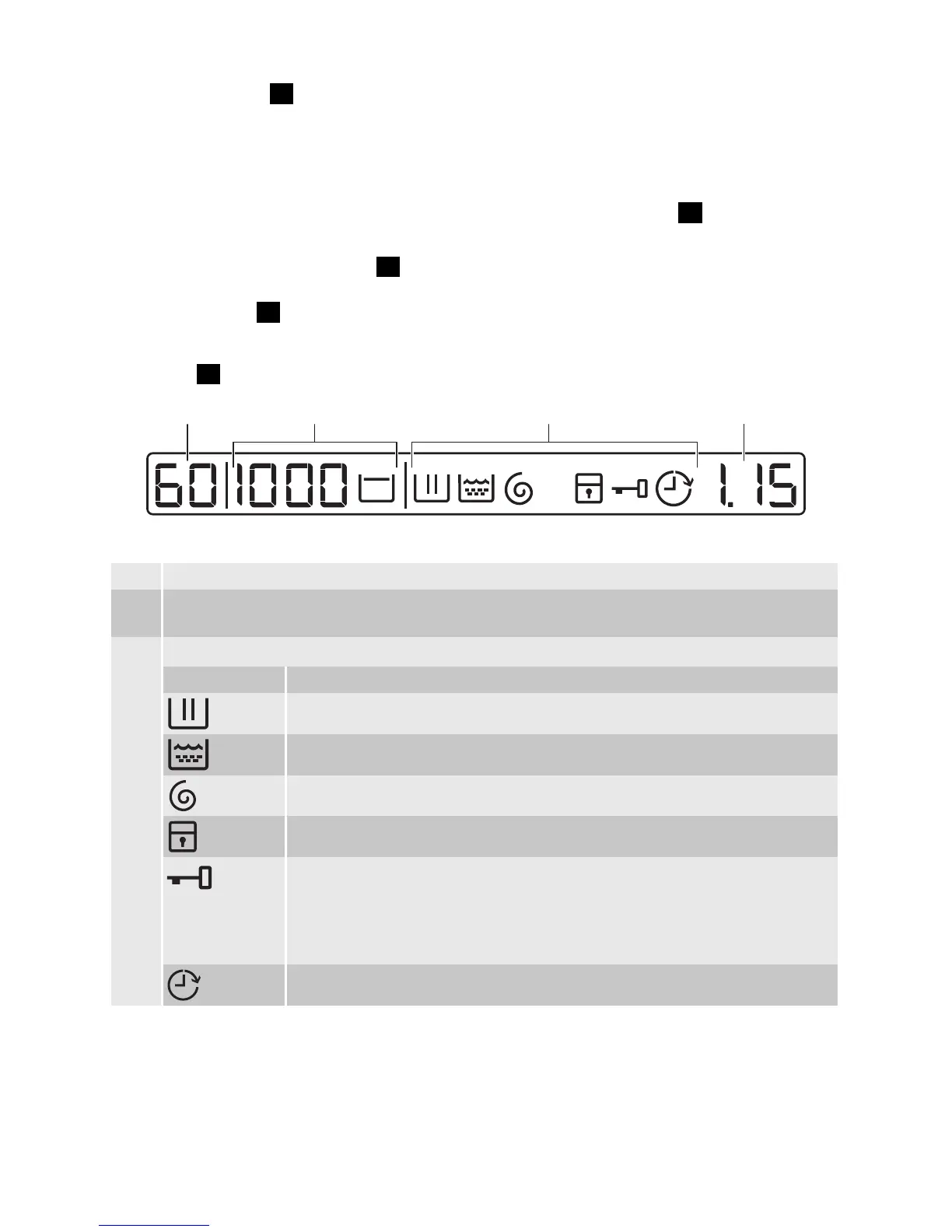
DISPLAY
3
A B C D
The display shows:
A • The maximum temperature of the programme.
B • The default spin speed of the programme.
•
'No Spin'
1)
and 'Rinse Hold' symbols.
C •
The display symbols.
2)
Symbols Description
Washing phase
Rinse phases
Spin phase
Child lock
You cannot open the appliance door when the symbol is on.
You can open the door only when the symbol goes off.
If the programme is completed but the symbol stays on:
• There is water in the drum.
• The 'Rinse Hold' function is on.
Delay start
electrolux 7



 To Next Page