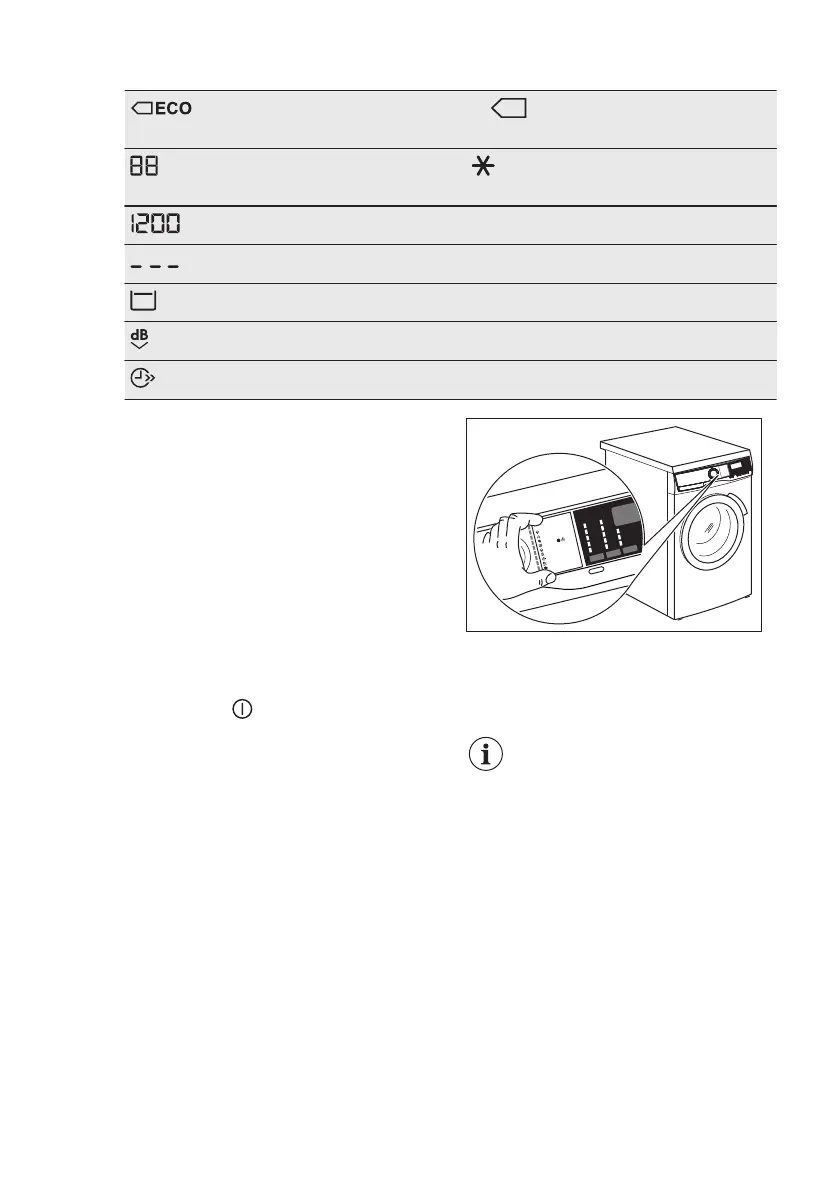
Energy saving indicators. The indicator appears by selecting a
programme for cotton at 40 °C or 60 °C.
Temperature indicator. The indicator appears when a cold wash
is set.
Spin speed indicator.
No spin speed indicator. Spin phase is off.
Rinse hold indicator.
Extra silent indicator.
Time saving indicator.
6.3 Multilingual badges
Adhesive badges in different languages
are supplied with the appliance.
The desired badge can be glued next to
the programme dial.
Program
Antiall ergi
20 min. - 3 kg
Motions tøj
Koge-/Ku lørt
Synteti sk
Finvask
Uld/Silke
Damp
Vattæpper
Jeans
7. DIAL AND BUTTONS
7.1 On/Off
Pressing this button for a few seconds
allows to activate or deactivate the
appliance. Two different tunes sound
while switching the appliance on or off.
As the Stand-by function automatically
deactivates the appliance to decrease
the energy consumption in a few cases,
you may need to activate the appliance
again.
For more details, refer to Stand-by
paragraph in Daily Use chapter.
7.2 Introduction
The options/functions are
not selectable with all
washing programmes.
Check the compatibility
between options/functions
and washing programmes in
the "Programme Chart". An
option/function can exclude
another one, in this case the
appliance doesn't allow you
to set the incompatible
options/functions together.
Make sure the screen and
touch buttons are always
clean and dry.
www.electrolux.com14




 To Next Page