3
Display
4
Steam touch button (Dampf - Vapeur)
5
Memory touch buttons (Memory -
Mémoire)
6
Start/Pause touch button (Start/Pause
- Départ/Pause)
7
Delay Start touch button (Zeitvorwahl -
Départ Différé )
8
Time Save touch button (Zeit Sparen -
Court)
9
Extra Rinse touch button (Spülen + -
Rinçage +)
10
Option touch button (Optionen/
Options)
11
Spin reduction touch button
(Schleudern - Essorage)
12
Temperature touch button (Temp.)
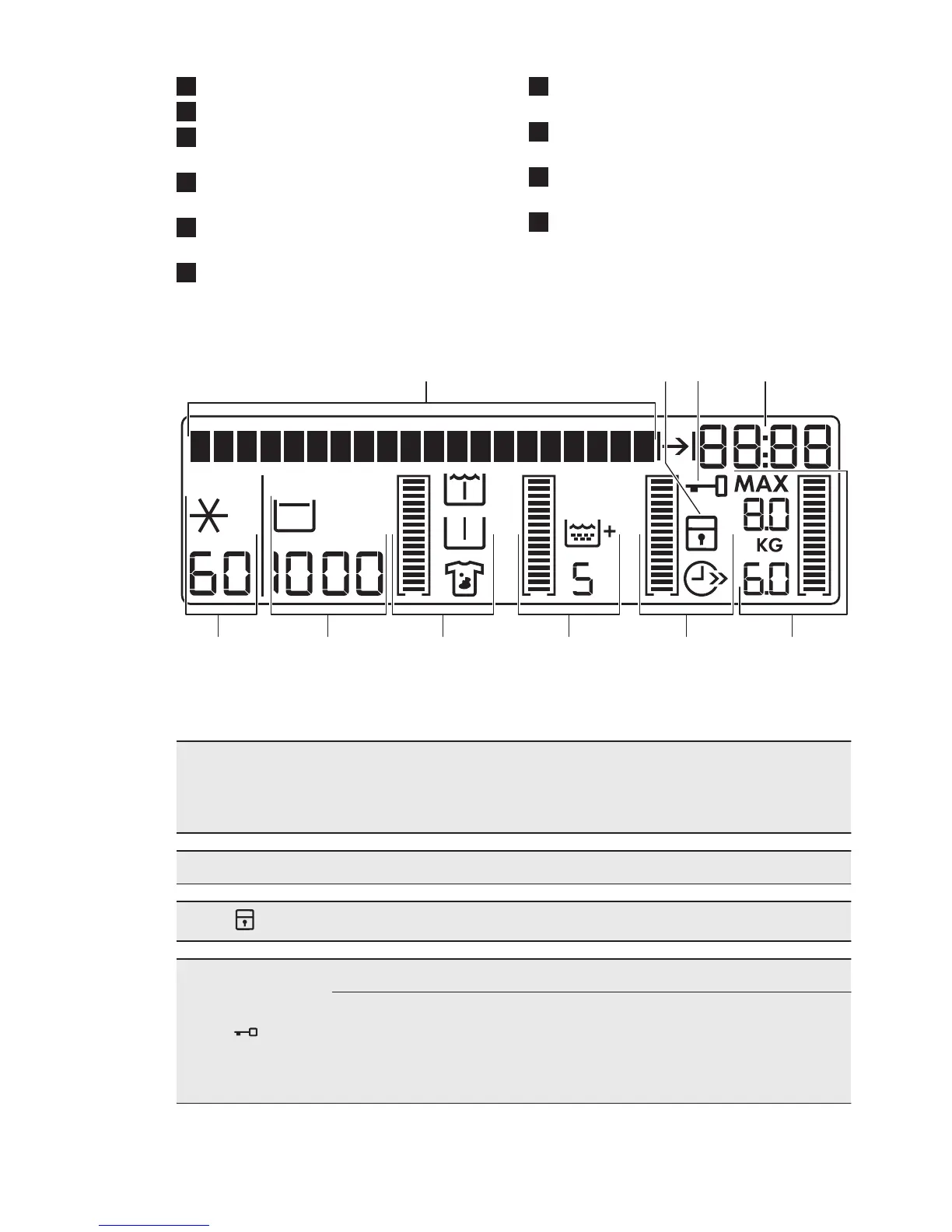
4.2 Display
The display shows:
A
The text bar:
• Guides you in the use of the appliance.
• Shows the programme status and phase.
• Shows alarm messages. Refer to 'Troubleshooting' .
The symbols appear on the display when the related phase or function is set.
B
Child safety lock
C
Door locked
You cannot open the appliance door when the symbol is on. You
can open the door only when the symbol goes off.
If the programme is completed but the symbol stays on:
• The «Rinse hold» function is on.
• There is water in the drum.
ENGLISH
7





 To Next Page