-19-
Address 02: Communication Options
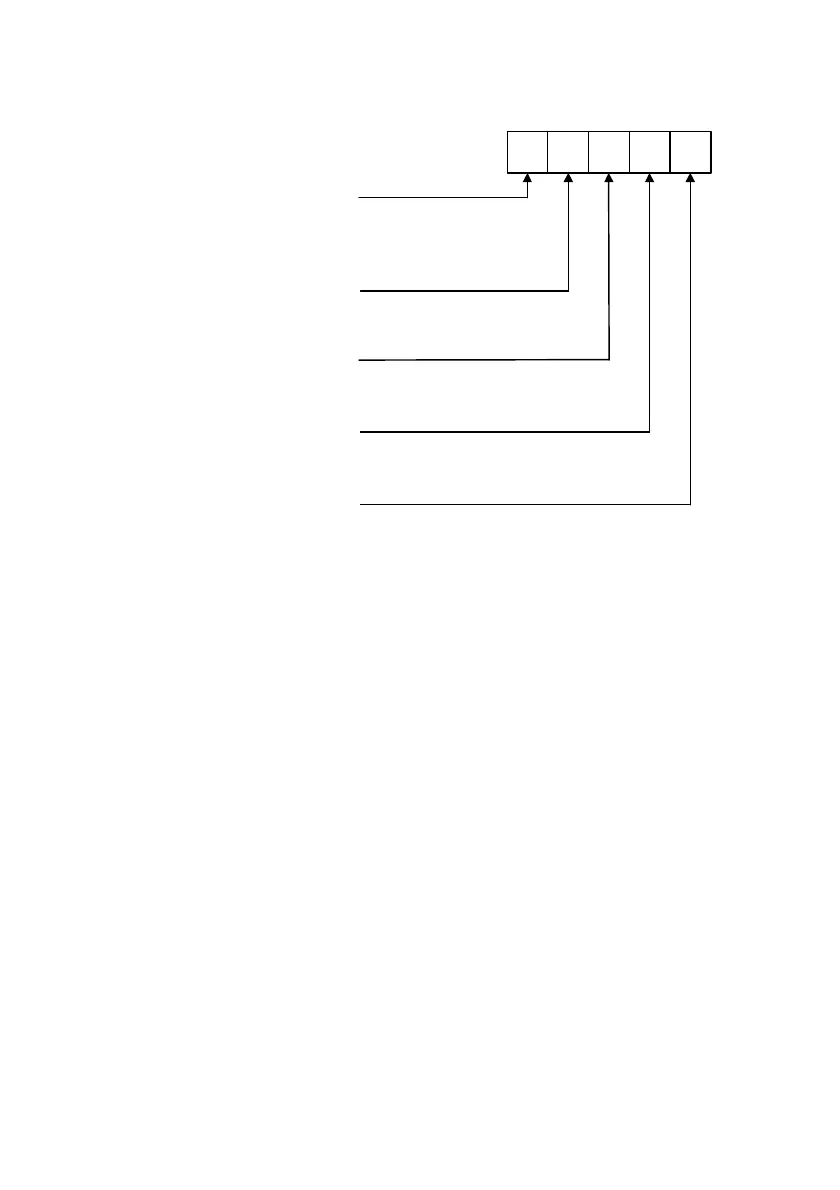
This address consists of the various options used in communication and/or remote
programming. Enter five digits according to the following.
Fifth Digit: Dialing
0 - Pulse
1 - DTMF
First Digit:
Protocol
0 - 20pps 4/2 no parity
1 - Follow Me
2 - Contact ID
3 - Voice Message (3601)
4 - 10pps 3/1 no parity
Fourth Digit:
Handshake
0 - 1400Hz Handshake
1 - 2300Hz Handshake
Second Digit:
RP Access Type
0 - Passcode
1 - Callback
Third Digit: RP Access
0 - Disable RP Access
1 - Enable RP Access
Address 03: Zone 1 Definition
One of six response types can be assigned to zone 1. Each zone type can be
programmed as ‘Silent’ or ‘Audible’. A ‘Silent’ zone will not activate a siren or bell when
the zone is tripped.
00 - Perimeter zone with delay (Silent)
10 - Perimeter zone with delay (Audible)
01 - Perimeter zone (Silent)
11 - Perimeter zone (Audible)
02 - Conditional zone (Silent)
12 - Conditional zone(Audible)
03 - Interior zone (Silent)
13 - Interior zone (Audible)
04 - 24hr zone (Silent)
14 - 24hr zone (Audible)
05 - Fast Loop Perimeter Zone (Silent)
15 - Fast Loop Perimeter Zone (Audible)
Address 04: Zone 2 Definition
Same as above for zone 2.
Address 05: Zone 3 Definition
Same as above for zone 3.
Address 06: Zone 4 Definition
Same as above for zone 4.


 To Next Page