Activating More Functions
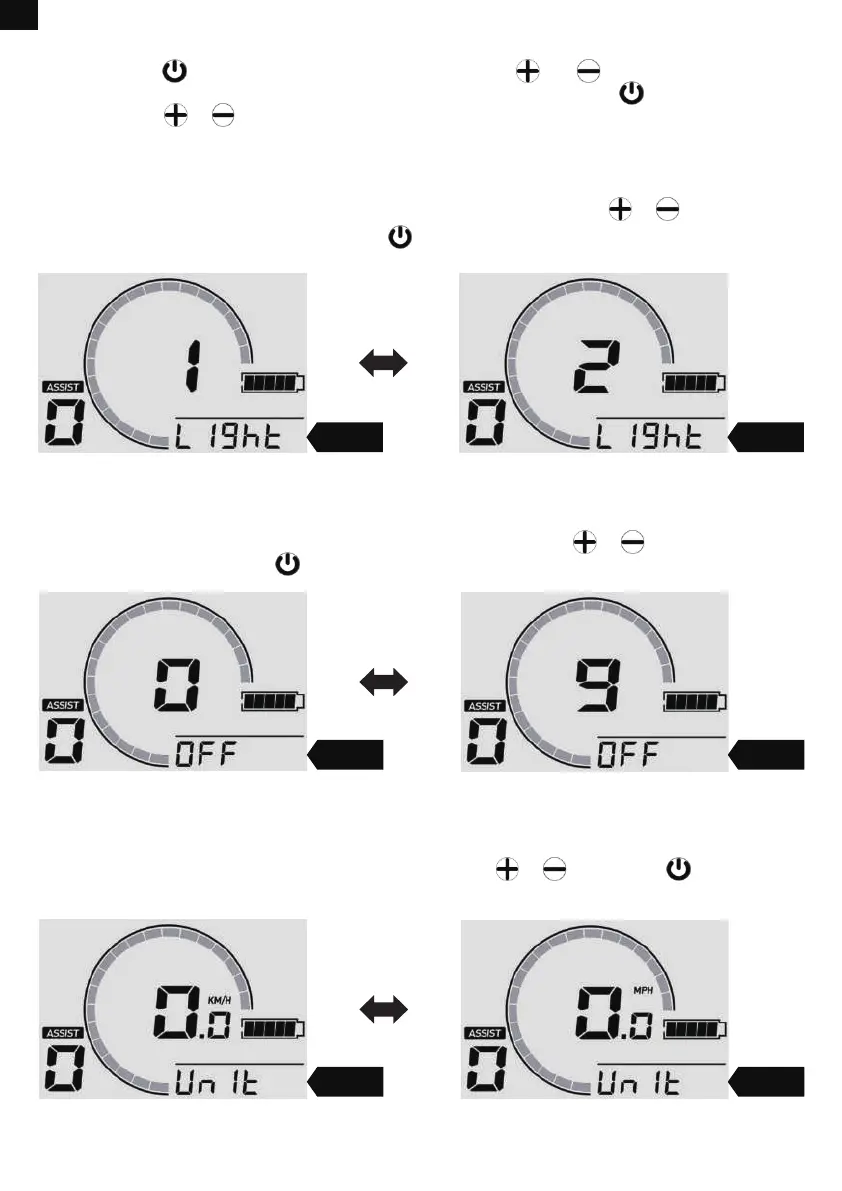
First, long press to turn the LCD display on. Then long press and at the same time for 2-3
seconds to enter or exit the menu interface. In the menu interface, short press to shift to the next
menu and press or to set the menu items. To ensure users’ safety, the menu interface can only
work when the bike is stationary.
Adjusting LCD Backlight
Enter the “Light” menu and adjust the LCD backlight illuminance by pressing or . Level 1 is the
darkest and level 5 is the brightest. Then press to keep the change and exit the “Light” menu.
Light Light
Setting Auto Power off
Enter the “OFF” menu and set the time within 0-10 minutes by pressing or . 0 means the auto
off function is turned off. Press to keep the change and exit the “OFF” menu.
Changing Speed Unit
Enter the “Unit” menu and change the speed unit by pressing or . Then press to keep the
change and exit the “Unit” menu.
OFF OFF
Unit Unit
12
EN


 To Next Page