EasyManua.ls Logo

Eleglide T1 - User Manual

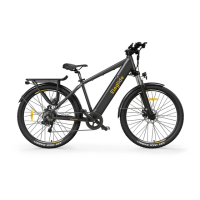
Eleglide T1
111 pages
Print Icon
To Next Page IconTo Next Page
Loading...
User Manual

Questions and Answers

  • C
    Carolyn JohnsonJul 29, 2025
    What to do if my Eleglide Bicycle display fails to work?
    • D
      Destiny RamirezJul 29, 2025
      If the display of your Eleglide Bicycle isn't working, there could be several reasons. It might be due to no power supply, in which case you should charge the battery. Another cause could be that the electric wire isn't properly connected, so ensure it's reconnected tightly. If the display is damaged or the controller has burned out or suffered water damage, contact the re-seller for assistance.
  • N
    Nicholas ColemanAug 4, 2025
    Why is my Eleglide Bicycle battery not charging?
    • P
      poolepaulAug 4, 2025
      If your Eleglide Bicycle battery isn't charging, several factors could be the cause. First, ensure the charger is properly plugged in. If the battery is outside the recommended temperature range, charge it at a proper temperature. If the battery is charged below rated voltage, ensure it is charged under rated voltage. If the battery is damaged, contact the re-seller.
  • M
    Mark LopezAug 10, 2025
    Why Eleglide Bicycle has insufficient riding distance?
    • D
      Danielle NewtonAug 10, 2025
      There are several reasons why your Eleglide Bicycle might have insufficient riding distance. The battery might not be fully charged, so ensure it is fully charged. Low tire pressure can also affect the distance, so check the tire pressure before each use. Frequent braking and riding habits can reduce distance. Battery aging or low ambient temperatures are normal causes of reduced riding distance.
  • R
    Ryan SchaeferAug 16, 2025
    What to do if the motor fails to work on my Eleglide Bicycle?
    • R
      Ricky SandersAug 16, 2025
      If the motor on your Eleglide Bicycle isn't working, it could be due to a few reasons. Check if the brake lever doesn’t back properly and adjust it. Also, ensure the electric wire is properly plugged in. If the sensor or controller is inefficient, contact the re-seller for assistance.
  • A
    Alexandria Knapp MDAug 22, 2025
    How to fix the front light on my Eleglide Bicycle?
    • W
      Willie CardenasAug 22, 2025
      If the front light on your Eleglide Bicycle isn't working, first check if the wire is properly plugged in. If it is and the light still doesn't work, it might be damaged, and you should contact the re-seller.

Summary

Note

Warning

Diagram

Specification

Package List

Assembly

Install The Handlebar

Instructions for installing the handlebar onto the e-bike stem.

Install The Front Wheel

Guide to properly mounting the front wheel using the quick release mechanism.

Fix The Headset

Procedure for securing the bicycle's headset using a socket head wrench.

Adjust The Stem Angle

Steps to adjust the stem angle for the T1 Step-Thru model.

Install The Headlight

Instructions on how to correctly mount the front headlight.

Install The Taillight

Guide for connecting and fixing the rear taillight assembly.

Fix The Mudguard

Steps for attaching the mudguard supports securely.

Install The Pedals

Instructions for installing the left and right pedals onto the crank arms.

Install The LCD Display

Detailed steps for mounting and connecting the LCD display unit.

Install Spoke Reflectors

Procedure for attaching spoke reflectors to the wheel spokes for visibility.

Install The Seat

Guide to inserting and adjusting the seat post to the correct height.

Turn The Power on

Final step to lock the battery and power on the e-bike display.

LCD Display Guide

Power on;off

Instructions for turning the LCD display and the bike on or off.

Shifting Speed Level

How to change between the five available speed assist levels.

Light on;off

Procedure for activating or deactivating the bike's lights.

6 km;h Push Mode

How to activate the walking assist mode at 6km/h.

Adjusting LCD Backlight

Guide to adjusting the brightness level of the LCD screen.

Setting Auto Power off

Instructions for configuring the automatic power-off timer for the display.

Changing Speed Unit

How to switch between metric (km/h) and imperial (mph) speed units.

Error Tracking

Information on identifying and resolving common error codes displayed on the LCD.

Maintenance

Cleaning

Proper methods for cleaning the e-bike mainframe and components.

Bicycle Storage

Proper storage procedures for the e-bike to prevent damage and corrosion.

Lithium-ion Battery Maintenance

Care and charging guidelines for the lithium-ion battery for optimal lifespan.

Component Maintenance

Maintenance procedures for specific bike parts including headset, brakes, chain, and more.

Troubleshooting

Warranty

Valid Proof of Purchase

Documents required to validate a warranty claim, such as order numbers and receipts.

Eleglide T1 Specifications

General IconGeneral
Motor Power250W
Max Speed25 km/h
Frame MaterialAluminum Alloy
Wheel Size27.5 inch
BrakesMechanical Disc Brakes
SuspensionFront Suspension
Charging Time4-6 hours
Weight22kg
Max Load120 kg
DisplayLCD Display
FoldableNo
Range100 km
Gears7-speed
TiresCST 27.5" x 2.1"
LightsFront and Rear LED Lights

Related product manuals