1
2
3
4
5
1
2
3
4
7
5
6
PREPARATIONS FOR START
BACK PANEL FUNCTION
REMOTE CONTROL FUNCTION
1 2
3
4
5
AUX IN
1
2
3
4
5
7
OPT
AUX
9
VOL+
PRESET
LINE
VOL-
6
8
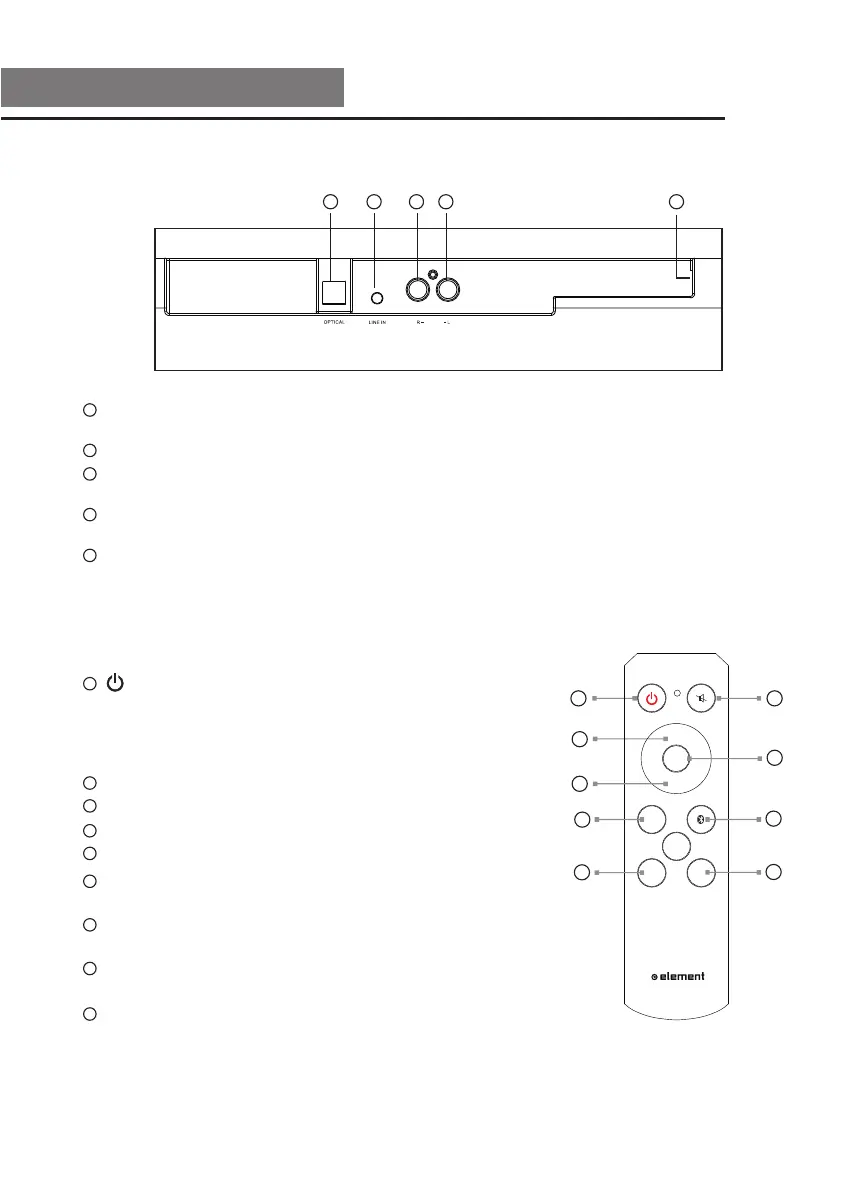
OPTICAL IN :Optical connector for connection from a device such as a home
theater system, amplifier, receiver, set top box, or DVD player.
LINE IN: Connect the LINE IN audio from cell phone or other device.
AUX IN (ANALOG R): Connect the analog audio from a device such as a TV,
set top box, DVD player, or gaming system.
AUX IN (ANALOG L): Connect the analog audio from a device such as a TV,
set top box, DVD player, or gaming system.
POWER CONNECTOR: Plug the connector from the AC/DC Power Adapter here.
BUTTON: Press to turn Sound Bar on or off.
NOTE: If the channel has no input signal or any
operation in 15 minutes, the device will automatically
go into the Standby mode.
MUTE: Press to turn the sound on and off.
Press the “+” button to increase the volume.
Press the “–” button to decrease the volume.
Preset the factory settings, the volume is 50%.
OPTICAL BUTTON: If the device is not in optical
mode, press this button to switch to OPTICAL IN mode.
BLUETOOTH BUTTON: If the device is not in Bluetooth
mode, press this button to switch to Bluetooth mode.
AUX IN BUTTON: If the device is not in AUX IN mode,
press this button to switch to AUX IN mode.
LINE IN BUTTON: If the device is not in LINE IN mode,
press this button to switch to LINE IN mode.
8
9
IN
7


 To Next Page