TH232-AF-230 400-232-003-B 2010-05-26 2/4
This thermostat provides the following temperature control modes:
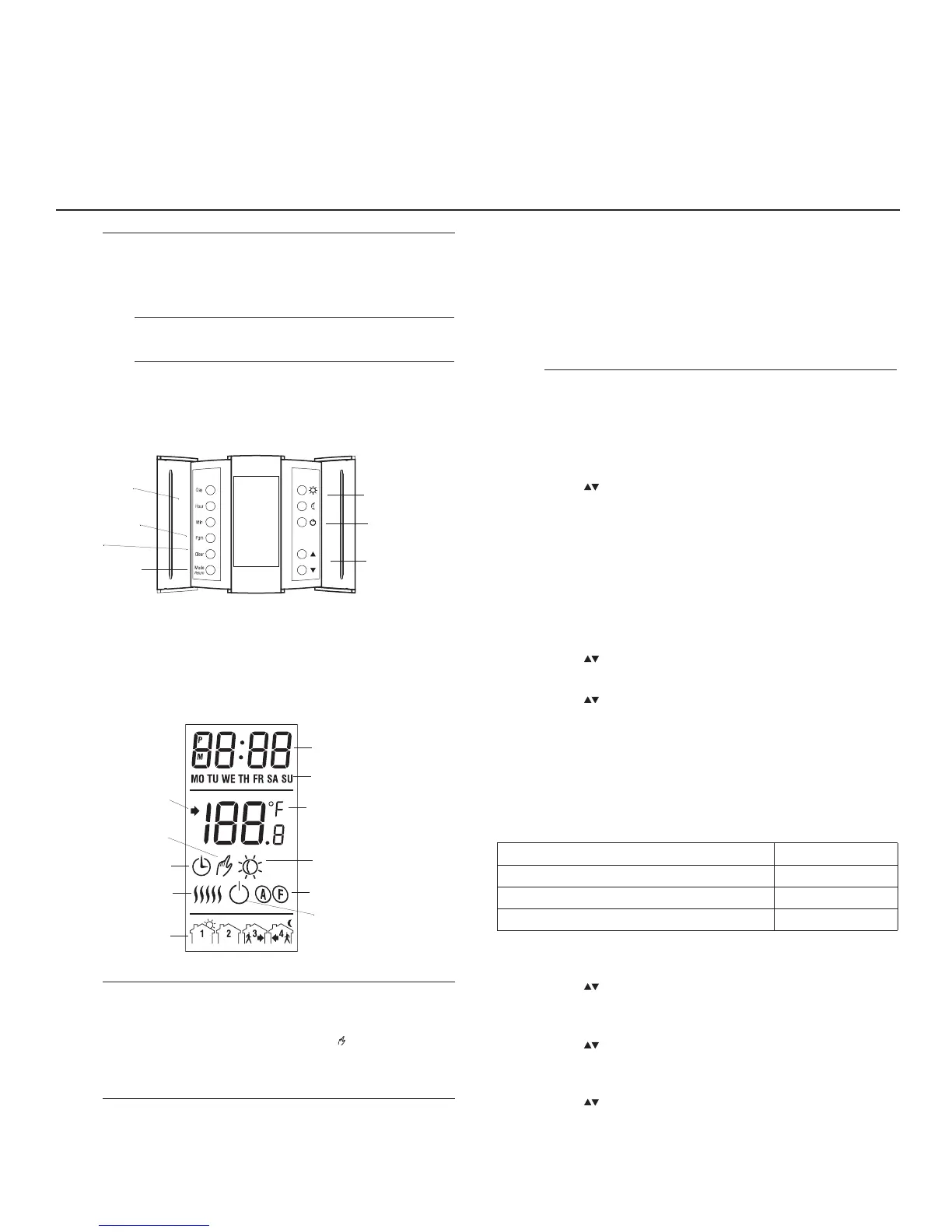
Display
Apply power to the thermostat at the main electrical panel. At
power-up, the thermostat is in manual mode and displays the
actual (measured) temperature. The setpoint temperature is 28 °C
(82 °F).
LO The actual temperature is below 0 °C (32 °F).
HI The actual temperature is above 70 °C (158 °F).
Er The thermostat built-in sensor is defective. Replace the
thermostat.
E1 The floor sensor circuit is opened. Check the sensor
connections.
E2 The floor sensor circuit is shorted. Replace the sensor.
4.1 Control Mode Selection
n
Press and hold the Clear button for 3 seconds. The current con-
trol mode is displayed
(ctl).
o Press the to select between A, AF and F.
NOTE
: If you have chosen the A or F mode, go to step 7. If you have
chosen the AF mode, the thermostat will control the ambient tempera-
ture while keeping the floor temperature within desired limits. If the
floor temperature is too low or too high, the thermostat will turn heating
on or off to maintain the floor temperature within the limits regardless
of the ambient temperature. The minimum and maximum floor temper-
ature limits are factory-set at 5 °C (41 °F) and 28 °C (82 °F) respec-
tively. To modify the limits, continue with the next step:
p
Press the
Clear
button briefly. The minimum limit is displayed (
FL:LO
).
q Press the button to set the minimum limit.
r
Press the
Clear
button briefly. The maximum limit is displayed (
FL:HI
).
s Press the buttons to set the maximum limit.
t Press the Mode/Return button to exit and save the changes.
NOTE: If no button is pressed for 60 seconds, the thermostat will
save the changes and return to normal display.
4.2 Other Configurations
This procedure allows you to choose the following configurations:
n Press and hold the Pgm button for 3 seconds. The current tem-
perature unit is displayed (unit).
o Press the to toggle between °C and °F.
p Press the Pgm button briefly. The current time format is dis-
played (Hr).
q Press the to toggle between 24H and 12H.
r Press the Pgm button briefly. The current Early Start setting is
displayed (ES).
s Press the to toggle between OFF and On.
t Press the Mode/Return button to exit and save the changes.


 To Next Page