COMPU COOK
Compu cook and the following Compu
settings leave you no more to do with
cooking than selecting the food to be
cooked and entering its weight or
number of servings, before pushing the
START button.
For example, to cook 1.5 lb of fish
1. Indicating the type of food placed into
the oven by pressing COOK pad 5
times.
2. Use the number pads to enter
weight within the range indicated
in the charts below, in this case,
touch 1 and 5.
3. push START button.
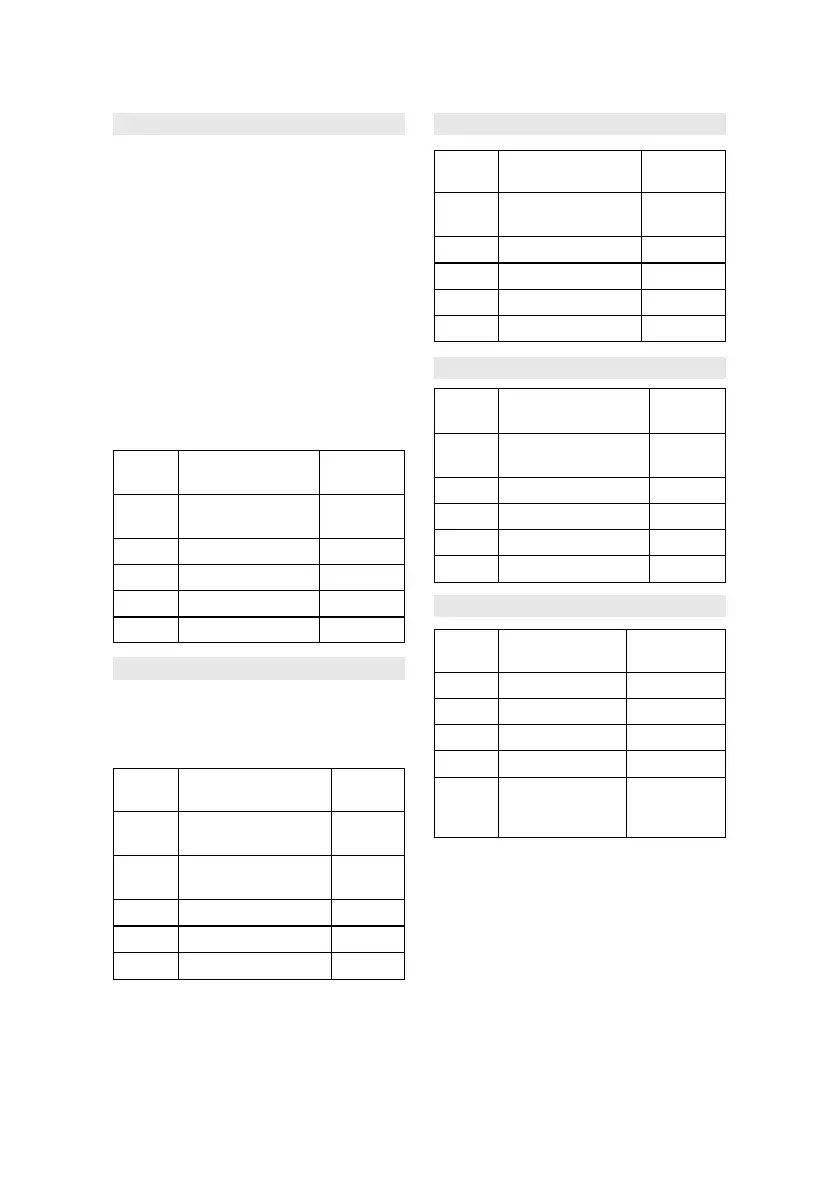
Press SETTING Food Amount
COOK
Once 1. baked potato 1~4
medium
Twice 2. fresh vegetable 1~4 cups
3 times 3. frozen vegetables 1~4 cups
4 times 4. ground meat 0.1~1.0 lb
5 times 5. seafood, fish 0.1~1.0 lb
COMPU PIZZA
For items 1~4, you just need to indicate
what kind of a pizza you want it to come
out of the oven and push the START
pad. Step 2 is skipped.
Press SETTING Food Quantity
PIZZA
Once 1. bake frozen pizza
regular crust 1
Twice 2. bake frozen pizza
rising crust 1
3 times 3. bake refrig pizza 1
4 times 4. Microwave pizza 1
5 times 5. Casserole 1~6 slices
COMPU GRILL
Press SETTING Food Quantity
Grill
Once 1. hamburgers 1-7 (0.1lb
each)
Twice 2. steaks 0.2~0.9lb
3 times 3. fish steaks 0.2~0.9lb
4 times 4. boneless poultry 0.2~0.9 lb
5 times 5. chicken pieces 0.2~1.4 lb
COMPU ROAST
Press SETTING Food Quantity
ROAST
Once 1. Chicken, turkey 1.1~3.2
(whole)
Twice 2. Pork loin 0.9~1.6
3 times 3. turkey breast 1.4~1.6
4 times 4. beef eye of round 0.9~1.6
5 times 5. Cornish hens 0.2~1.4
COMPU BAKE
Press SETTING Food Quantity
BAKE
Once 1. French fries 0.1~0.4
Twice 2. Frozen snack 0.9~1.6
3 times 3. Brownies 10x10x5
4 times 4. Snack cake 10x10x5
5 times 5. biscuits 8~10 (1 package of
convenience
biscuits)



 To Next Page