19
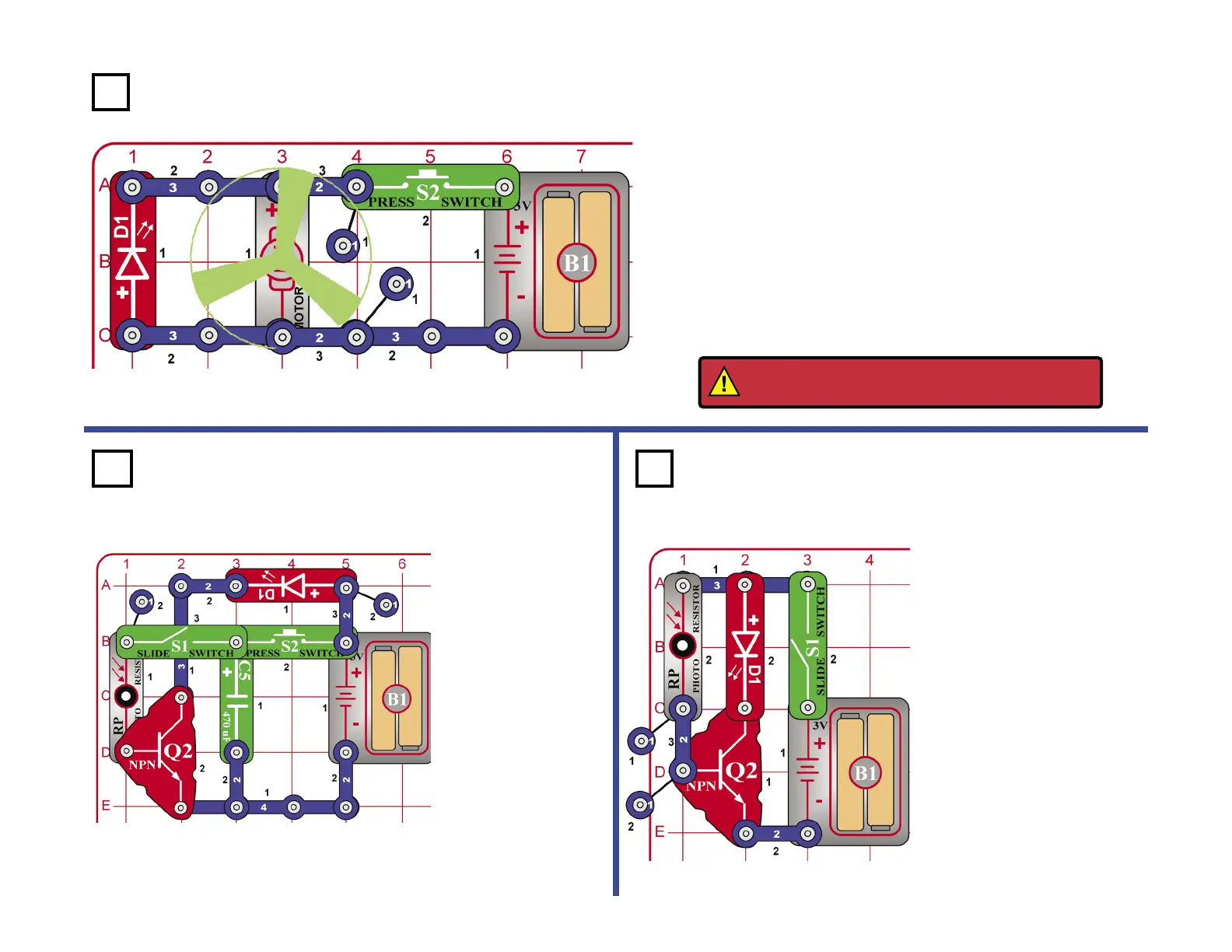
Press and release the
press switch (S2), then
turn on the slide switch
(S1). The LED will light
for a while when there
is room light on the
photoresistor (RP) and
slowly dims.
The capacitor (C5) will
store energy until a light
shines on the photo
resistor to release the
energy, which activates
the NPN transistor (Q2)
and turns on the LED
(D1). Press the press
switch again to recharge
the capacitor.
Turn on the switch, the
brightness of the LED
depends on how much
room light shines on
the photoresistor.
The resistance drops
as more light shines,
allowing more current
to the NPN.
Project 104
Project 103
Place the fan on the motor (M1). Hold down the press switch (S2)
for a few seconds and then watch the LED (D1) as you release the
switch. The LED ashes briey but only after the batteries (B1) are
disconnected from the circuit.
Do you know why the LED ashes? It ashes because the mechanical
energy stored in the fan blade makes the motor act like a generator.
When the switch is released, this energy creates a brief current
through the LED.
If you reverse the motor direction, then the LED will light the same way,
but the fan may y off after the LED lights.
Fan Flash Energy
Project 105
WARNING: Moving parts. Do not touch the fan or
motor during operation. Do not lean over motor.
Photo Timer Light
Room Light to Red Light










 To Next Page