24
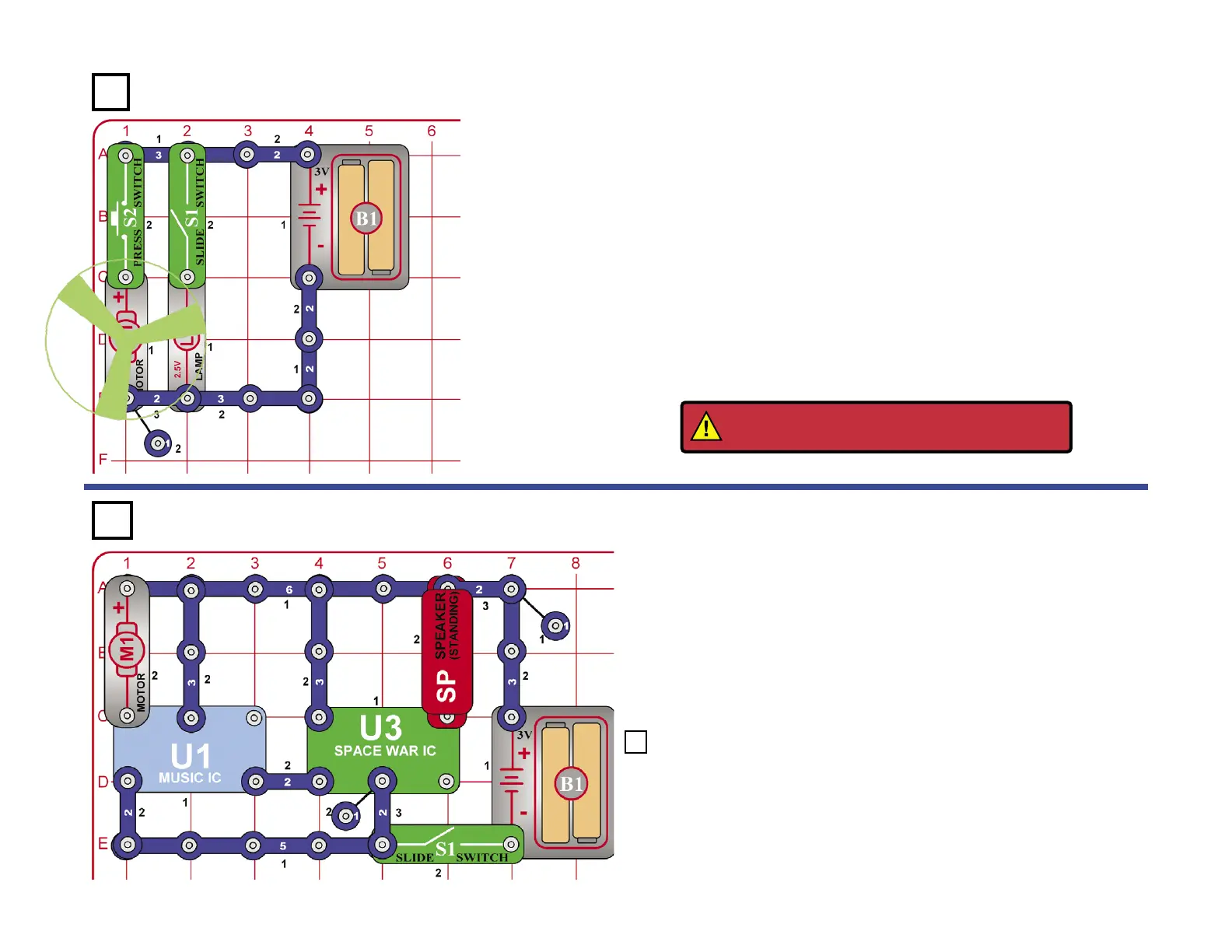
Light the Motor
Build the circuit and place the fan on the motor (M1). Depending on
which of the switches (S1 and S2) are on, you can turn on either the
lamp (L1) (Project #1), the motor (M1) (Project #2), or both together
(Project #10).
Motor Space Sounds
Turn it on and wait for any sounds to stop. Then, spin the motor (M1) and
the sounds play again.
Do you know why turning the motor makes the sound play? Actually, the
DC motor is also a DC generator and when you turn it, the motor generates
a voltage that triggers the sound circuits.
This circuit is loud and may bother other people around you so replace
the speaker (SP) with the LED (D1), (“+” on top); the circuit operates
in the same manner but now the LED ashes instead of the speaker
making sounds.
Project 118 Twist & Blink
Project 117
Project 116
WARNING: Moving parts. Do not touch the fan
or motor during operation.











 To Next Page