●Using the USB Interface
Step1: Connect the USB disk to the projector's USB port, then select “Media”
Step2: To project images and other content after connected, You can choose
“Movie” , “Music” , “Photo” , and “Text” from the list.
Supporting File Formats:
Image Format:
Audio format:
Video format:
Text format:
JPG, JPEG, BMP, PNG
MP3, WMA, MP2, MP3, OGG, M4A, MA4,
FLAC, 3GP, WAV, M3U, RM, WMV
MP4, MOV, 3GP, AVI, FLV, ISO, M2TS, MKV,
MPG, RMVB, TP, TRP, TS, WMV, VOB, DAT, ASF.H.265.
TXT
7
●Using the HDMI Interface
Please select the HDMI, the projector could be connected with DVD player, Game
box, HDD player etc.
Connecting to PC
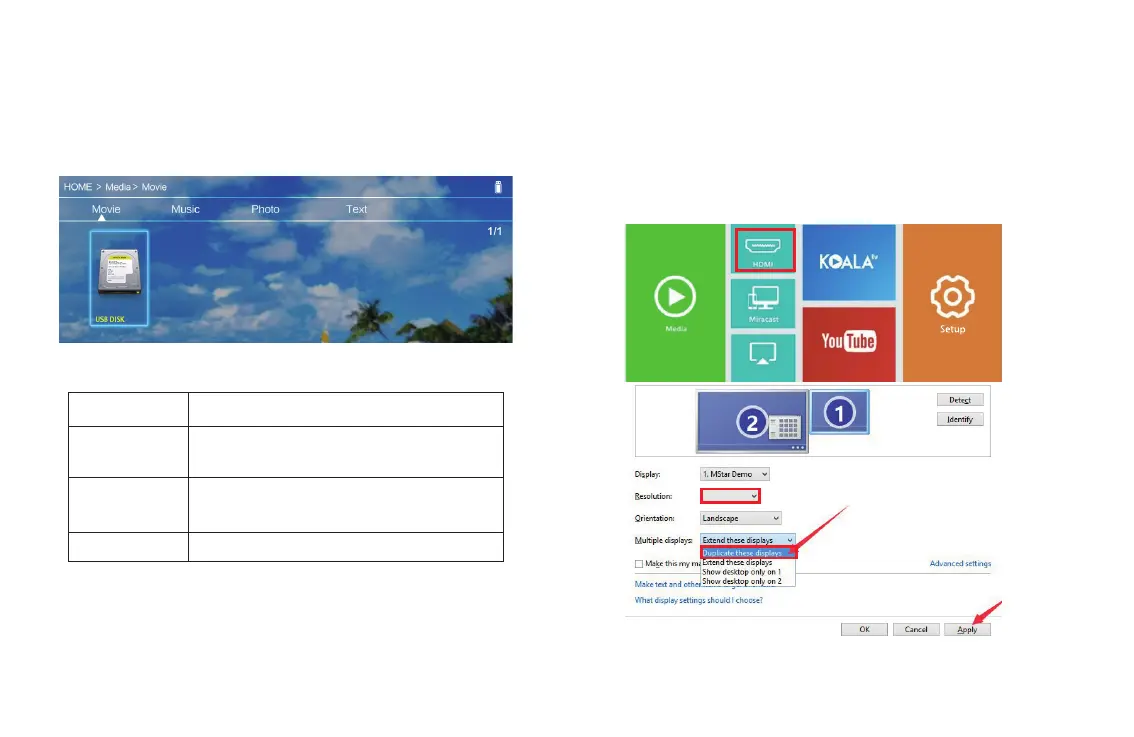
Step1: Connect the projector to your laptop or other HDMI sources via HDMI cable
Step2: Select the HDMI source of the home page.
Tips: Adjust the PC display resolution to about “1024×768”.
8
1024×768
iOS Cast


 To Next Page
 Loading...