●Miracast
Step1: Select the “Miracast” of the home page.
Step2: Open the “wireless display ”function of your device.
Step3: Select the corresponding projector device name“ZYCAST-****”
Attention: Note that dierent Android devices have dierent ways to open
the “wireless display”. For details, please refer to the instructions for Android
devices.
The following information is for your reference only:
• Samsung: Please open the "Smart View" function on your device and then
connect it with the projector.
• Google Pixel: Please used Chromecast to cast your phone's screen to the
projector.
• Xiaomi: Please open the “Wireless display” function on your device and
then connect it with the projector.
• Huawei: Please open the “Multi-screen” function on your device and then
connect it with the projector.
• Motorola: Please open the “Wireless screen” function on your device and
then connect it with the projector.
11
●Setup
Set submenu function
Network:
Scan / Auto IP / Static IP
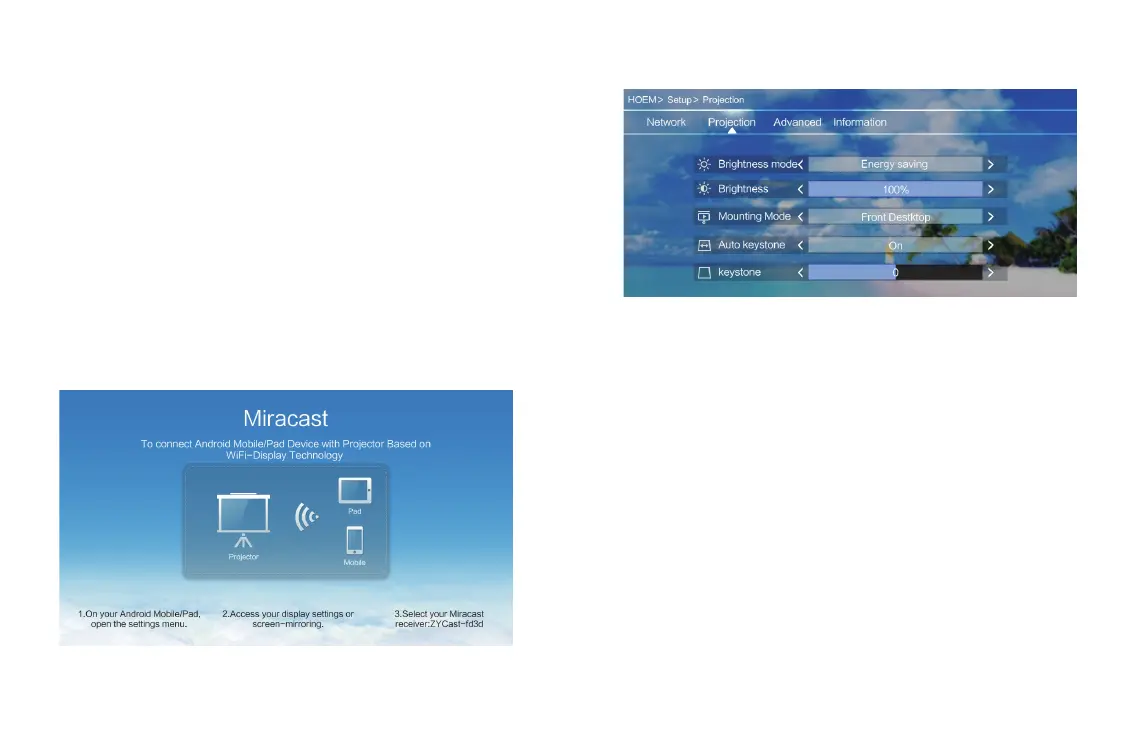
Projection:
Brightness Mode: Standard / Energy Saving / Customize
Mounting Mode: Front Desktop / Front Ceiling
Automatic trapezoid: On/O
Keystone correction: -40~+40
Advanced:
Language/Boot Source/Local update/Online update/Restore Factory
12


 To Next Page
 Loading...