Need help?
Do you have a question about the Elgato 4K60 and is the answer not in the manual?
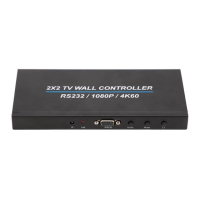
The 2x2 TV wall controller supports 1 HDMI input and 4 HDMI outputs, dividing a single HDMI signal into 4 blocks for display units.
Lists 1 HDMI input, 4 HDMI outputs, 4K60Hz input, 1080P60 output, and plug-and-play operation.
Explains all input/output ports (HDMI, SPDIF, DC/12V) and controls (IR, LED, RS232, Audio, Mode).
Details buttons for brightness, contrast, splicing modes (1x2, 2x1, 1x3, 3x1, 1x4, 4x1), border adjustment, and picture flipping.
Guides on connecting source, power, and setting splicing modes using the unit or remote.
Illustrates connecting various sources (PC, DVD, Notebook, PS4) to the input and outputting to 4 spliced monitors.
Details ASCII and HEX commands for controlling the device, including mode switching, power, and status checks.
The 4K60 2x2 TV Wall Controller is a sophisticated device designed to enhance visual displays by creating large, dynamic image screens from a single HDMI source. This controller takes one HDMI input signal and intelligently divides it into four distinct blocks, distributing them to four individual video display units, such as rear projection units or LCD TVs. The primary function is to enable the creation of expansive, high-definition video walls, making it ideal for various applications where a large-scale visual presentation is desired.
At its core, the 4K60 2x2 TV Wall Controller serves as a central hub for managing and distributing video signals across multiple screens. It receives a single HDMI 2.0 input, which can be a 4K60Hz signal or a lower resolution, and processes it to generate four HDMI outputs. These outputs are then fed to individual display units, which collectively form a cohesive video wall. The device is capable of handling high-definition video, ensuring that the resulting large image screen maintains clarity and detail. The controller's ability to divide and distribute the signal seamlessly allows for the creation of a single, continuous image across multiple displays, transforming a collection of screens into a unified visual canvas. This functionality is crucial for applications requiring immersive visual experiences, such as digital signage, control rooms, entertainment venues, and presentations. The controller ensures that the transition between screens is smooth, and the overall image quality is preserved, providing a professional and impactful display solution.
The 4K60 2x2 TV Wall Controller is designed with user-friendliness and versatility in mind, offering a range of features that simplify its operation and enhance its adaptability to various display configurations.
Multiple Splicing Modes: One of the standout features is its support for multiple splicing modes, allowing users to configure their video wall in various layouts. These modes include:
These modes provide flexibility in designing the video wall layout to suit specific content and spatial requirements.
Easy Operation: The device emphasizes ease of use, offering a plug-and-play experience. Users can set up their video wall by simply connecting the HDMI source to the input, connecting the HDMI outputs to the TVs, and then connecting the 12V power adapter. The splicing mode can be easily selected using either the MODE button on the unit itself or the included remote controller.
Remote Control Functionality: The remote controller provides comprehensive control over the device, offering dedicated buttons for various functions:
RS232 Remote Control: For more advanced integration and control, the device supports RS232 remote command control. This allows users to connect the splicer to a PC via an RS232 uncrossed cable or a USB to RS232 adapter. With serial port tools installed on the PC, users can send specific commands to control the device, including switching modes, turning the OSD (On-Screen Display) on or off, and querying the current state of the device. This feature is particularly useful for professional installations where centralized control and automation are required. The RS232 interface provides a robust and reliable method for managing the video wall controller within a larger system.
Audio Output: The device includes an SPDIF (Digital Audio Output) port, allowing users to extract audio from the HDMI signal and route it to external audio systems, providing a complete audiovisual experience.
Physical Interface: The physical interface is clearly labeled, with distinct sections for HDMI inputs and outputs, power, and control ports. This intuitive layout simplifies connection and troubleshooting.
The 4K60 2x2 TV Wall Controller is designed for straightforward maintenance, focusing on reliability and ease of use rather than complex upkeep procedures.
Plug and Play Design: The plug-and-play nature of the device minimizes the need for extensive setup or configuration, which in turn reduces potential points of failure and simplifies troubleshooting. When issues arise, the modular design allows for easy disconnection and reconnection of components to diagnose problems.
LED Indicators: The presence of an LED indicator on the device provides immediate visual feedback on its operational status, making it easy to confirm if the unit is powered on and functioning correctly.
Remote Control and RS232 for Diagnostics: The remote control and RS232 interface not only facilitate operation but also aid in basic diagnostics. Users can quickly switch modes or query the device's status via RS232 to identify if a specific mode is causing an issue or if the device is responding to commands. The RS232 command table provides clear instructions for various operations, which can be helpful in verifying the device's functionality.
Robust Connectivity: The use of standard HDMI and RS232 ports ensures compatibility with widely available cables and adapters, simplifying replacement if a cable becomes faulty. The 12V DC power input is also a common standard, making power supply replacement straightforward if needed.
Minimal User Intervention: The device is built to operate reliably without constant user intervention. Once configured, it is expected to maintain its settings and performance, requiring only occasional adjustments or mode changes as needed. This reduces the burden of ongoing maintenance for the user.
In summary, the 4K60 2x2 TV Wall Controller is a powerful yet user-friendly solution for creating impressive video wall displays. Its comprehensive features, including multiple splicing modes, intuitive remote control, and advanced RS232 integration, make it a versatile tool for a wide range of applications. The focus on ease of use and standard connectivity also contributes to its maintainability, ensuring a reliable and long-lasting performance.
 General
| HDR Pass-Through | Yes |
|---|---|
| Input | HDMI |
| Output | HDMI |
| Maximum Capture Resolution | 4K at 60Hz |
| Maximum Pass-Through Resolution | 4K at 60Hz |

 To Next Page