1716
UKUK
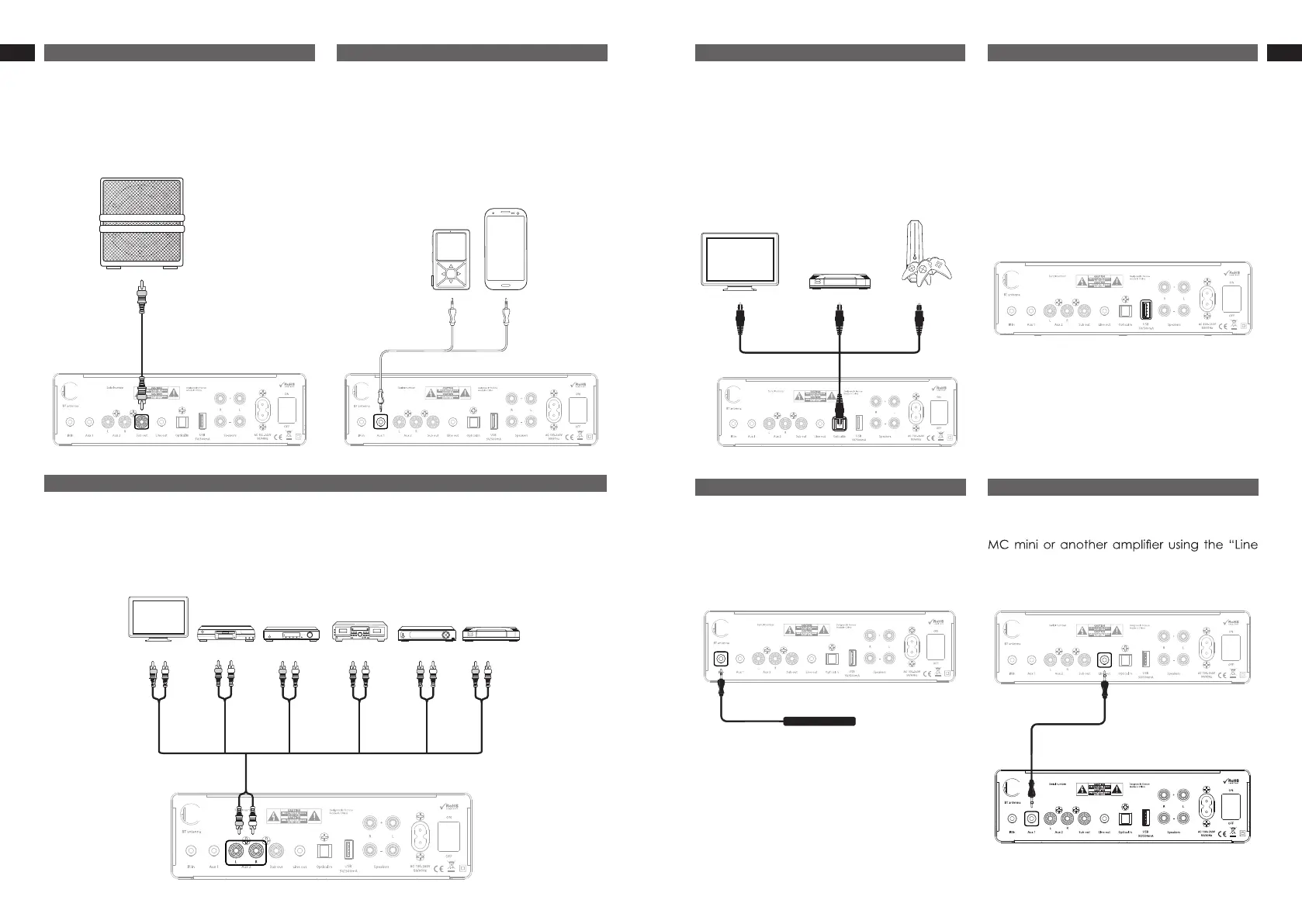
You can link devices equipped with RCA audio analog output. To select this input, press the
AUX2 button on the remote control, or short press the“Mode selection” knob until the AUX 2 LED
lights up.
4. AUX 2
You can connect a device equipped with an
optical output to enjoy digital quality sound.
To select this input, press the OPT button on
the remote control, or short press the “Mode
selection” knob until the Optical LED lights up.
5. Optical
The USB plug allows you to charge your
electronic devices up to 0.5A.
6. USB
Allows you to use the IR deported sensor as
part of an integration (such as suspended
ceiling), by connecting it to the “IR in” input.
7. IR in
Allows you to connect the MC mini to another
out” output.
8. Line out
To connect a subwoofer, plug it into the “Sub
out” using a RCA sub cable (not provided).
2. Subwoofer
You can link any smartphone, MP3 player
or any device equipped with a headphone
output using a 3.5 mm mini-jack cable (not
provided). To select this input, press the AUX1
button on the remote control, or short press
the “Mode selection” knob until the AUX 1 LED
lights up.
3. AUX 1
Any device with low comsumption can be
recharged by this USB port (cable not
provided)


 To Next Page