4. Set the refrigerant, (long press + unlock, then short press
or switch the refrigerant type).
3.3 Pressure Holding Measurement Mode(HOLD)
Note: This function needs to be purchased before it can be used, and
the purchase method is detailed in 4.4 of this article.
The high-voltage side channel is the system pressure-holding test
terminal.
1.Connect the high-pressure side refrigerant hose to the system
under test, and close the high-pressure valve.
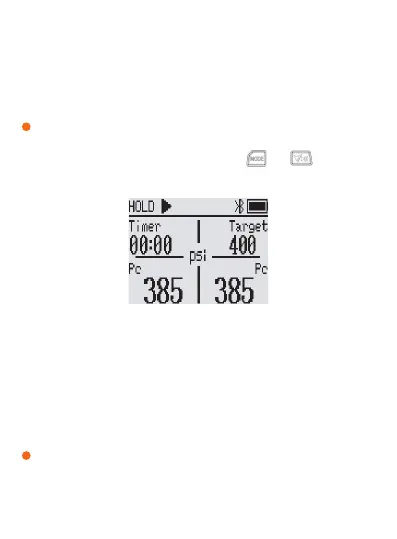
2.Enter the holding pressure test : press the and button at
the same time , the upper left corner of the window displays HOLD
(Figure 2).
3.Set the pressure holding parameters :
Pressure alarm value: When the current pressure value reaches the
target pressure holding value, the device will alarm, and the
pressure holding can be started at this time.
Decay ratio: adjust the decay ratio, and set the pre-warning value for
pressure keeping.
Temperature Compensation: Turn on/off the temperature
compensation switch.
Pressure hold time: set the hold time.
Figure 2 Enter the holding pressure test interface
!
The parameters of this step need to be connected to the APP for
setting
!


 To Next Page