12
Operation
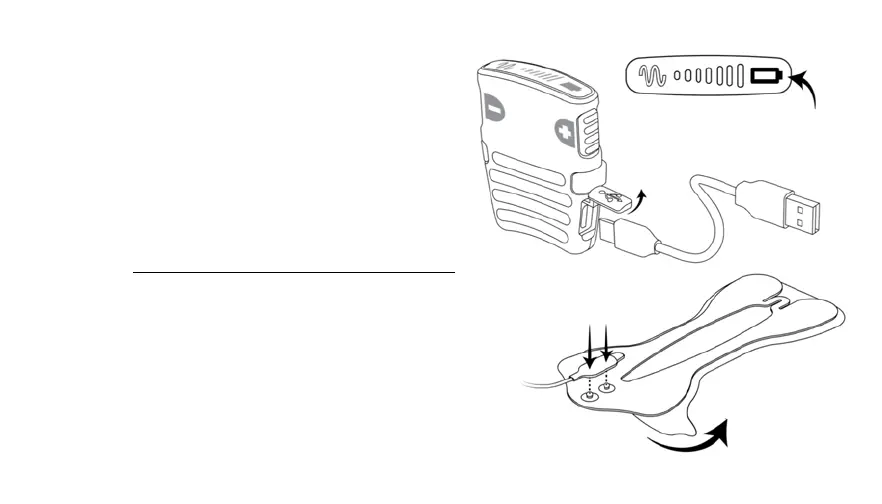
1. EnsureBatteryisCharged
Press either button to check the battery status. If
batteryoutlineblinksredordoesnotlight,chargethe
batterypriortouse.Lifttheblueflapandconnectthe
USBChargingCabletothesideofControllerandaUSB
powersupply.Thebatterylightwillblinkgreenwhile
chargingandturnsolidgreenwhenfullycharged.The
devicecannotbeusedwhenthebatteryisloworwhile
charging.RemovetheUSBChargingCablepriortouse.
The fully charged device can deliver at least two
treatment sessions, depending on the selected
intensity level and frequency of use. See Technical
Specifications for information regarding appropriate
useofUSBpowersupplies.
2. ConnectGelPadCabletoGelPad
WithControllerturnedoff,snaptheGelPadCabletothe
GelPad.
SnapGelPad Cable
to GelPad
PeelLiner
fromGelPad
Constant Green
FullyCharged
BlinkingGreen–Charging
BlinkingRed
LowBattery


 To Next Page