User Manual: i-Series Interactive Signage
SW602242 Rev C, Page 24 of 35
3.1.2. GPIOs
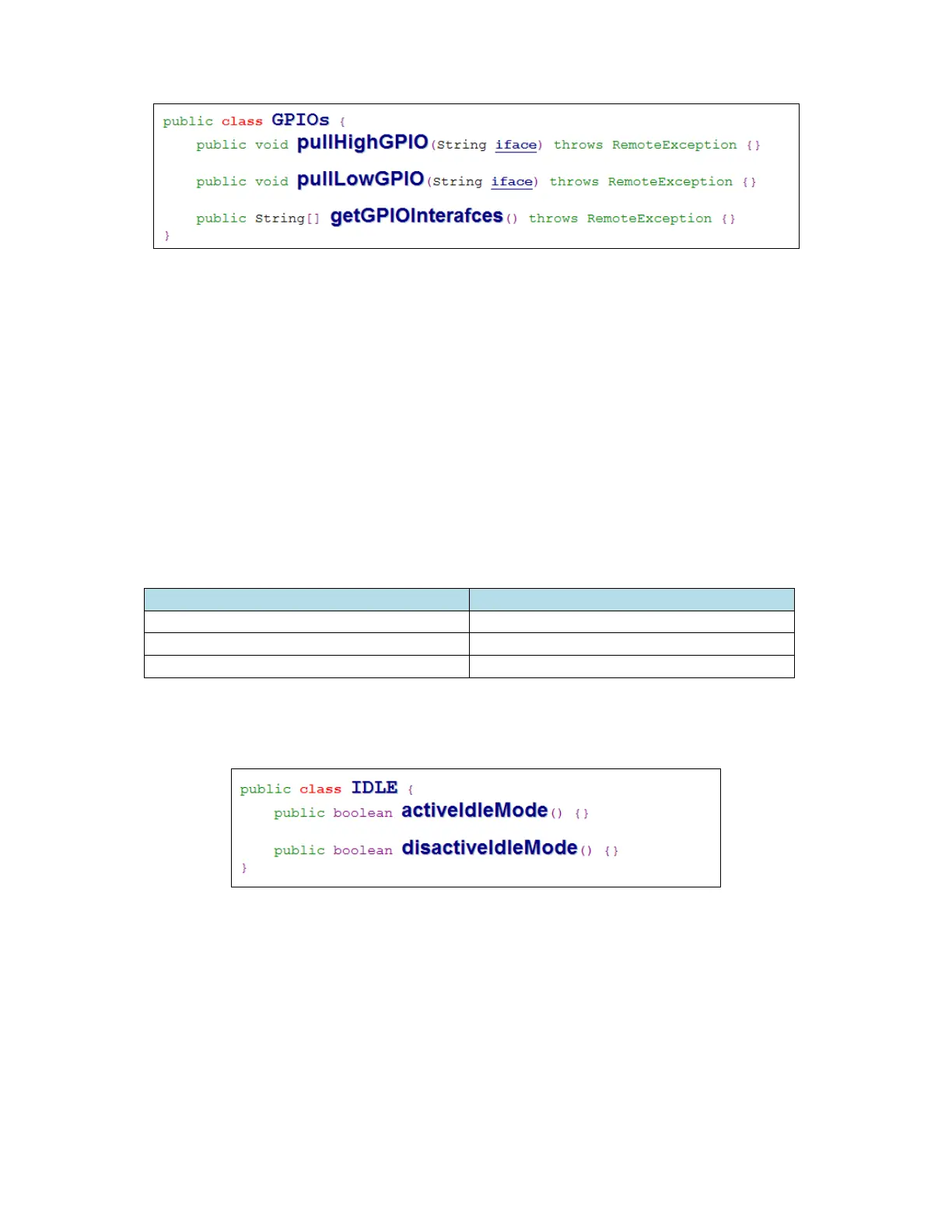
pullHighGPIO
Pull high the state of GPIO-iface
PullLowGPIO
Pull low the state of GPIO-iface disactiveBCR
getGPIOInterfaces
Get the list string data of interest GPIOs at designed system.
Refer to Table 3-1 GPIOs list
Note:
The pull action only workable with output pin defined GPIO
The input pin defined GPIO can notify the application about the status change by
“ELOPeripheralEventListener” also
GPIOs PIN define
gpio80 Output
gpio81 Input
gpio82 Input
Table 3-1 GPIOs List
3.1.3. IDLE
activeIdleMode
Force system to enter IDLE_MODE (IDLE_MODE on)
disactiveIdleMode
Force system to leave IDLE_MODE (IDLE_MODE off)
3.2. ELOPeripheralEventListener


 To Next Page