Change Water or Travel
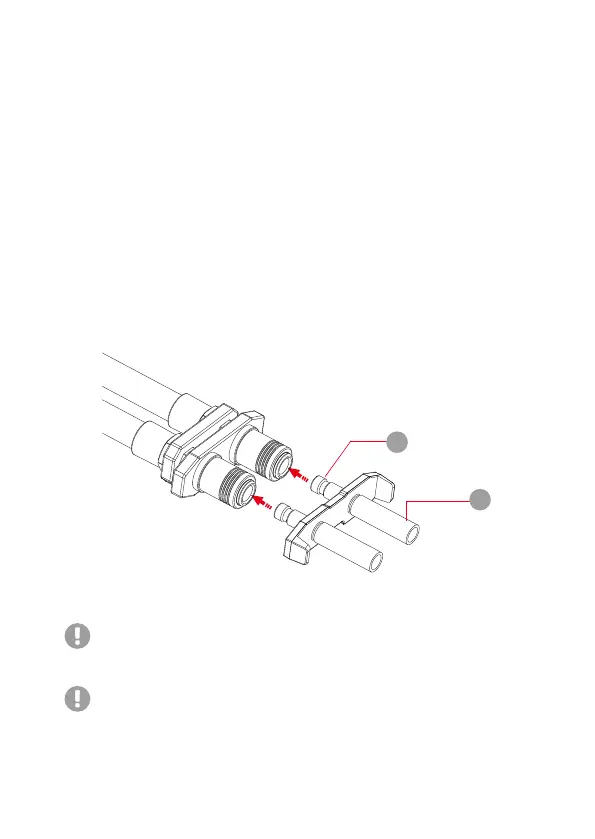
When you are ready to remove the Black Dual Head Drain Plug, squeeze
the silver connector to unlock and remove it.
1.If you need to travel, please empty the liquid in the Liquid Propulsion Package,
Water Tubes and laptop’s liquid cooling copper pipes with the included dual head
drain plug to avoid water leakage during transportation. Device malfunction may
occur if this is not done properly.
2.To prevent water scaling, please change the water regularly.
3.Check if there is water leakage when connecting or disconnecting the device, and
clean up in time.
1
2
If you are to change the water or need to travel, please follow the instructions
listed below:
1. Since system operation may lead to accumulated heat in the silver connector,
it is recommended to remove the connector only after turning off the device.
2. Insert (1) into laptop's drain tubes (4mm deep) to assist draining all remaining
liquid from the laptop.
3. Put laptop's rubber flap back on (squeeze it tight) to avoid minor water leakage.
4. Insert (2) on to the silver connector to drain the liquid in the LPP unit.
5. Remove the Black Dual Head Drain Plug when the liquid is emptied, and gently
tighten the Hexagon Water Stoppers on the drain port.


 To Next Page