GB
43
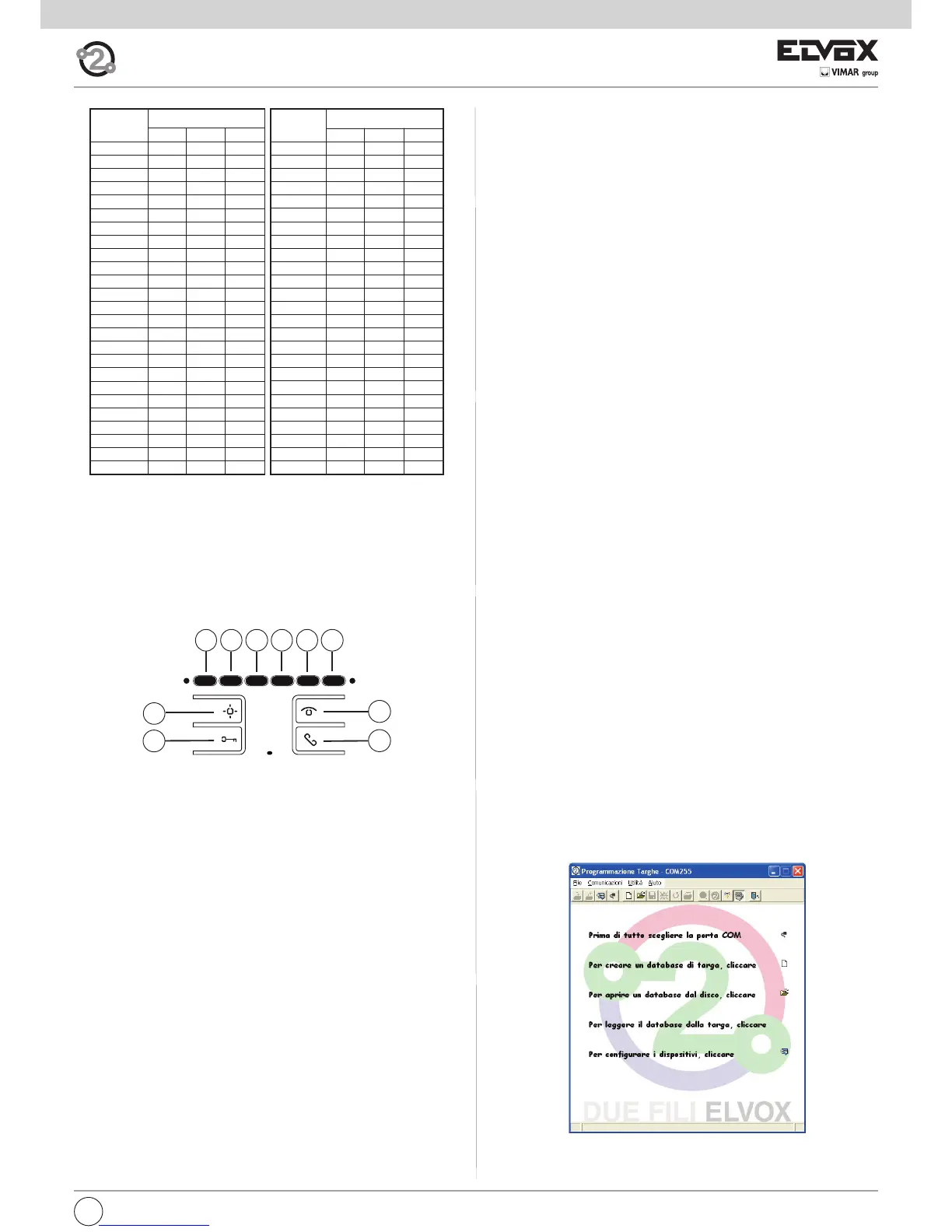
Table of primary and corresponding secondary ID codes:
ID
Primario
ID Secondario
1 2 3
26 126 127 128
27 129 130 131
28 132 133 134
29 135 136 137
30 138 139 140
31 141 142 143
32 144 145 146
33 147 148 149
34 150 151 152
35 153 154 155
36 156 157 158
37 159 160 161
38 162 163 164
39 165 166 167
40 168 169 170
41 171 172 173
42 174 175 176
43 177 178 179
44 180 181 182
45 183 184 185
46 186 187 188
47 189 190 191
48 192 193 194
49 195 196 197
50 198 199 200
ID
Primario
ID Secondario
1 2 3
1 51 52 53
2 54 55 56
3 57 58 59
4 60 61 62
5 63 64 65
6 66 67 68
7 69 70 71
8 72 73 74
9 75 76 77
10 78 79 80
11 81 82 83
12 84 85 86
13 87 88 89
14 90 91 92
15 93 94 95
16 96 97 98
17 99 100 101
18 102 103 104
19 105 106 107
20 108 109 110
21 111 112 113
22 114 115 116
23 117 118 119
24 120 121 122
25 123 124 125
4) Release buttons A and B.
5) Press and hold the button you wish to program (excluding speak/listen,
lock and self-start).
6) Wait for the interphone to emit a tone.
7) Release the button.
8) For entrance panels with buttons, press the button corresponding to the
monitor on which the button is being saved. For alphanumeric entrance
panels, enter the ID number corresponding to the monitor on which the
button is being saved, and confirm using the bell button on the entrance
panel.
9) At the end of the procedure described above, a sharp tone will be emit-
ted by the interphone, while the entrance panel makes a call to the inter-
phone on which programming has taken place.
Reprogramming the default value separately for each button
1) Press and hold button B.
2) Press and hold button A at the same time.
3) Wait for the red LED to flash.
4) Release buttons A and B.
5) Press and hold the button for which you wish to restore the default set-
ting (does not apply to Self-start and Lock buttons).
6) Wait for the interphone to emit a tone.
7) Release the button.
8) Press the button again (it will now be restored to its default value).
Important: Delete from Group: to delete from a group, the programming
deletion procedure described in the “Deleting programming” section must
be carried out (all programming deleted).
Button programming
Important: without programmer 950C or SaveProg software, the only fun-
ctions that can be assigned are intercommunicating, specific entrance
panel self-activation, restoring buttons programmed by the installer to their
default settings and deleting all programming procedures performed.
A
B
C
E2
E3
E1
E5
E6
E4
D
Deleting all programming at once
1) Press and hold button B.
2) Press and hold button A at the same time.
3) Wait for the RED LED to flash.
4) Release buttons A and B.
5) Press and hold button A again.
6) When the interphone emits a “note”, during the chime, release button A
and press and release button C.
At this point interphone programming will be deleted. To test programming
deletion, press button C; the interphone should beep three times.
Programming and configuring with programmer 950C
Interphone programming can be carried out using programmer art. 950C.
The programmer must be connected to an entrance panel and device con-
figuration mode started. This programmer can be used to: change button
programming (except the speak/listen button), create groups, select me-
lody types, adjust the chime or conversation volume and enable or disable
functions. When using the programmer, please refer to the corresponding
instructions.
Programming with SAVEPROG software
SaveProg is a software program for PCs, supplied with interfaces art. 692I
and 692I/U. These interfaces enable connection of the PC to an entrance
panel or another suitable device, 692I via an RS232 port and 692I/U via a
USB connection.
Once the interface is connected and SaveProg installed, when you open
the program the following window appears.
Programming intercommunicating call buttons
To program the buttons, proceed as follows:
1) Press “speak/listen” or lift the handset (depending on the model instal-
led) of the interphone you wish TO CALL.
2) Press and hold button B on the interphone you wish to program (ma-
king the call).
3) Press and hold button A at the same time.
4) Wait for the RED LED to flash.
5) Release buttons A and B.
6) Press and hold the button you wish to program (e.g. E1, E2, E3, E4, E5,
E6).
7) Wait for the interphone to emit a chime.
8) Release the button you wish to program on the interphone making the
call.
9) Press a button (lock/F1/F2) on the interphone you wish to call.
10) A “note” on the interphone (making the call) being programmed con-
firms the setting has been saved.
Important: This procedure can be used to manually reprogram the but-
tons, with the exception of the speak/listen button (not programmable) and
the lock and self-start buttons (for which programmer 950C or SaveProg
software is required).
Programming the self-activation/self-start button to a specific panel
(different from the self-start function enabled using button “A”)
1) Press and hold button B.
2) Press and hold button A at the same time.
3) Wait for the RED LED to flash.



 To Next Page
 Loading...