6
www.emachines.com
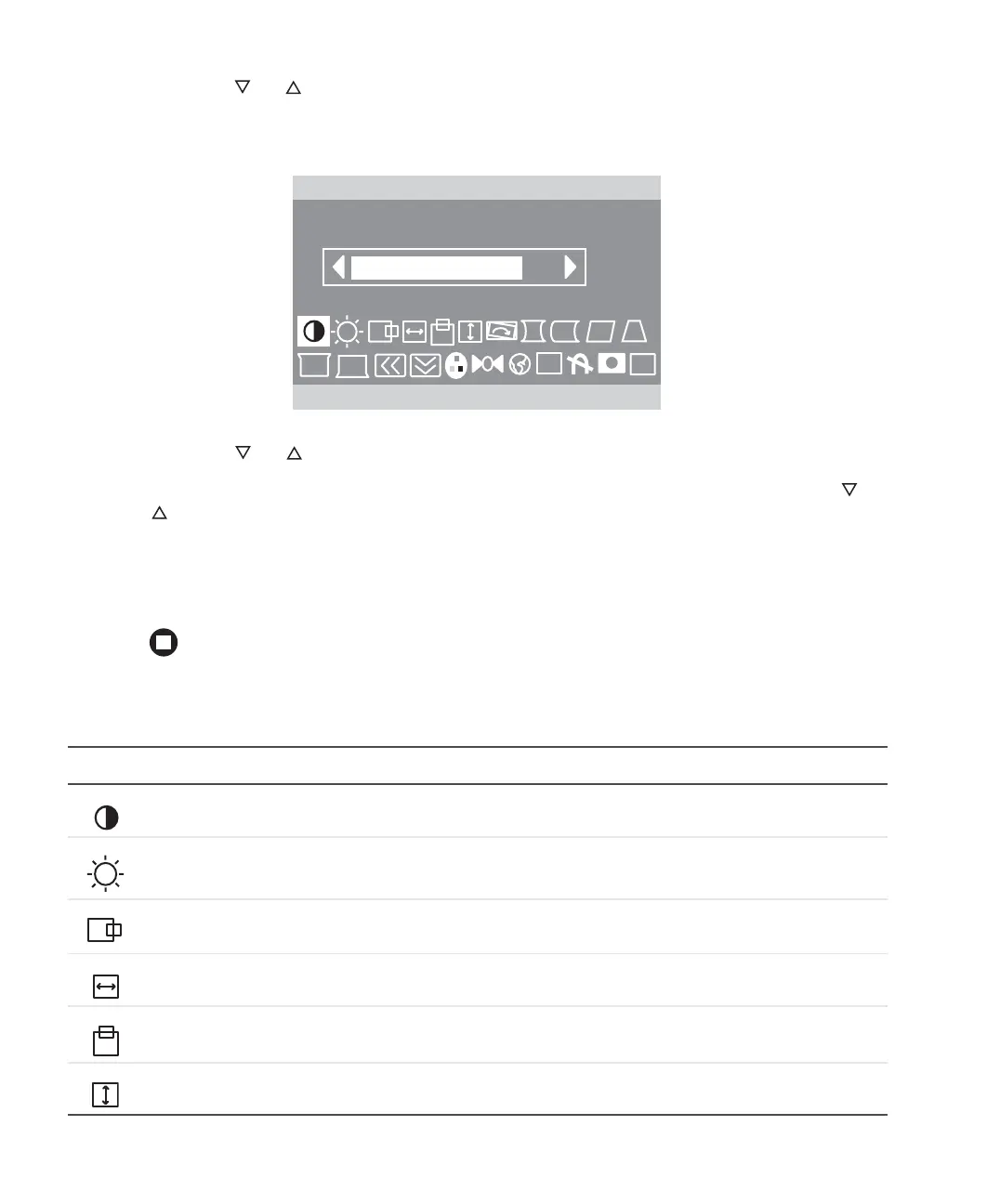
2 Press the or buttons to highlight an OSD menu option to adjust (for example
Contrast), then press the
MENU button to select the option. The change menu for that
option is displayed.
3 Press the or buttons to adjust an OSD menu option.
4 Press the EXIT button to save changes and return to the options menu. Press the or
buttons to highlight a different OSD menu option.
- OR-
If you have finished making all adjustments, press the
EXIT button twice to save your
settings and exit the OSD.
On-screen display menu options
Icon Description
CONTRAST. Adjusts the level of white between the lightest and darkest portions of an image.
BRIGHTNESS. Adjusts the amount of light in the darkest portion of the picture.
H POSITION. Controls the horizontal position of the display image.
H SIZE. Controls the horizontal size of the display image.
V POSITION. Controls the vertical position of the display image.
V SIZE. Controls the vertical size of the display image.
1024 x 768 / 85Hz
CONTRAST
EXIT
OSD
i
8.0


 To Next Page