5
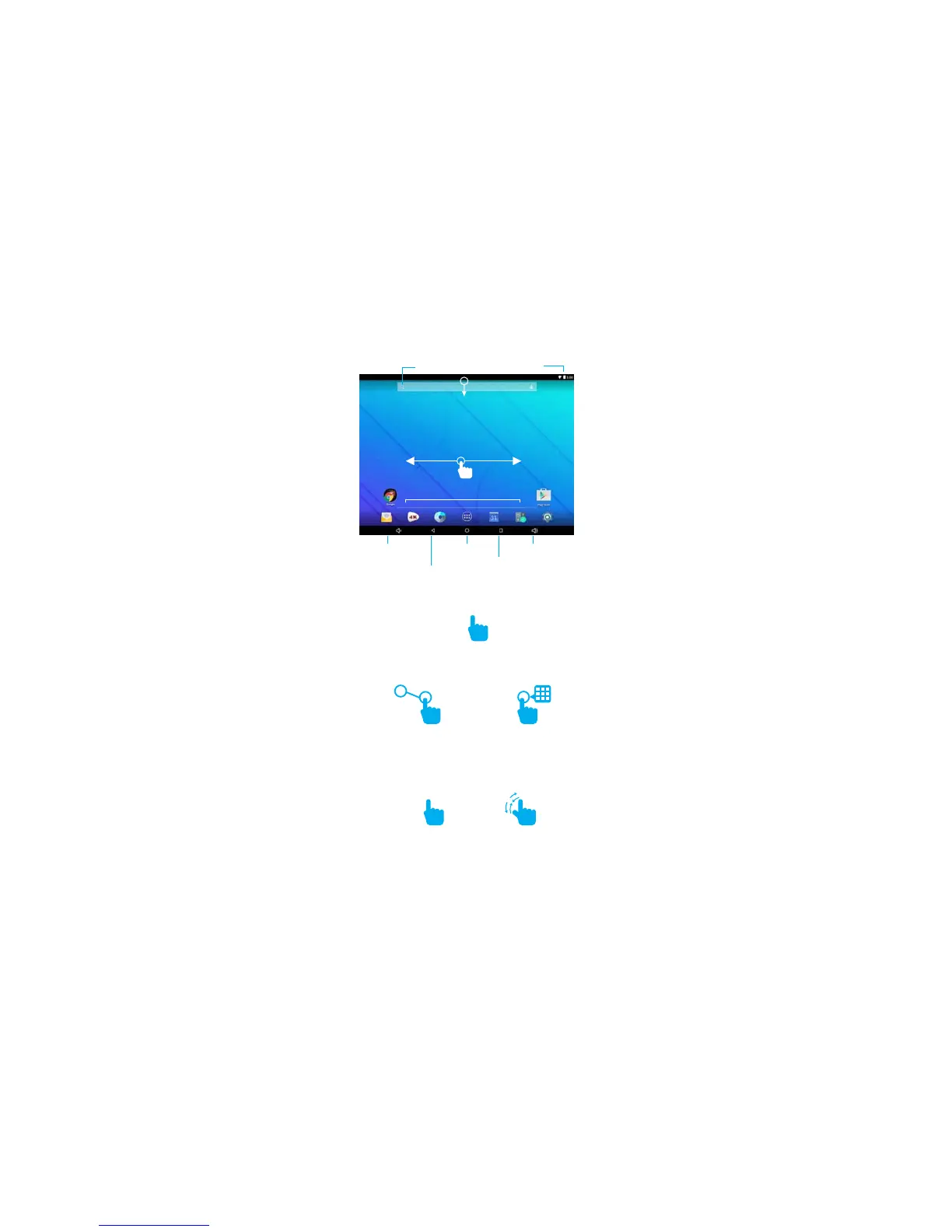
Zooming: Double tap quickly to zoom into a webpage,
picture, or map. Some apps allow you to zoom in
DQGRXWE\WRXFKLQJWKHVFUHHQZLWKWZR´QJHUVDQG
pinching them together.
Search
Tap the screen once to activate or open something.
Touch and hold to move an item by dragging.
*In many apps touch and hold can offer more options.
7,3<RXFDQµLFNWKHVFUHHQZLWK\RXU´QJHUWRTXLFNO\
scroll through a long list, such as a library of music.
7DSDVSHFL´FORFDWLRQRQWKHVFUHHQZKHUH\RXZRXOG
like to enter text. The on-screen keyboard will pop up.
Screen Basics
Touch Screen Basics
Slide down to reveal
\RXUQRWL´FDWLRQVDQGVHWWLQJV
Swipe left or right to switch
between home screens.
x2
Back
Volume UpHome
Volume Down
Recent apps
Battery
Dock



 To Next Page