This document serves as a Quick Start Guide for the Ematic ESB112X speaker, detailing its basic functions, pairing procedures, media playback options, and customer support information.
The Ematic ESB112X is a portable speaker designed for wireless audio playback and hands-free calling. It offers multiple connectivity options including Bluetooth and MicroSD card playback, as well as a line-in port for wired connections. The speaker is equipped with a microphone for call functionality and a set of control buttons for managing media and calls directly on the device.
Basic Functions and Controls:
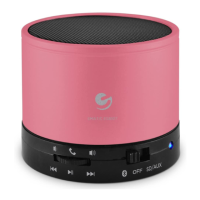
The top panel of the speaker features several buttons for controlling various aspects of its operation:
- Play/Pause: This button is used to start or stop audio playback. When connected via Bluetooth, it also functions as the Answer Calls button, allowing users to accept incoming calls directly from the speaker.
- Previous track/Rewind: This button allows users to navigate to the previous track during media playback. Holding it down will initiate a rewind function within the current track.
- Next track/Fast forward: This button is used to skip to the next track. Holding it down will fast forward within the current track.
- Increase Volume: This button increases the audio output level of the speaker.
- Decrease Volume: This button reduces the audio output level of the speaker.
- Microphone: Integrated into the speaker, the microphone enables hands-free calling when connected to a smartphone via Bluetooth.
The side panel of the speaker houses the following ports and controls:
- Status Light: This indicator light provides visual feedback on the speaker's operational status, such as power on/off, pairing mode, and battery level.
- Power switch: This switch is used to turn the speaker on or off.
- Charge by Mini USB: This port is used to charge the speaker's internal battery using a Mini USB cable.
- MicroSD card slot: This slot allows users to insert a MicroSD card containing audio files for direct playback.
- Line-in: This port enables a wired connection to audio sources using a standard 3.5mm audio cable.
Pairing to the Speaker (Bluetooth):
To use the speaker wirelessly with a device, follow these pairing steps:
- Turn on the Speaker: Locate the power switch and turn the speaker on. The status light will blink rapidly, indicating it is in pairing mode and ready to connect. If it blinks slowly, it means it is already connected to a device.
- Access Bluetooth Settings on your Device:
- For iPad®/iPhone®/iPod touch®: Go to your device's Bluetooth settings. Ensure Bluetooth is active.
- For Android™ 4.0 - 4.3: Enter the settings app from your apps menu and turn on Bluetooth. Then, tap "Search for Devices" to scan for available Bluetooth devices.
- Connect to "BT Speakers": Once your device's Bluetooth is active, look for "BT Speakers" in the list of available devices and tap on it to connect.
- Confirmation: After a successful connection, "Connected" will be displayed next to "BT Speakers" on your device.
Answering Calls:
When the speaker is connected to your smartphone via Bluetooth, you can answer incoming calls directly through the speaker. Simply press the "Play/Pause" button (which also functions as the "Answer Calls" button) located on the top of the speaker to accept a call. The integrated microphone will allow for hands-free conversation.
The Ematic ESB112X speaker supports media playback from various sources:
Using Bluetooth:
- Ensure Connection: Make sure your device is successfully paired and connected to the Bluetooth Speaker as described in the "Pairing to the Speaker" section.
- Select Media: Choose a song or video to play on your connected device. The speaker will automatically synchronize with your device and begin playing the audio.
- Control Playback: Use the "Play/Pause," "Previous track/Rewind," and "Next track/Fast forward" buttons on the top of the speaker to control media playback.
Using MicroSD Card:
- Insert MicroSD Card: Locate the MicroSD card slot on the side of the speaker. Insert a MicroSD card containing your desired audio files into the slot.
- Automatic Playback: The speaker will automatically detect the MicroSD card and begin playing the audio files stored on it.
- Control Playback: Use the "Play/Pause," "Previous track/Rewind," and "Next track/Fast forward" buttons on the top of the speaker to navigate through your tracks and control playback.
Maintenance Features:
- Charging the Speaker: The speaker's battery status is indicated by the status light. If the status light changes to red and blinks rapidly, it signifies a low battery. To charge the speaker, connect a Mini USB cable to the "Charge by Mini USB" port on the side of the speaker and plug the other end into a power source. Ensure the speaker is fully charged for optimal performance.
Customer Support:
For any support inquiries regarding your Ematic ESB112X device, you can visit ematic.us/support. To submit a support request, fill out the required information online. You will receive a ticket number, which you can reference for future communications with customer support.

 Need help?
 General

 To Next Page