Step 1: Installing the software on your PC
1. Open your web browser and navigate to embertec.com/pc
2. Click on the Embertec 8PC+ software file to download it.
3. Click on the downloaded file and follow the prompts to install
the software.
Step 2: Connecting your equipment
1. Switch off your PC and all peripheral equipment and unplug from
the wall outlet.
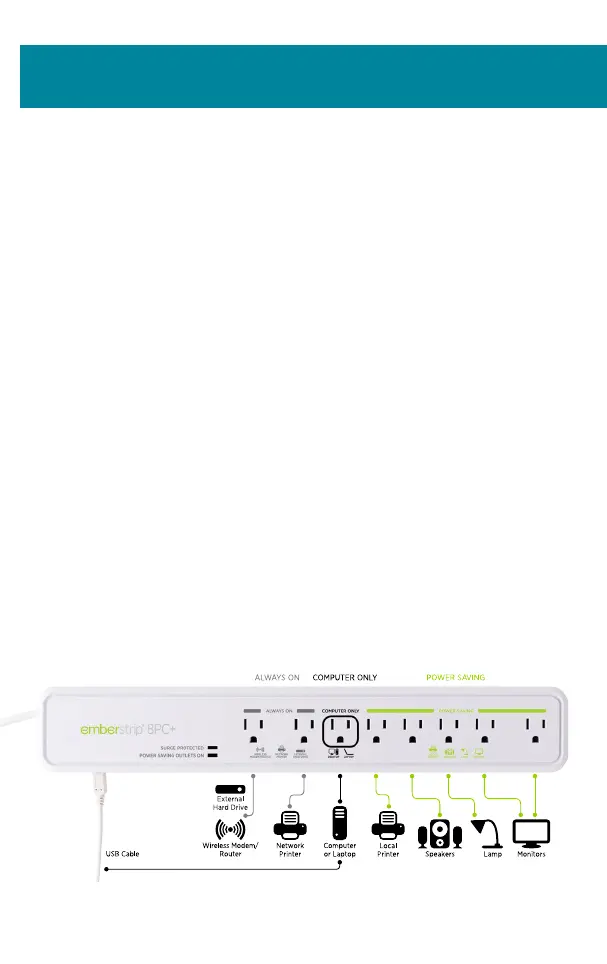
2. Connect only ONE PC (laptop or desktop) into the outlet marked
Computer Only.
3. Plug the equipment that is used with the PC such as monitors, printers,
speakers and lamps into the Power Saving outlets on the strip.
4. Connect the equipment that needs to remain turned on, such as the
internet modem/router, fax machine and external hard drives to the
Always On outlets or to another free outlet on the wall outlet.
5. Connect the USB cable from the Embertec Emberstrip® 8PC+ to
your PC.
6. Plug the Embertec Emberstrip® 8PC+ into a wall outlet.
7. Now turn on your equipment as normal.
Due to continual improvement in design or otherwise, the product you purchase may differ
slightly from the illustration in this book.
Quick installation guide
3


 To Next Page