AUX IN
14
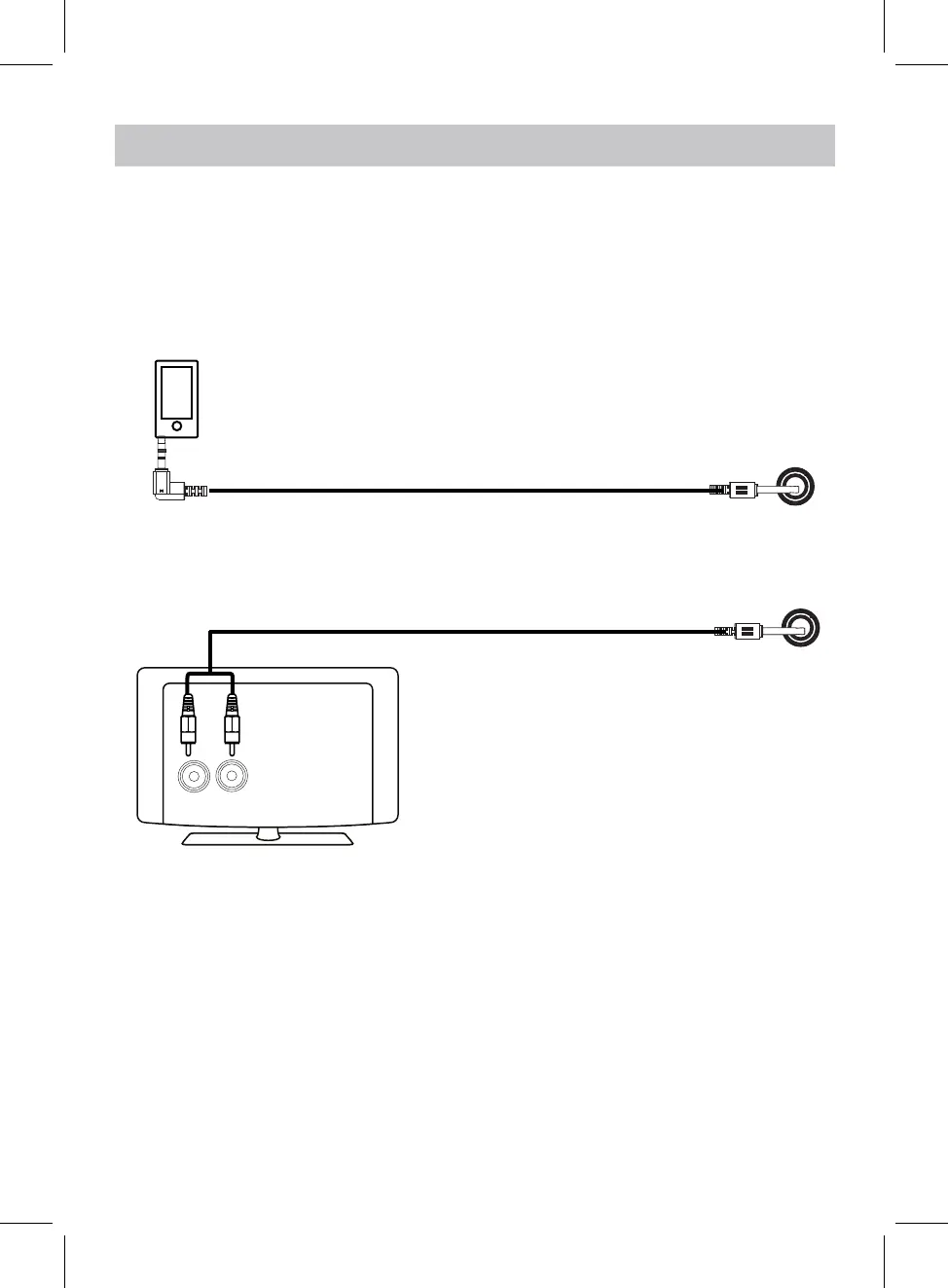
An external (Auxiliary) audio source (i.e. personal CD player or MP3 player)
can be connected to this unit and heard through the speakers.
Audio
Player
To Audio Out Jack
1. Plug one end of the Aux In cable into the AUX IN jack on the rear
of the unit.
2. Plug the other end of the Aux In cable into the Earphone, AUX OUT or LINE
OUT jack of the external audio source.
3. Power on the unit as previously explained.
4. Press the Standby/Source button on the unit or press the SOURCE
button on the Remote Control repeatedly until the color of Indicator turns
to Violet (blue + red), and a voice tone sounds "AUX Mode".
5. Power on the connected external player and start playing as usual.
LISTEN THROUGH AUX IN
AUX IN
L
R
(Cable not included)
(Cable included)
TV
or
Note: In AUX mode, the volume is mainly controlled by the connected device.


 To Next Page