EasyManua.ls Logo

Emerson PD6511 - Adjusting the Sound

Emerson PD6511
8 pages
Print Icon
To Next Page IconTo Next Page
To Previous Page IconTo Previous Page
Loading...
USING
HOUSE
CURRENT
Before
use,
check
that
the
setting
voltage
of
your
unit
matches
your
local
outlet
voltage
of
AC
230V,
50Hz.
CAUTION
To
prevent
electrical
shock,
match
wide
blade
of
plug
to
wide
slot,
fully
insert.
To
AC
outlet
=
USING
BATTERIES
Disconnect
the
AC
power
cord
from
the
AC
inlet
of
the
unit.
Battery
power
is
cut
automatically
by
the
cord
while
it
is
connected.
When
the
volume
decrease,
or
the
sound
distorts,
replace
all
of
the
batteries
with
new
ones.
mae
door
-
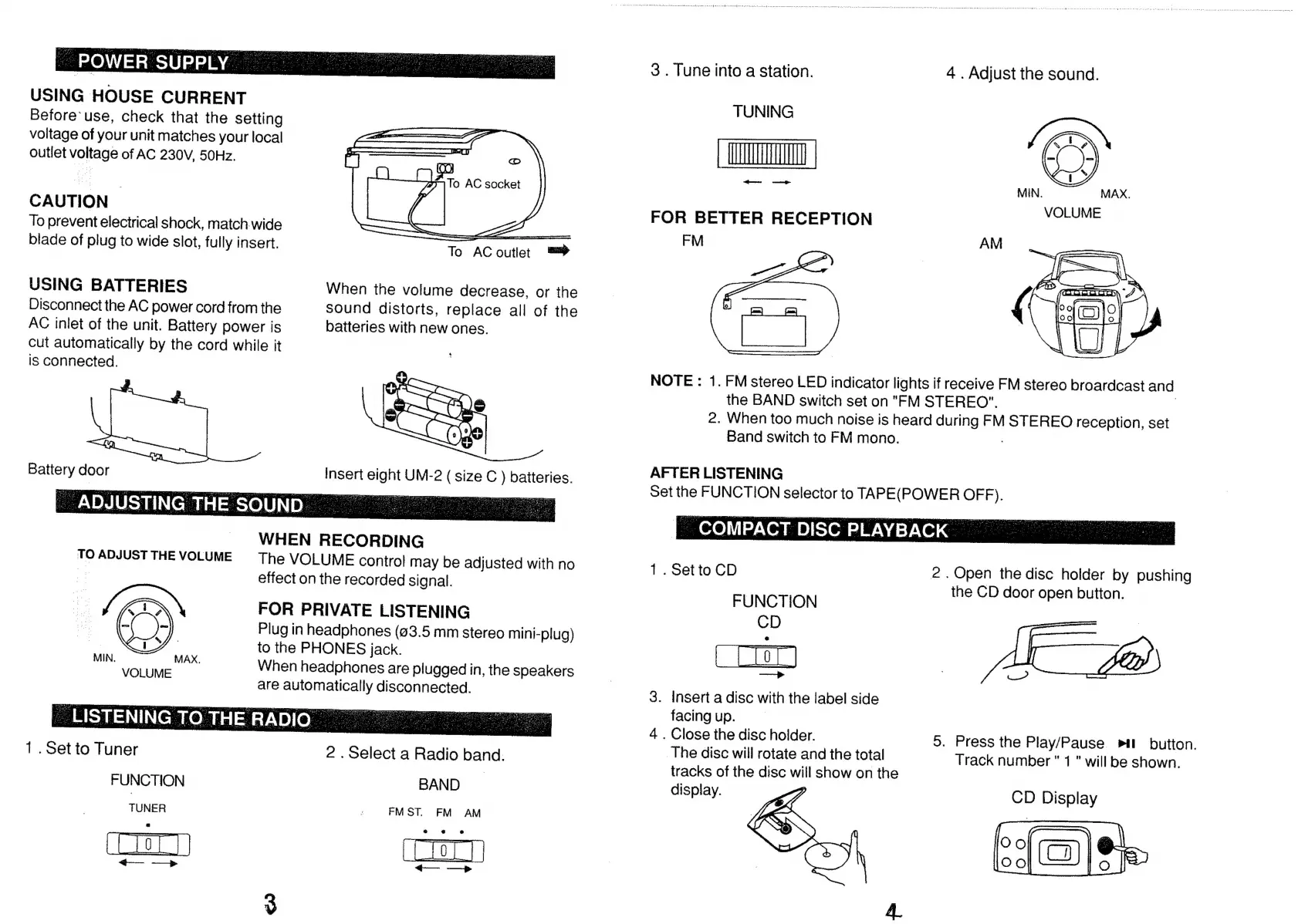
ADJUSTING
THE
SOUND
WHEN
RECORDING
TO
ADJUST
THE
VOLUME
The
VOLUME
contro!
may
be
adjusted
with
no
effect
on
the
recorded
signal.
i
FOR
PRIVATE
LISTENING
insert
oe
UM-2
a
size
C
ae
batteries.
` l
=
e:
Plug
in
headphones
(83.5
mm
stereo
mini-plug)
DA
to
the
PHONES
jack.
MIN.
LE
MAX.
When
headphones
are
plugged
in,
the
speakers
are
een
disconnected.
1.
Set
to
Tuner
2
.
Select
a
Radio
band.
FUNCTION
BAND
TUNER
:
FMST.
FM
AM
ELIOT
AMA
E
tf
—>»
3
.
Tune
into
a
station.
4
.
Adjust
the
sound.
TUNING
Ea
|
ella
rca
FOR
BETTER
RECEPTION
FM
NOTE
:
1.
FM
stereo
LED
indicator
lights
if
receive
FM
stereo
broardcast
and
the
BAND
switch
set
on
"FM
STEREO".
2.
When
too
much
noise
is
heard
during
FM
STEREO
reception,
set
Band
switch
to
FM
mono.
AFTER
LISTENING
|
Set
the
FUNCTION
selector
to
TAPE(POWER
OFF).
-
COMPACT
DISC
PLAYBACK
|
1.
Set
to
CD
FUNCTION
CD
|
rr
AO
3.
Inserta
disc
with
the
label
side
facing
up.
4
.
Close
the
disc
holder.
The
disc
will
rotate
and
the
total
tracks
of
the
disc
will
show
on
the
display.
CD
Display
2
.
Open
the
disc
holder
by
pushing
the
CD
door
open
button.
5.
Press
the
Play/Pause
»ı
button.
Track
number"
1
"
will
be
shown.

Related product manuals