7 Device network configuration
In order to communicate with the Emerson Wireless Gateway,
and ultimately the information system, the transmitter must be
configured to communicate with the wireless network.
This step is the wireless equivalent of connecting wires from a
transmitter to the information system. Using a Field Communicator
or AMS Device Manager, enter the Network ID and Join Key so that
they match the Network ID and Join Key of the gateway and other
devices in the network. If the Network ID and Join Key are not
identical, the THUM Adapter will not communicate with the network.
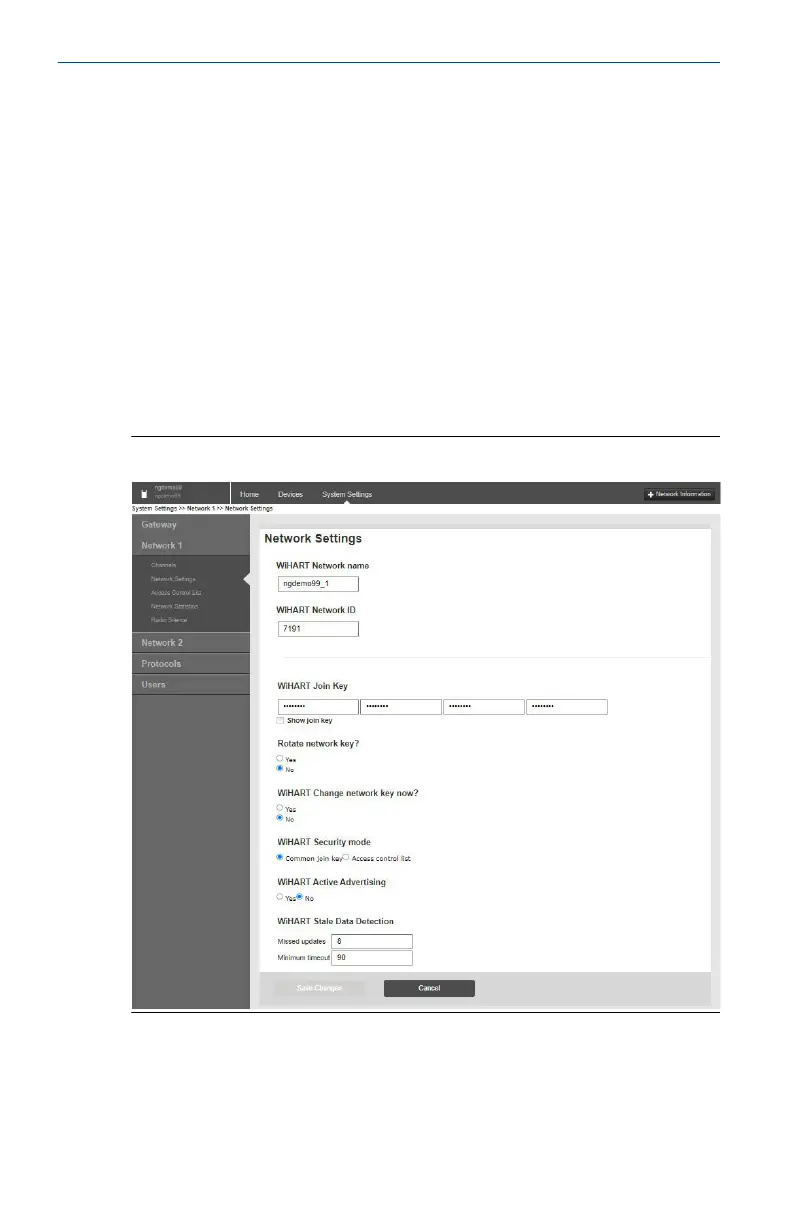
The Network ID and Join Key may be obtained from the Gateway on
the System Settings → Network → Network Settings page on the web
server, shown in Figure 7-1.
Figure 7-1: Gateway Network Settings
Quick Start Guide May2024
28 www.emerson.com



 To Next Page