1 Wireless considerations
1.1 Power up sequence
Power up wireless devices in order of proximity from the Gateway,
beginning with the closest.
This will result in a simpler and faster network installation. Enable
Active Advertising on the Gateway to ensure that new devices join
the network faster. For more information, see the Wireless Gateway
Reference Manual.
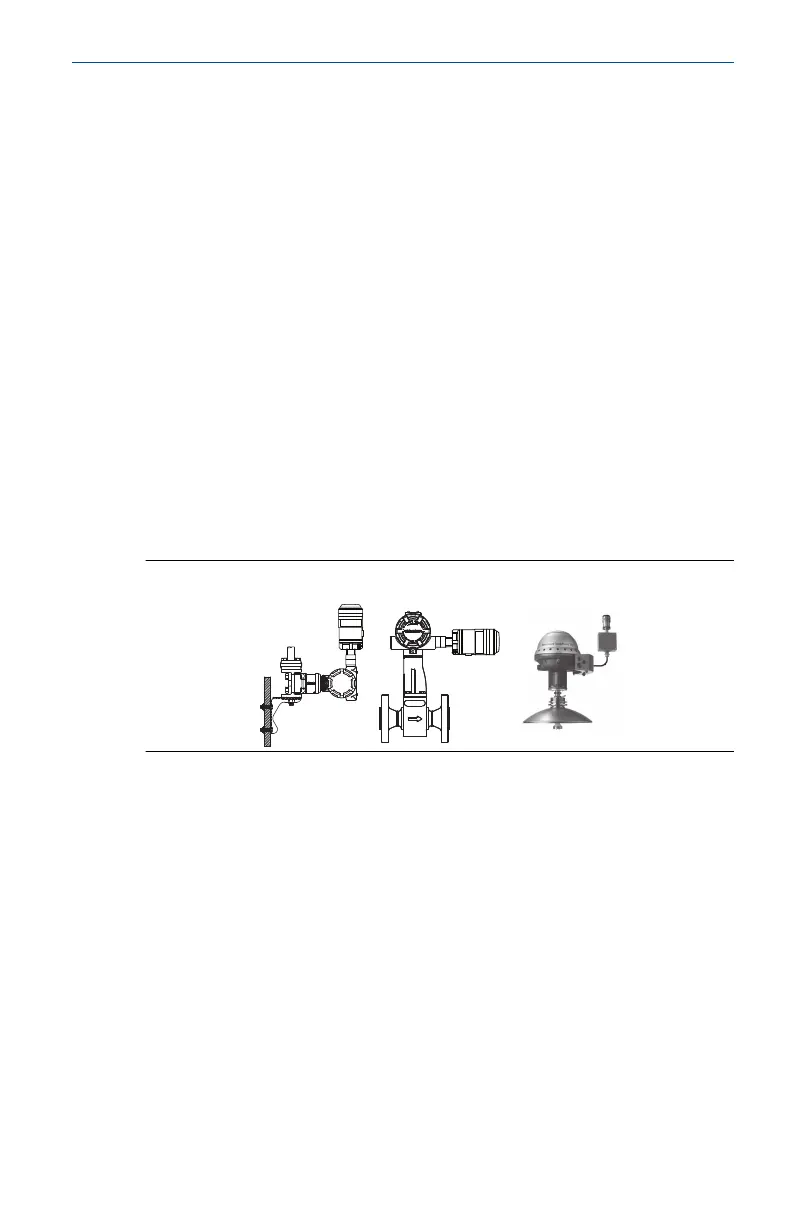
1.2 THUM Adapter position
THUM Adapter should be positioned vertically straight up, and
should be approximately 3 ft. (1 m) from any large structure, building
or conductive surface to allow for clear communication to other
devices. If the THUM Adapter is mounted horizontally, wireless
communication range may be decreased. The THUM Adapter should
not be mounted vertically straight down. See Wireless THUM Adapter
Reference Manual for more information.
Figure 1-1: THUM Adapter Position
1.3 Conduit entry
When installing the THUM Adapter into the conduit entry of a wired
device, use an approved thread sealant. Thread sealant provides
a water tight seal. The thread sealant also provides lubrication to
ensure easy removal of the THUM Adapter.
1.4
M20 conduit adapter
When using the M20 Conduit Adapter on the THUM Adapter, use
an approved thread sealant and tighten wrench tight to the THUM
Adapter. When installing the M20 conduit adapter into a conduit,
tighten to 32.5 N-m/25 ft-lb to ensure watertight seal.
May2024 Quick Start Guide
Quick Start Guide 5



 To Next Page